
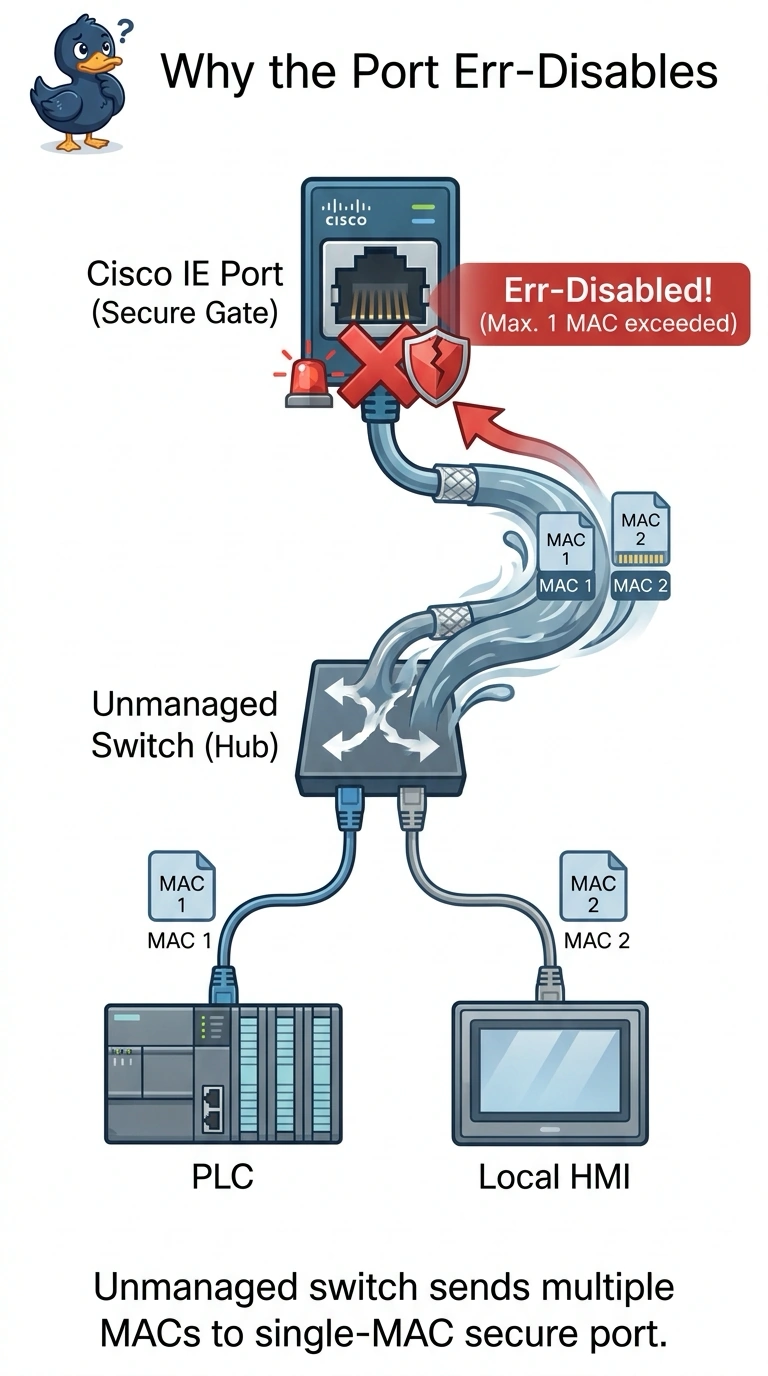
A panel uses a small unmanaged switch so one PLC and one local HMI share a single Cisco IE port. Port security allows one MAC, and the port is err-disabled. Why?
Select an answer to reveal the explanation.
Short Explanation
One switch port was asked to pretend a little unmanaged switch is a single device. You allowed one MAC, then both the PLC and the HMI showed up, and the port went down. Learning a lone address is not what knocked this panel offline.
Full Explanation
Port security counts source MAC addresses on the port. The unmanaged switch is invisible as a hop, so the Cisco IE port sees the PLC and the local HMI as separate MACs. A maximum of one is exceeded as soon as the second address appears. With the violation behavior that err-disables a port, the whole panel loses the link. A maximum of one is the wrong setting for a port that feeds a panel switch with two devices behind it. It is not a universal cap for any port that might sit above a small switch. Sticky learning records a secure MAC into the running configuration. Recording the PLC address does not err-disable the port. A later violation can, if a second MAC arrives and the violation mode takes the port down, but sticky itself is not the trip. A native VLAN mismatch affects untagged traffic on a trunk. It is not the port-security violation that err-disabled this access port. Exam caveat: shutdown is the default violation mode, which is why the port is err-disabled rather than merely dropping the extra MAC. The underlying mismatch is still the maximum against two real devices. Operational check: the secure-address count and the MAC table on that port should show more than the PLC, matching the HMI behind the unmanaged switch.