
Port security will be enabled on a filler PLC port before the PLC is reconnected. A laptop is currently plugged in. Which configuration avoids learning the laptop as the allowed address?
Select an answer to reveal the explanation.
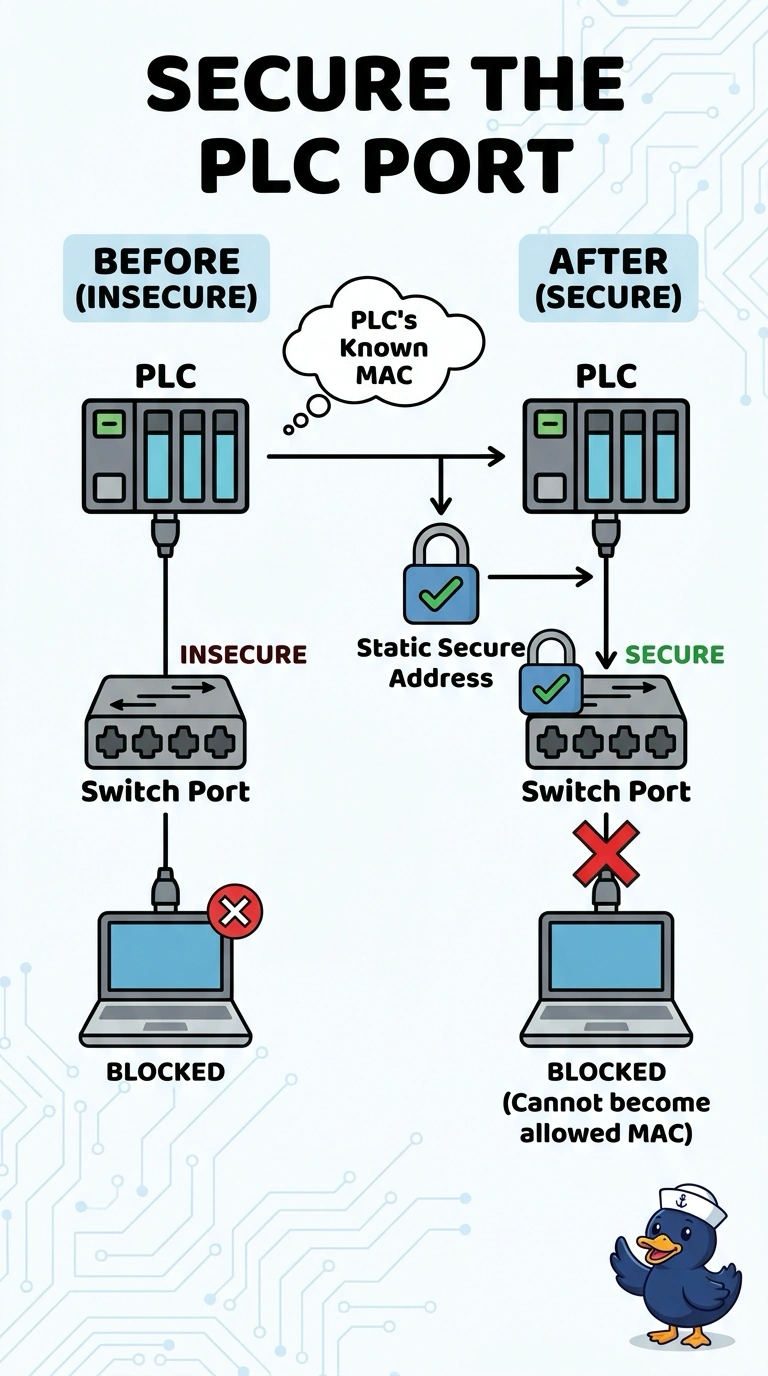
Short Explanation
Sticky learning believes whoever sits down first. You type the PLC's known MAC as a static secure address before the laptop can be learned. The trap is arming sticky while the wrong machine is still plugged in.
Full Explanation
Sticky secure MAC addresses are learned from the traffic on the port and then treated as allowed. If the laptop is the first talker, the port will defend the laptop and reject the PLC. A static secure MAC is configured, not learned, so the allowed address is the controller you already identified. Protect would hide a violation and still depends on what the port considers allowed. A maximum of two would make the laptop a permanent guest beside the PLC, which is the opposite of a single-device port. The caveat is that the static address must be the verified source MAC the PLC actually uses on this connection, including any approved logical or redundant-controller addressing, not a guess from an old drawing. The check is show port-security interface: the secure MAC should be the static PLC address, and the laptop should not forward. Put the before-and-after evidence in the work order, including the interface or account you changed, the time, and the person who approved it. On the next shift, confirm the original symptom is gone and that the change did not open a second path while closing the first. If the process is still inside a live batch, leave the controller running and finish only the part of this work that does not restart it. That sequence keeps a correct fix from turning into an unplanned outage.