
A public-works training twin needs one hydrant highlighted in red while the rest stay shared instances. How should staff tint that hydrant without deinstancing the fleet?
Select an answer to reveal the explanation.
Short Explanation
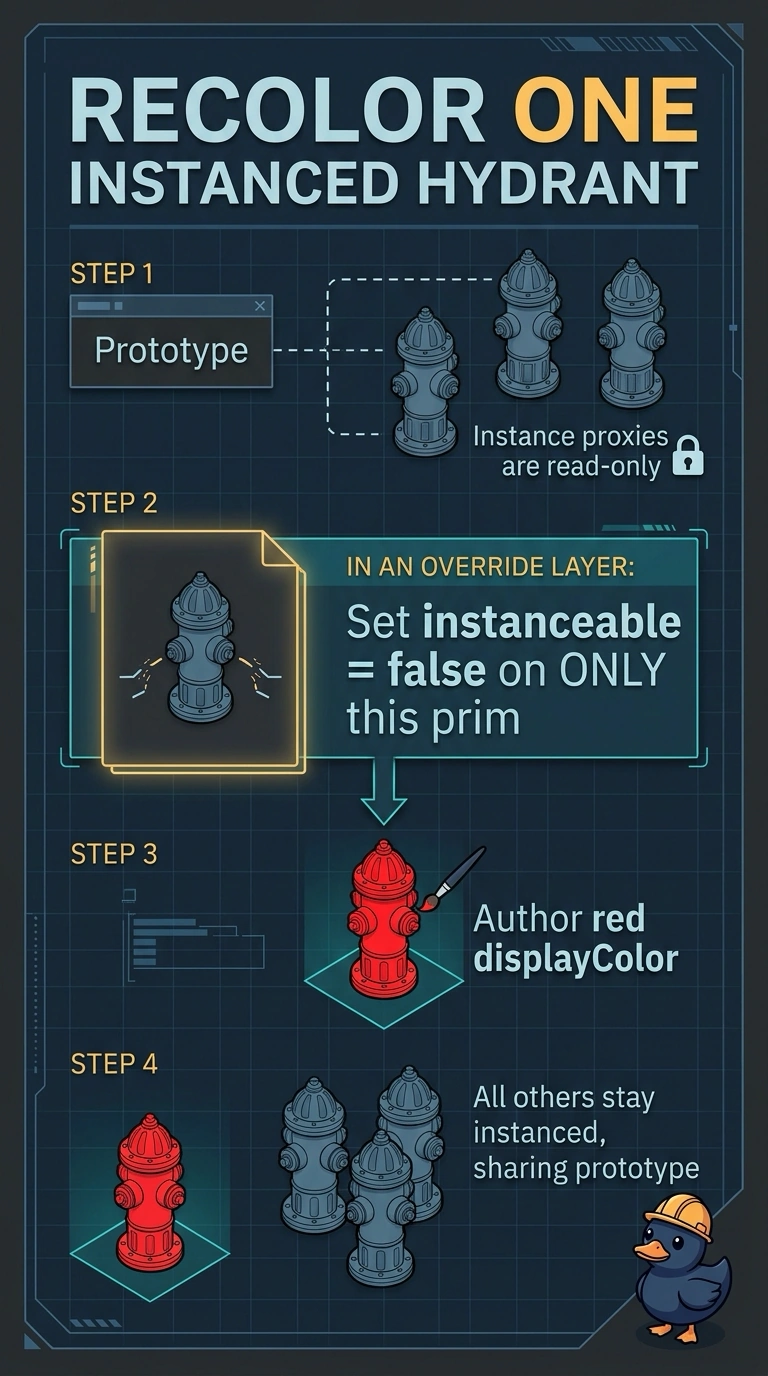
Instance proxies are read-only, so you cannot paint a single hydrant through its proxy. Instead, flip instanceable off for just that one hydrant in a stronger override layer and tint it there, leaving the rest of the fleet shared.
Full Explanation
In a public-works training twin, hydrants are authored once as a shared prototype and placed along streets through scenegraph instancing. Per the OpenUSD scenegraph instancing documentation, editing scene description through instance proxies, or on descendants beneath an instance, is not allowed. Properties and metadata on the instance prim itself can be overridden, and the instanceable flag is ordinary metadata that a stronger layer can change. To highlight one hydrant, set instanceable to false on that single hydrant in a clearly named override layer and author the red displayColor on its now-unique prims. Every other hydrant stays a shared instance, so memory stays flat for the fleet and the highlight can be removed by muting the layer. Deleting the prototype and rebuilding streets as unique meshes destroys aggregation and turns a temporary highlight into a citywide authoring burden. Setting red displayColor on the shared prototype makes every hydrant red and pollutes the shared asset. Flattening the city stage to USDA expands instances, balloons file size, and makes reversible, layer-aware edits harder. Exam caveat: if a hydrant's prototype descendants author their own displayColor, an opinion on the instance root will not override them, so deinstancing that one hydrant is the reliable route. Practical check: confirm the target is red, sibling hydrants keep their shared look, and only the one hydrant reports as non-instanceable after reopening the layer stack.