
Transit wants a single platform seat recolored for an accessibility demo while the other seats stay shared instances. What is the correct approach?
Select an answer to reveal the explanation.
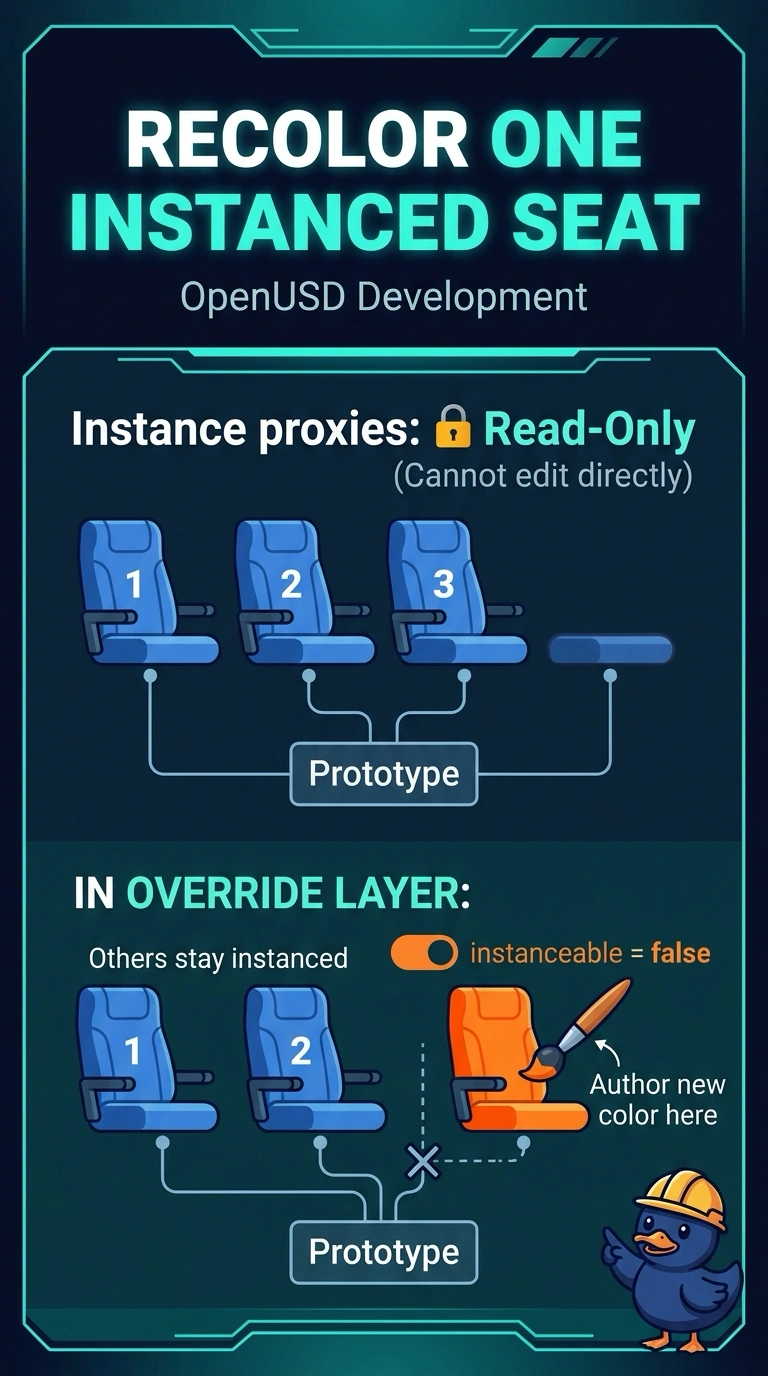
Short Explanation
Instance proxies are read-only in OpenUSD, so a single seat cannot be recolored through its proxy. Make just that one seat non-instanceable in an override layer and color it there, and the other seats keep sharing the prototype.
Full Explanation
Transit platform seating is a textbook instancing case: one seat component has hundreds of placements along a platform edge. OpenUSD does not allow edits through instance proxies or on descendants beneath an instance, so a per-seat color cannot be authored while that seat remains an instance. The instanceable flag, however, is metadata on the instance prim and a stronger layer can change it. For an accessibility demo, set instanceable to false on only the demo seat in a named override layer and author the new color on its prims. The other seats stay instanced, so memory and update-once behavior are preserved for the fleet, and muting the layer after the demo restores the original state. Marking every seat non-instanceable and duplicating meshes abandons instancing for the whole platform, multiplies unique prims, and breaks prototype updates. Replacing the seat prototype index with a unique payload per row unique-ifies geometry and payload I/O and suits a seat that becomes a different asset, not a temporary tint. Muting the root LayerStack so edits write only to memory removes the authored composition and creates no durable, reviewable override. Exam caveat: editing the prototype changes every seat, so it is only right when all seats should change. Practical check: confirm only the demo seat shows the new color, neighbors still report as instances, and the override layer can be muted to revert.