
You are designing the architecture for an AI platform that needs to spin up and spin down hundreds of short-lived machine learning model instances to handle fluctuating user demand. Why would you choose containerization over traditional virtual machines (VMs) to host these dynamic workloads?
Select an answer to reveal the explanation.
Short Explanation and Infographic
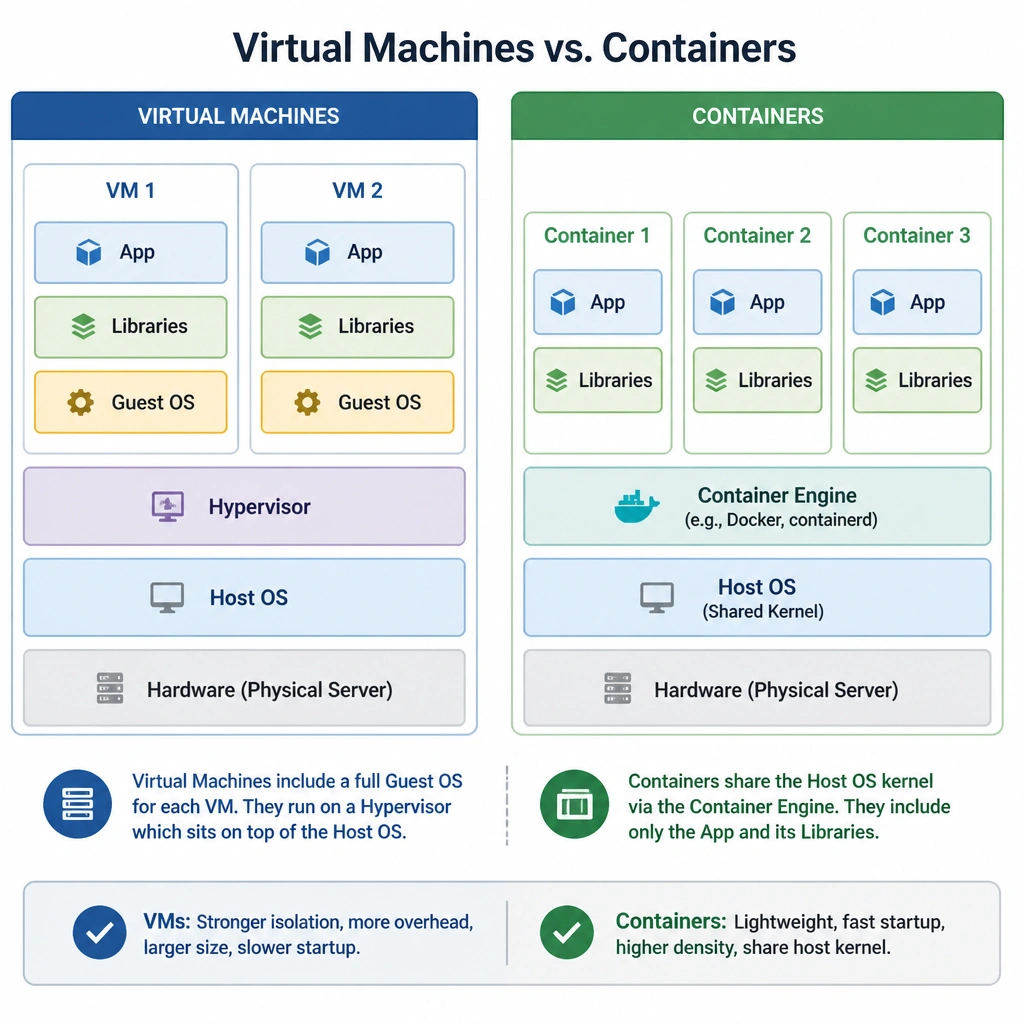
Here's the deal: virtual machines are heavy. Every single VM you spin up needs its own guest operating system, which eats up CPU, memory, and disk space before you even load your application. That's a huge waste of resources when you're trying to scale AI models up and down. Containers, on the other hand, are incredibly lightweight because they share the host system's kernel. They only package the application and its direct dependencies. This means you can pack a ton of containers onto a single physical server, and they start up in seconds instead of minutes. Now, don't get confused: containers don't magically fix library conflicts for you, nor do they optimize your AI models. They just package and isolate them efficiently. Got it? Sweet. Let's keep rolling.
Full explanation below image
Full Explanation
In modern AI operations, efficiency and speed are paramount, especially when scaling workloads to meet variable demand. Containers have become the standard packaging format for AI applications due to their architectural efficiency compared to virtual machines. Virtual machines (VMs) operate by running a hypervisor on host hardware, which then hosts multiple guest operating systems. Each VM contains a full copy of an operating system, virtual device drivers, and application binaries. This guest OS layer introduces significant CPU, memory, and storage overhead, and results in slow boot times (often minutes). In contrast, containers use operating system-level virtualization (such as Linux namespaces and cgroups). They share the host operating system kernel and isolate the application processes at the user space level. Because they do not require a guest OS, containers are extremely lightweight—typically megabytes rather than gigabytes in size—and can boot in a fraction of a second. This allows infrastructure engineers to achieve much higher deployment density on the same physical hardware, maximize GPU and CPU utilization, and rapidly scale AI microservices up or down. Let's look at why the other options are wrong: Option A is incorrect because containers do not automatically resolve library or CUDA dependencies; developers must still define and configure these dependencies inside the container image (e.g., using a Dockerfile). Option C is incorrect because containers are deployment and packaging tools; they have no role in optimizing neural network architectures or hyperparameter tuning. Option D is incorrect because containers do not virtualize CPU cores into GPU hardware; GPU acceleration requires passing physical GPU devices through to the container using specialized runtimes (like the NVIDIA Container Toolkit).