
An operations engineer needs to monitor GPU utilization in real time directly from the CLI. The tool must support interactive process killing, color-coded status displays, and a Python API to query metrics programmatically. Which tool fits these requirements?
Select an answer to reveal the explanation.
Short Explanation and Infographic
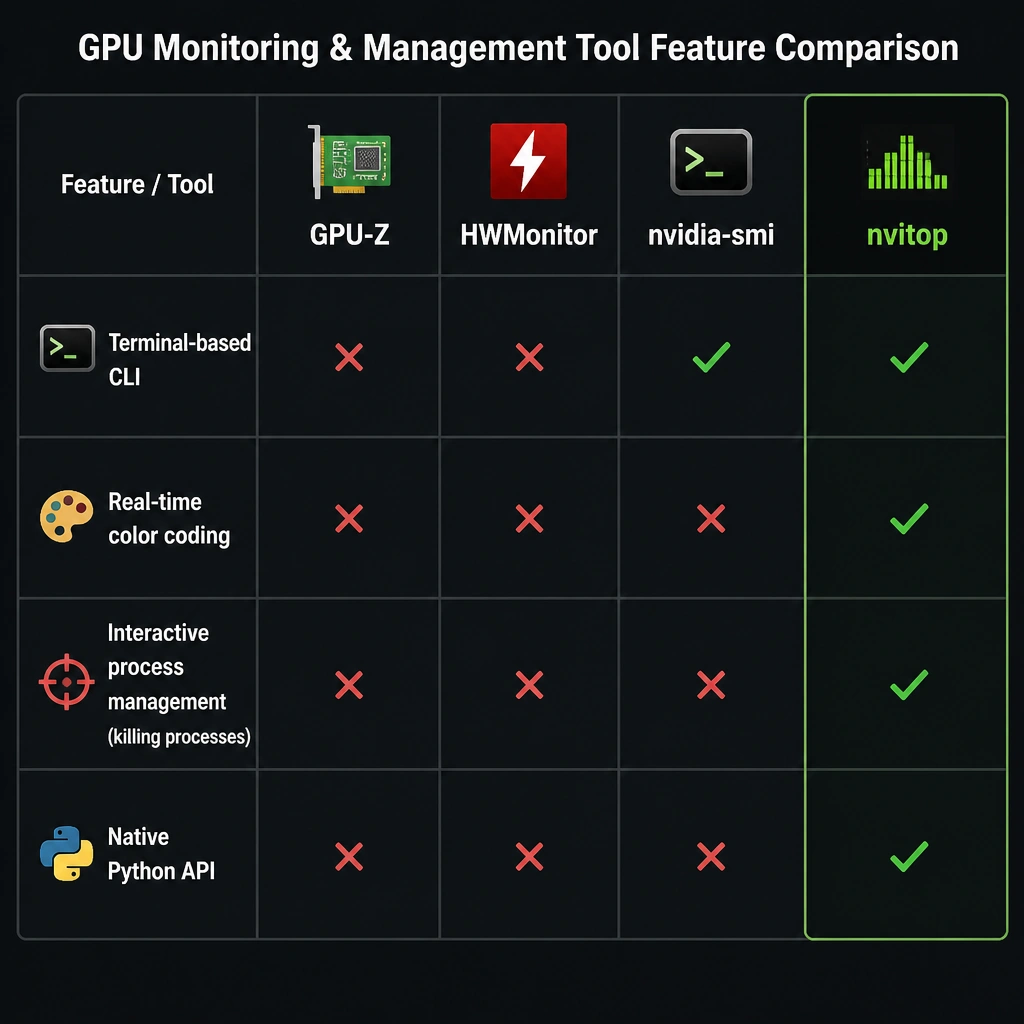
Let me show you how this works in the real world. We all use nvidia-smi—it's the classic CLI command to check your GPU status. But what if you want to kill a runaway PyTorch process or write a Python script that pulls GPU stats with clean, color-coded terminal updates? That's where nvitop comes in. Think of it like htop but custom-made for NVIDIA GPUs. It's interactive, runs in your terminal, gives you colorful feedback, and has a built-in Python API. GPU-Z and HWMonitor are desktop Windows GUI tools—not what you want on a headless Linux cluster. So nvitop is your go-to here.
Full explanation below image
Full Explanation
GPU monitoring is critical for optimizing training pipelines and diagnosing hardware issues. - nvitop (Option D) is an interactive, terminal-based GPU monitoring tool that acts as an enhanced version of nvidia-smi. It supports real-time, color-coded monitoring of GPU memory, utilization, and temperatures. Crucially, it provides an interactive CLI interface where operators can manage running processes (such as sending termination signals) and includes a Python API for integrating GPU monitoring into automation scripts. - nvidia-smi (Option B) is the default utility provided with NVIDIA GPU drivers. While it provides detailed status output, it is non-interactive and does not offer built-in process control or a native Python API. - GPU-Z (Option A) and HWMonitor (Option C) are Windows-based graphical diagnostic tools. They lack CLI process management capabilities and Python APIs, making them unsuitable for headless Linux enterprise GPU clusters. In a multi-tenant GPU server, several machine learning engineers might share resources. If a process hangs and continues to consume GPU memory, a standard nvidia-smi run will show the PID but require the engineer to manually open a terminal and run kill -9 PID. With nvitop, the engineer can view the process list in a dynamic color-coded table, select the target process, and terminate it interactively. Additionally, developers can import nvitop in Python scripts to programmatically print GPU metrics to console logs during long training runs. This level of automation and interactivity makes nvitop highly popular in Linux-based AI development environments compared to Windows-centric GUI tools.