
An infrastructure engineer is evaluating virtualization options for hosting AI and machine learning training pipelines. Why do containers offer a significant resource-utilization advantage over traditional hypervisor-based virtual machines (VMs) for these workloads?
Select an answer to reveal the explanation.
Short Explanation and Infographic
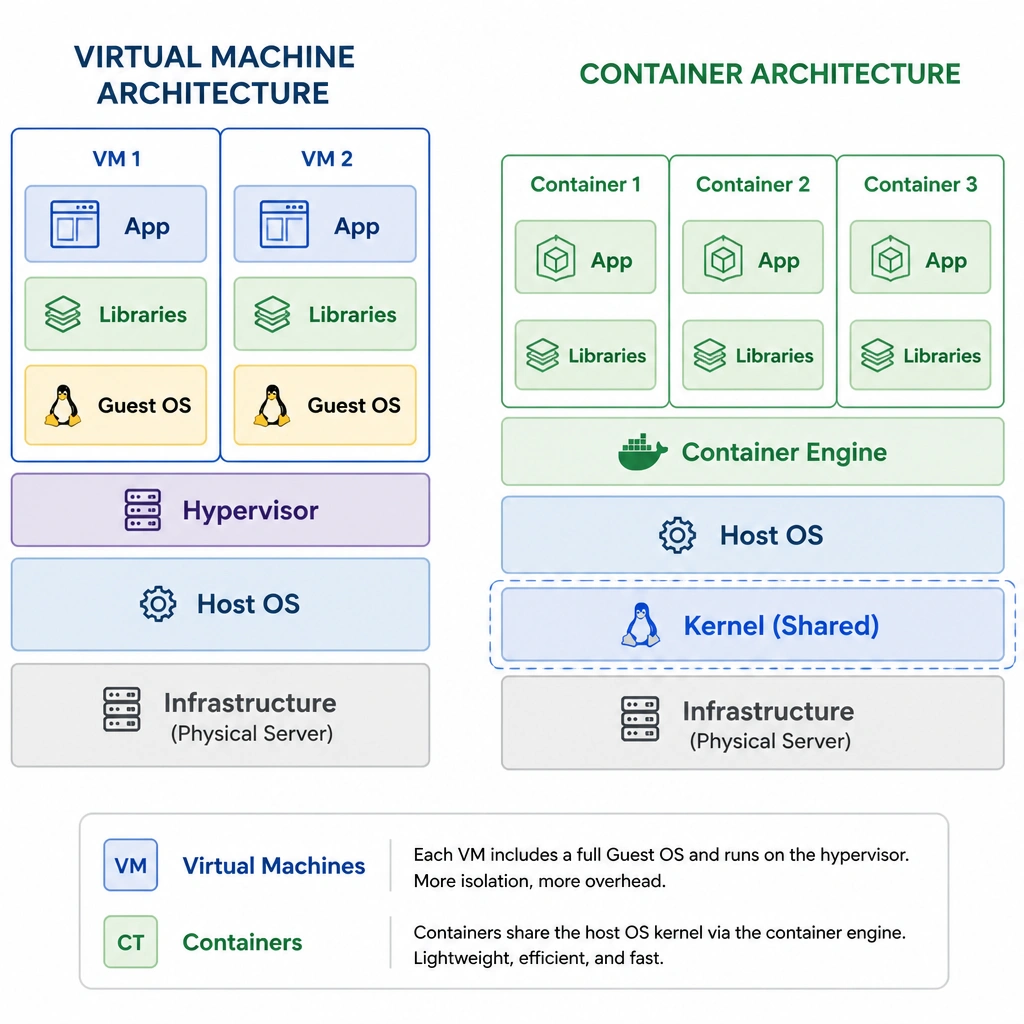
Okay, let's dive into the difference between virtual machines and containers. When you spin up a VM, you're packing a whole guest operating system with it—kernel, drivers, utilities, the works. That's a lot of dead weight in terms of RAM and CPU usage. Now, think about containers: they share the host OS kernel. They only package the specific libraries and application code they need to run. Because they don't have to carry that guest OS baggage, they boot in seconds and use way less memory. When you're running heavy AI workloads that need every scrap of system resource, sharing the host kernel is a massive advantage.
Full explanation below image
Full Explanation
Virtualization technologies play a key role in modern AI deployments, but the choice between virtual machines (VMs) and containers has major resource implications. Traditional VMs run on top of a hypervisor, and each VM requires its own complete guest operating system (OS), including its own kernel, system libraries, and virtual device drivers. Running multiple VMs on a single host results in significant CPU and memory overhead because of the redundant operating system instances.
Containers, on the other hand, represent OS-level virtualization. Instead of hypervising the hardware, containers share the host operating system's kernel. The container runtime (like Docker or containerd) uses Linux namespaces and cgroups to isolate processes. Because a container does not run a guest OS, it has a tiny footprint—often just a few megabytes—and starts almost instantly. For resource-intensive AI workloads, this means more of the physical host's system memory and CPU cycles can be dedicated to the actual machine learning algorithms, model training, and data ingestion, rather than maintaining multiple operating system kernels.
Let's break down why the other options are wrong: - Option A (Simulating accelerators in software): Containers do not eliminate the need for physical GPUs. They are simply packaging environments. AI models still require physical GPU hardware (or other accelerators) to execute matrix math efficiently; software simulation would be far too slow. - Option C (Expanding capacity beyond physical hardware limits): No virtualization or containerization technology can exceed the physical constraints of the host hardware. You cannot allocate more physical CPU cores or RAM than what actually exists on the server. - Option D (Automatic GPU VRAM optimization): Containers do not automatically optimize or manage GPU memory allocations for deep learning models. This optimization must be configured within the application framework (like PyTorch or TensorFlow) or managed by a GPU-aware scheduler.