
You need a command-line tool that goes beyond the basic static output of nvidia-smi to monitor cluster GPUs. You want an interactive terminal-based interface that dynamically scales to your terminal window size, displays real-time color-coded statistics, and allows you to sort and terminate GPU processes directly from the UI. Which tool fits this description?
Select an answer to reveal the explanation.
Short Explanation and Infographic
We've all run nvidia-smi and sat there staring at a static screen, or run it in a loop using watch -n 1 nvidia-smi. It works, but it's not very interactive, and you can't easily kill runaway processes or customize the view. Enter nvitop. Think of it like htop but supercharged specifically for your NVIDIA GPUs. The cool thing is that it runs right in your terminal, automatically adjusts its layout if you resize your window, shows color-coded usage bars, and lets you scroll through processes and kill them on the fly. It also has a neat Python API if you want to write custom scripts. Trust me, once you start using it, you won't go back!
Full explanation below image
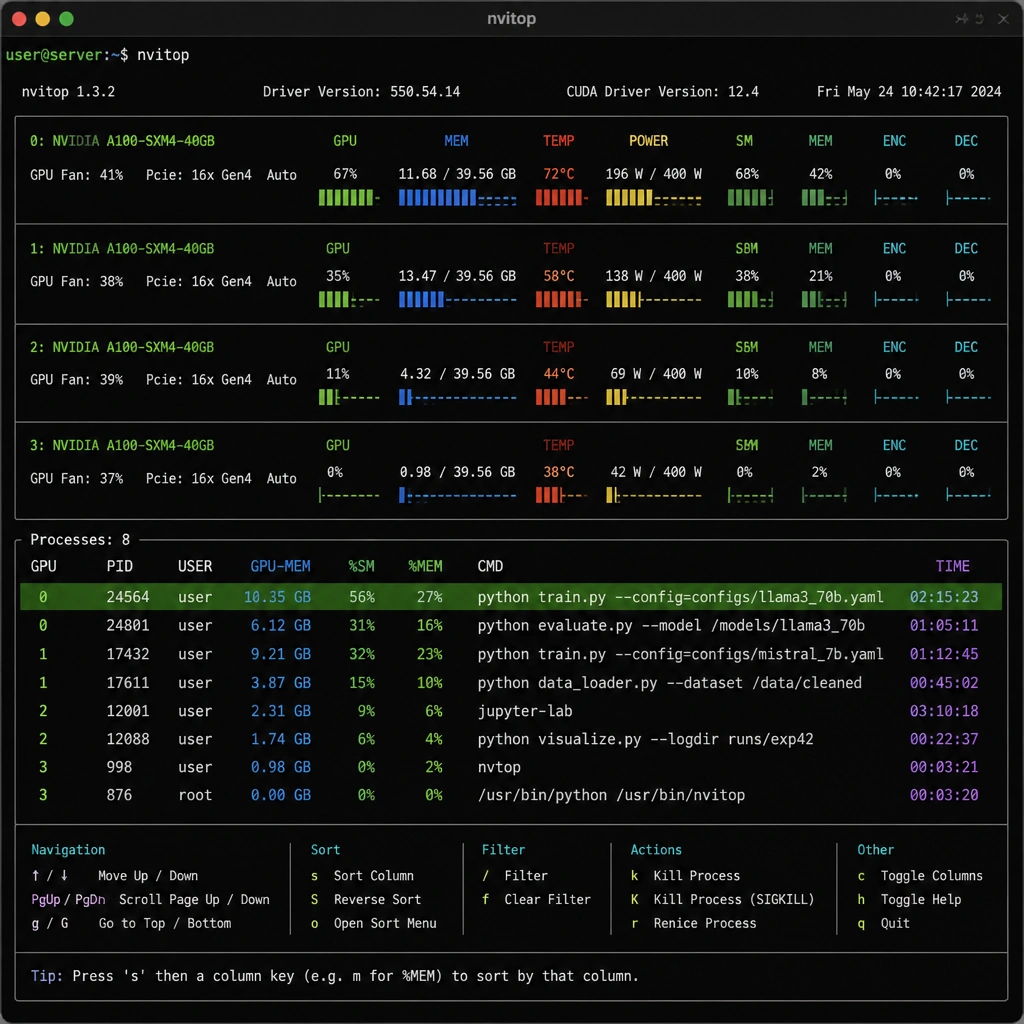
Full Explanation
nvitop (NVIDIA TOP) is an interactive, terminal-based GPU monitoring tool designed to serve as a modern replacement or enhancement for nvidia-smi. While nvidia-smi is the official utility provided by NVIDIA and is excellent for scripting and viewing static snapshots of GPU state, it lacks interactive capabilities. nvitop brings the familiar usability of system monitoring tools like htop to GPU administration. It features a dynamically scaling user interface that fits the terminal window size, real-time color-coded graphing of GPU memory and compute usage, and interactive keyboard shortcuts that allow administrators to sort active GPU processes and terminate (kill) processes directly from the interface. It also includes a Python library for programmatically accessing GPU metrics.
Let's look at why the other options are incorrect: Option A is incorrect because GPU-Z is a lightweight, Windows-only graphical utility designed to provide detailed information about video cards and GPUs. It is not an interactive terminal tool and cannot run on Linux servers where most AI workloads are hosted. Option B is incorrect because HWMonitor is a hardware monitoring program that reads PC systems' main health sensors (voltages, temperatures, fans) via a graphical interface. It does not provide specialized GPU process management or terminal-interactive control. Option C is incorrect because nvidia-smi is a non-interactive command-line interface. To get real-time updates, users must repeatedly execute it or pair it with utility commands like watch, and it does not allow interactive process sorting or termination within its output.