
The NVIDIA GPU Operator automates the management of all NVIDIA software components needed to provision GPUs in Kubernetes. Which three components are installed by the GPU Operator as the foundational requirements for basic containerized GPU workloads to execute? (Choose three.)
Select all correct answers, then click Submit.
Short Explanation and Infographic
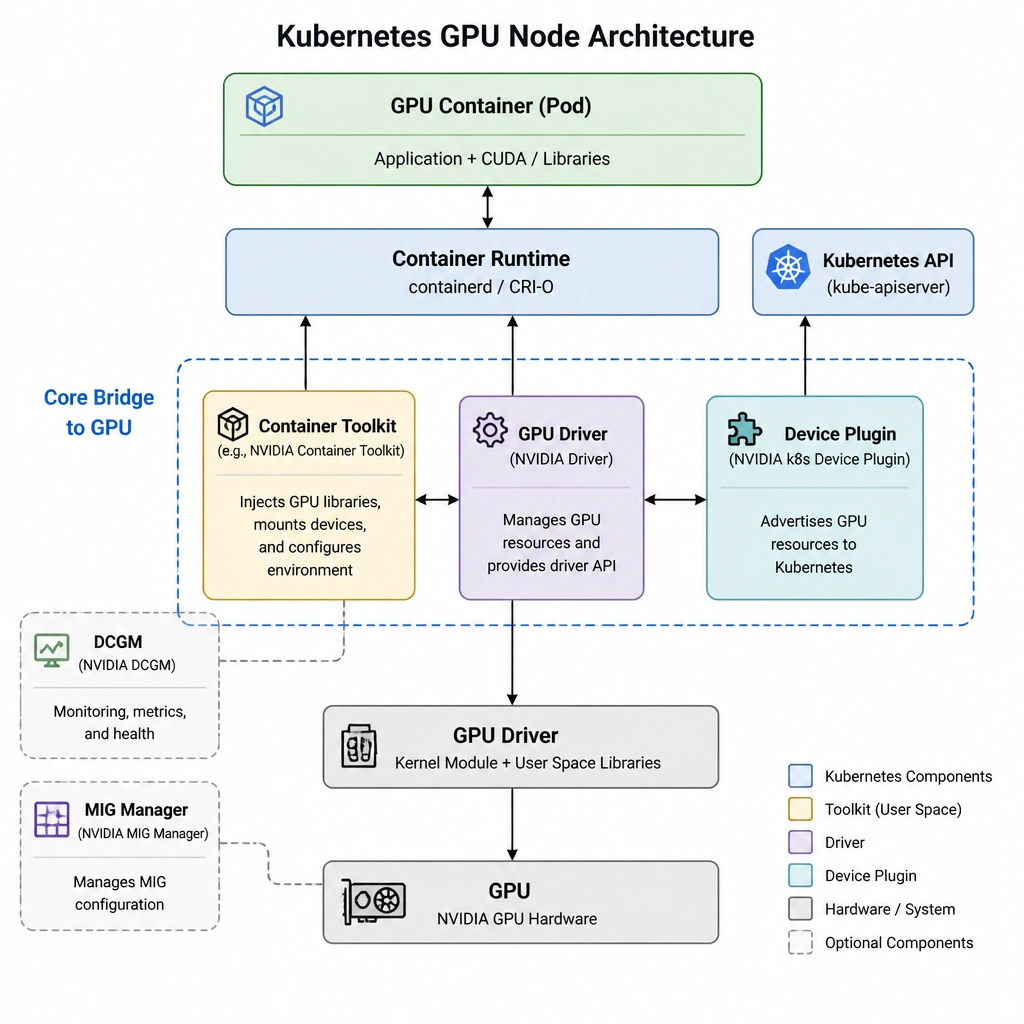
Okay, let's dive in. The NVIDIA GPU Operator is an absolute lifesaver when you're managing GPUs in Kubernetes. Instead of manually installing drivers and software on every single node in your cluster, the Operator does the heavy lifting for you. But you need to know which pieces are the absolute bare essentials to get a basic GPU container up and running. Think of it like building a house. First, you need the foundation, which is the NVIDIA GPU Driver (Option A). Without this driver, the host operating system cannot talk to the physical GPU hardware at all. Next, you need a way for the containers to see and use the GPU. That's the NVIDIA Container Toolkit (Option E). It plugs into container runtimes like Docker or containerd, allowing containers to access the GPU libraries. Finally, you need Kubernetes to know that the GPUs exist so it can schedule pods on them. That's where the NVIDIA Device Plugin (Option C) comes in—it advertises the GPU resources to the Kubernetes API server. So, what about the other options? While DCGM (Option B) is fantastic for monitoring GPU health and metrics, your containers will run just fine without it. GPUDirect Storage (GDS) (Option D) is an advanced tool that bypasses the CPU for NVMe storage reads, but it's definitely not required for basic GPU scheduling. And the MIG Manager (Option F) is only used if you want to partition physical GPUs into smaller virtual instances. Stick to the driver, container toolkit, and device plugin for your core foundation!
Full explanation below image
Full Explanation
The NVIDIA GPU Operator uses Kubernetes custom resource definitions (CRDs) to orchestrate and manage the lifecycle of all software components required to expose NVIDIA GPUs to containerized applications. Among the various components it deploys, three are critical and foundational for any GPU-accelerated container to run:
1. NVIDIA GPU Driver (Option A): Installed as a daemonset on the container hosts, this kernel-level software enables the host operating system to communicate directly with the physical GPU hardware. 2. NVIDIA Container Toolkit (Option E): This component configures the container runtime (e.g., containerd, CRI-O) to mount the necessary GPU user-space libraries and device nodes into the container namespace during startup, enabling containerized code to interface with CUDA. 3. NVIDIA Device Plugin (Option C): A daemonset that registers the GPUs on each node as allocatable resources within the Kubernetes cluster. It allows the kube-scheduler to track GPU capacity and schedule pods requesting nvidia.com/gpu resource allocations.
Review of the non-essential components: - NVIDIA Data Center GPU Manager (DCGM) (Option B) is utilized for health monitoring, telemetry, and diagnostics. While important for cluster administration, it is not required for basic GPU workload execution. - NVIDIA GPUDirect Storage (GDS) (Option D) enables direct DMA transfer between storage and GPU memory. It is a performance-optimizing technology and is not a baseline scheduling requirement. - NVIDIA MIG Manager (Option F) orchestrates Multi-Instance GPU partitioning. It is optional and only required if administrators choose to divide physical GPUs into multiple hardware-isolated instances.
Understanding these dependencies helps in troubleshooting GPU scheduling and initialization issues in containerized environments.