An enterprise is deploying a cluster of virtual machines (VMs) on a hypervisor-based virtualization platform to run deep learning training workloads. To achieve near-bare-metal GPU performance and low latency inside the guest OS, which virtualization technique must be properly configured?
Select an answer to reveal the explanation.
Short Explanation and Infographic
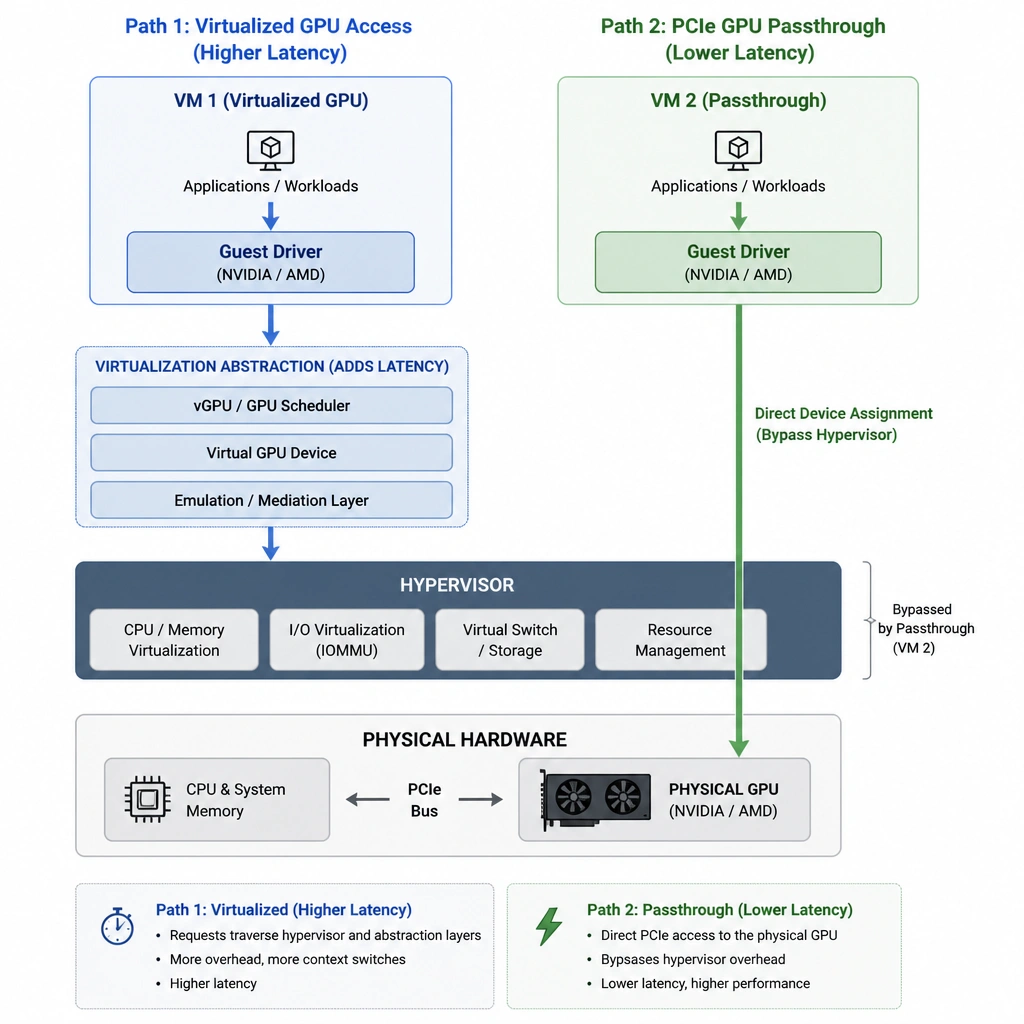
Check this out: when you're virtualizing high-performance AI environments, standard virtualization overhead will absolutely crush your performance. If your guest virtual machines are trying to talk to a physical GPU through a hypervisor translation layer, it's going to be painfully slow. To get that sweet, near-bare-metal performance your deep learning models need, you've got to use GPU passthrough. Think of it like giving a VM a direct, private highway straight to the PCIe bus of the physical card. No pit stops, no translations, just pure speed. If you try to overcommit or use temporal sharing profiles for intensive training workloads, you'll end up with massive latency and a bunch of angry data scientists. Trust me on this, configure GPU passthrough correctly or you'll have a bottleneck that's tough to troubleshoot!
Full explanation below image
Full Explanation
Virtualizing accelerated infrastructure for heavy AI workloads (such as deep learning training or high-throughput inference) requires minimizing virtualization overhead. GPU passthrough (also known as PCIe passthrough or Direct Device Assignment) maps a physical GPU directly to a single virtual machine (VM). By bypassing the hypervisor's translation layer, the guest operating system interacts directly with the GPU hardware. This eliminates CPU-GPU communication overhead, resulting in near-bare-metal performance. - Direct GPU passthrough provides the low-latency, high-bandwidth path to the hardware required for deep learning workloads, ensuring the VM can fully utilize the GPU's compute capability. - Overcommitting GPU memory is incorrect because GPU memory cannot be overcommitted without severe performance degradation or VM crashes, as AI workloads require active, continuous allocation of high-speed VRAM. - Temporal sharing with a 1:8 profile splits a single GPU's compute time among multiple VMs, which introduces latency and scheduling bottlenecks, making it unsuitable for high-performance training workloads. - Dynamic Resource Scheduling based on CPU only balances host CPU loads and does not solve the GPU communication bottleneck or ensure access to accelerator hardware.