
Adatum Corp's security team wants to test the phishing awareness of employees in the Finance department only. The simulation should use a credential harvesting technique — presenting a fake login page when the user clicks a link — and any employee who clicks the link should automatically be enrolled in a security awareness training course without any manual intervention by the security team. What is the correct way to set up this simulation in Microsoft 365?
Select an answer to reveal the explanation.
Short Explanation and Infographic
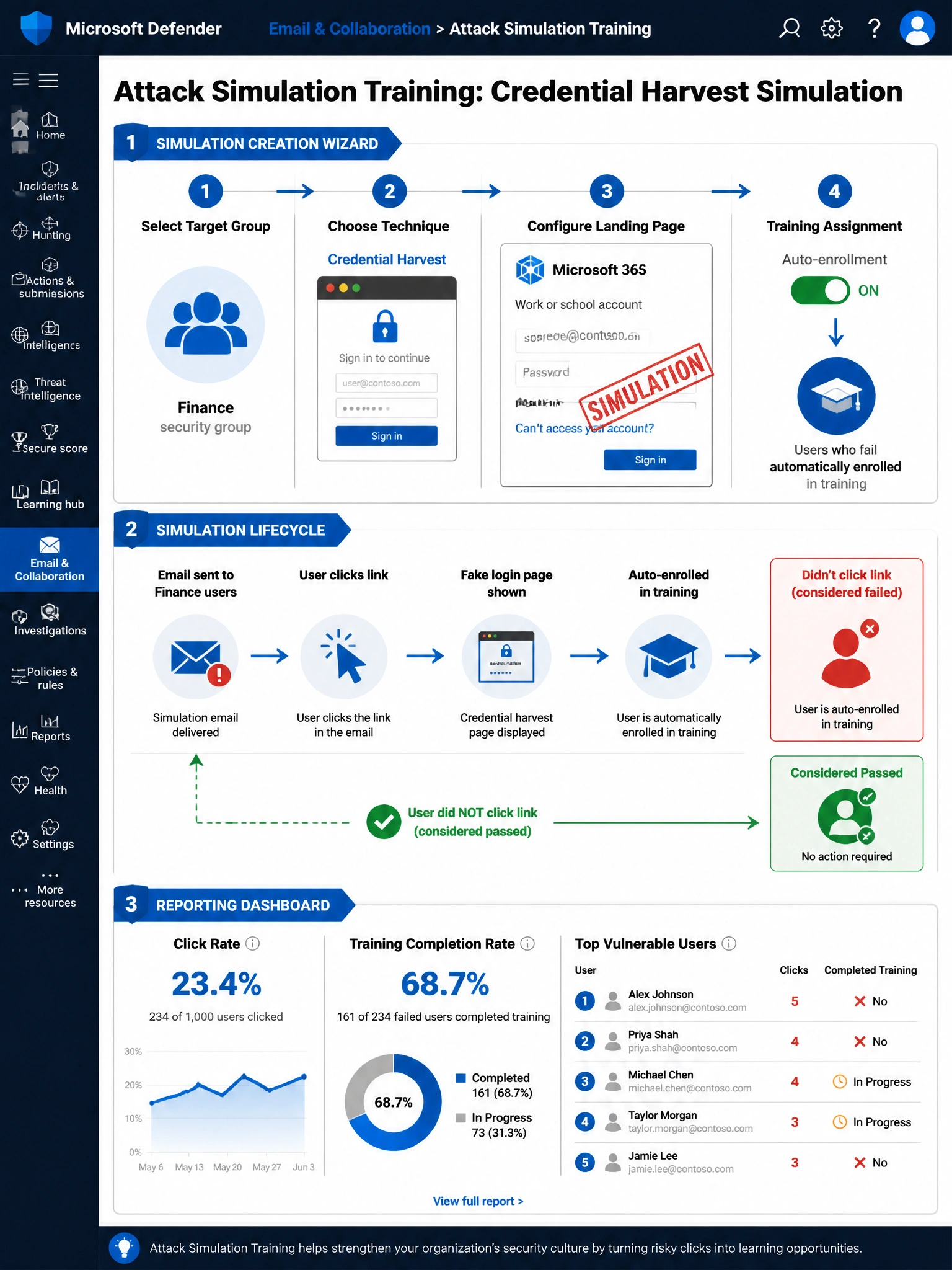
Attack Simulation Training is purpose-built for exactly this — it's like a fire drill where the fire department handles everything: they pick who gets the 'alarm,' you choose the type of fake attack, and anyone who 'runs the wrong way' (clicks the link) automatically gets signed up for safety training. No manual follow-up, no Exchange trickery needed. It handles targeting, technique, landing page, and auto-training enrollment all in one workflow.
Full explanation below image
Full Explanation
Option B is correct. Microsoft Attack Simulation Training, available in the Microsoft Defender portal under Email & Collaboration > Attack Simulation Training, provides a complete end-to-end workflow for running controlled phishing simulations. The administrator can: (1) target a specific Microsoft 365 security group (Finance department), (2) select 'Credential Harvest' as the social engineering technique — which presents a fake sign-in page to capture simulated credentials, (3) configure the phishing email payload and landing page, and (4) in the 'Training assignment' step, configure the system to automatically assign a specific training course to any user who clicks the simulated phishing link. This auto-enrollment removes all manual follow-up work from the security team and ensures immediate, consistent training assignment.
Option A (sending a real phishing test through Exchange Online) is incorrect and potentially dangerous. Sending actual emails with tracking links through Exchange Online is not a controlled simulation — it bypasses Safe Links and other defenses in unpredictable ways, may trigger security alerts, lacks the reporting dashboard and auto-training capabilities, and could cause confusion or compliance issues. Attack Simulation Training is the proper, sanctioned tool for this purpose.
Option C (Defender for Endpoint attack surface reduction rules) is incorrect because Defender for Endpoint and its attack surface reduction (ASR) rules are focused on endpoint-level threat prevention — blocking malicious scripts, restricting Office macros, preventing credential theft from LSASS, etc. ASR rules are not a simulation or training tool and cannot simulate phishing scenarios or enroll users in training.
Option D (creating the simulation under Incidents and Alerts) is incorrect because Incidents and Alerts in Microsoft Defender is the section for reviewing real security incidents detected by the platform. It is not a tool for creating controlled simulations. Attack Simulation Training has its own dedicated section in the Defender portal and its own creation wizard separate from incident management.
Exam tip: Know the Attack Simulation Training workflow for AB-650: Navigate to Microsoft Defender portal > Email & Collaboration > Attack Simulation Training > Simulations > Launch a simulation. The five social engineering techniques available are: Credential Harvest, Malware Attachment, Link in Attachment, Link to Malware, and Drive-by URL. Credential Harvest is the most common technique tested.