
Fabrikam's security operations team is receiving a high volume of 'Email messages containing malicious URL removed after delivery' alerts triggered by a known-safe internal newsletter sent from [email protected]. The alerts are flooding the security queue and causing alert fatigue, making it harder to identify real threats. The administrator needs to stop false positive alerts from this specific safe sender while ensuring the overall alert policy remains active for all other senders. What should the administrator do?
Select an answer to reveal the explanation.
Short Explanation and Infographic
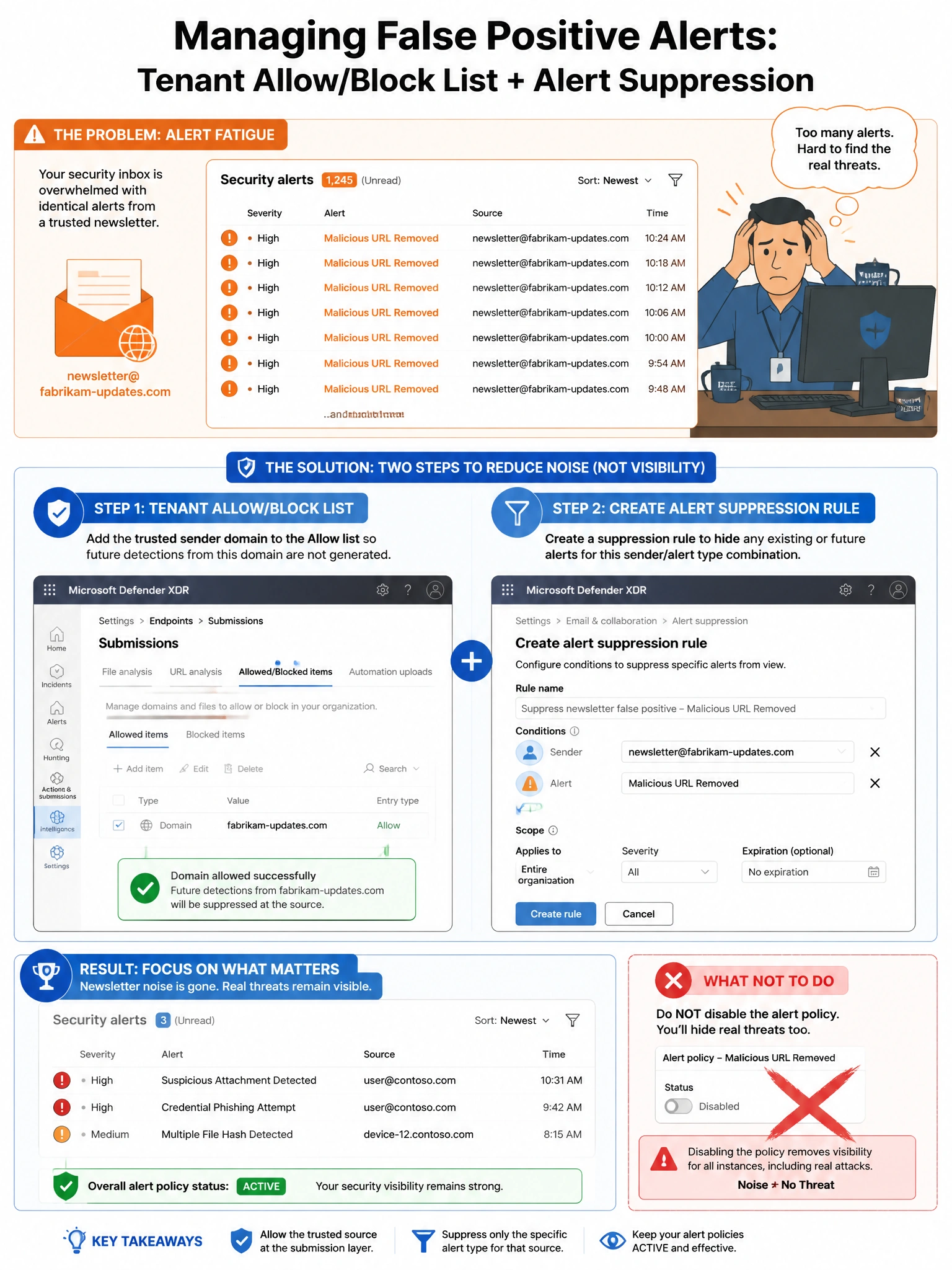
Disabling the alert policy is like unplugging your smoke detector because burnt toast keeps triggering it — you fix the toast problem, not the detector. The right move is to teach the system that this specific newsletter is safe (Tenant Allow/Block List) and then mute the noise for that specific pattern (alert suppression rule) so the detector keeps working for everything else.
Full explanation below image
Full Explanation
Option B is correct and represents a two-pronged best practice approach. First, adding the newsletter's sending domain, IP address, or known-safe URLs to the Tenant Allow/Block List in Microsoft Defender XDR tells the filtering stack to treat traffic from that source as trusted, which reduces or eliminates the underlying false positive detection. Second, creating an alert suppression rule in Microsoft Defender XDR (under Settings > Microsoft Defender XDR > Alert suppression) scoped to the specific sender, alert type, or URL pattern ensures that any remaining noise from this known-safe source does not surface in the security queue. Together these two steps eliminate alert fatigue while keeping the alert policy active for all other senders.
Option A (disabling the alert policy entirely) is incorrect and dangerous. The 'Email messages containing malicious URL removed after delivery' alert policy is a critical security signal that fires when ZAP (Zero-Hour Auto Purge) retroactively removes a malicious URL from delivered emails. Disabling it entirely would eliminate detection visibility for all real post-delivery URL threats across all senders, not just the newsletter. This creates a significant detection gap.
Option C (Safe Links policy bypassing all internal email scanning) is incorrect for two reasons. First, the newsletter may be sent from an external sending service ([email protected] suggests a dedicated sending domain), so a bypass for 'internal emails' may not apply. Second, even if it did apply, bypassing URL scanning for all internal emails is far too broad — it would eliminate protection for legitimate internal email traffic that could be compromised in a business email compromise scenario. Scope matters.
Option D (anti-phishing policy trusted senders) is incorrect because adding a sender to the trusted senders list in the anti-phishing policy only affects impersonation and spoof detection checks within that specific policy. It does not suppress Safe Links URL detonation alerts or ZAP post-delivery removal events, which are what trigger the 'Email messages containing malicious URL removed after delivery' alert. The trusted senders list in anti-phishing is also a broad exemption and security risk if misconfigured.
Exam tip: The Tenant Allow/Block List is the Microsoft-recommended way to manage false positives in Microsoft Defender for Office 365. You can submit false positives directly from Threat Explorer or the Submissions page. Alert suppression rules in Defender XDR are scoped, time-limited suppressions that you create to manage known-noisy detections without disabling the underlying policy. Both tools work together for production noise management.