
VanArsdel Ltd's compliance officer wants to give end users limited control over their quarantined emails. Specifically, users should be able to release their own emails quarantined by spam filtering without admin involvement. However, emails quarantined because of phishing or malware detections must require admin approval before any release — end users should only be able to request a release, not perform it themselves. How should the Microsoft 365 administrator configure this?
Select an answer to reveal the explanation.
Short Explanation and Infographic
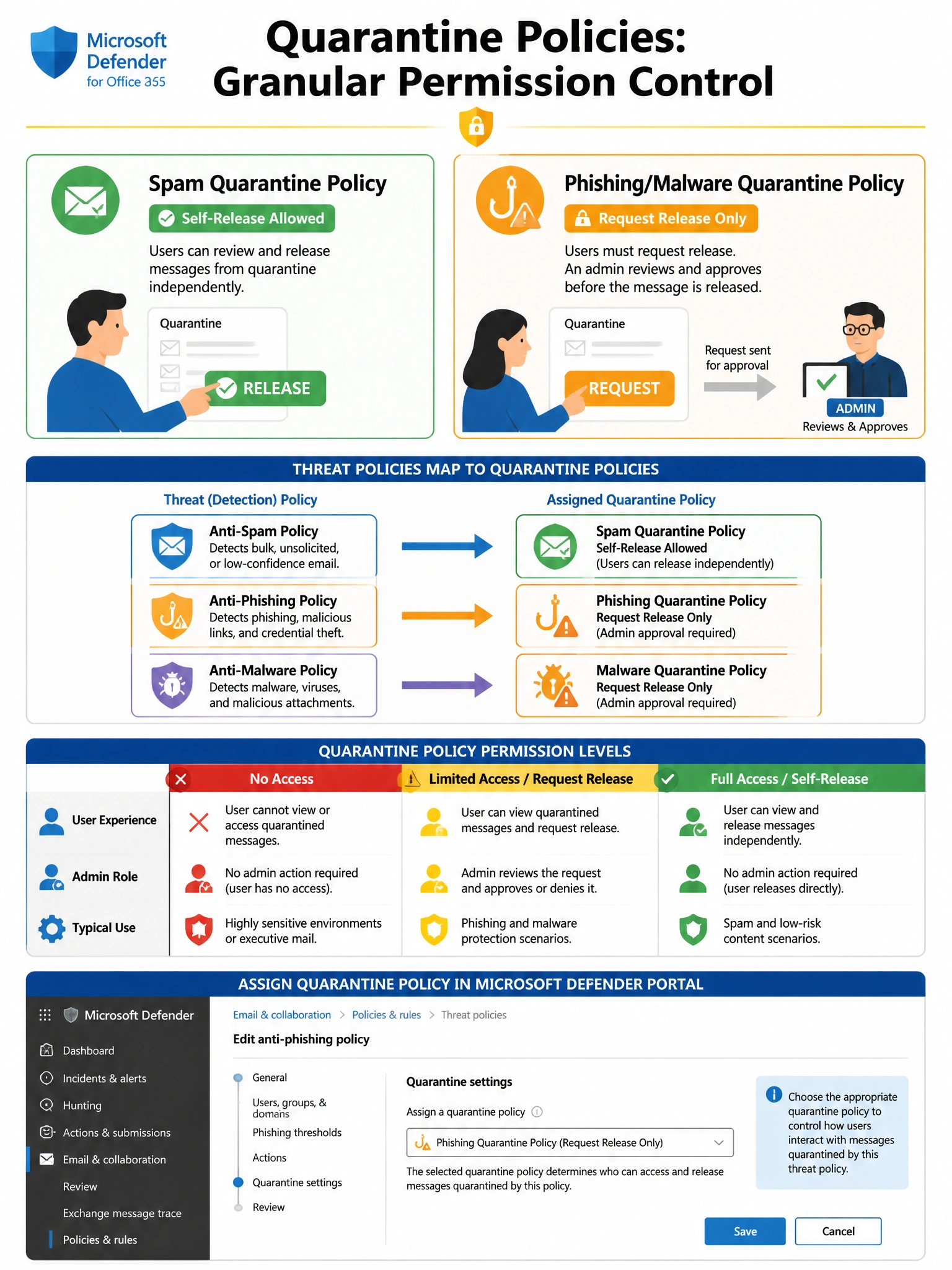
Quarantine policies work like different ID badges at a hotel — a regular guest badge lets you enter your own room (self-release for spam), but a restricted visitor badge only lets you knock and ask for entry (request-release for phishing/malware). You assign the right badge to each threat type separately. One global setting or transport rule hacks can't achieve this granularity cleanly.
Full explanation below image
Full Explanation
Option B is correct. Microsoft Defender for Office 365 quarantine policies allow administrators to precisely define what end users can do with their quarantined messages. By creating two separate quarantine policies — one granting 'Release messages' (self-release) permission for spam, and another granting 'Request release' (admin-approval-required) permission for phishing and malware — and then assigning these policies to the respective threat protection policies, VanArsdel Ltd achieves exactly the tiered access model required. Quarantine policies can be applied per-protection-type within the anti-spam, anti-phishing, and anti-malware policies under Microsoft Defender for Office 365.
Option A (No access for all) is incorrect because setting No access for all quarantine policies would prevent end users from doing anything with their quarantined spam messages, which contradicts the compliance officer's requirement that spam emails should be self-releasable. This over-restricts user capabilities.
Option C (Enable quarantine notifications with full release) is incorrect because enabling quarantine notifications and granting full release permission is an all-or-nothing approach that applies the same permissions globally. This would give users the ability to self-release phishing and malware quarantined emails, which violates the requirement that those categories require admin approval. Notifications can be enabled independently of release permissions.
Option D (Transport rules for quarantine routing) is incorrect because Exchange mail flow rules (transport rules) operate on messages before or during delivery — they cannot be used to manage messages that are already held in quarantine. Transport rules cannot route quarantine-release requests to a manager approval mailbox. This is not how Exchange transport rules function.
Exam tip: Quarantine policies are a key feature tested on AB-650. Remember the three main user permission presets: No access (users cannot see or interact with quarantined mail), Limited access (users can request release but not self-release — admin must approve), and Full access (users can self-release, block sender, and delete). You can also create custom policies with granular permissions. The key is that each threat policy (anti-spam, anti-phishing, anti-malware, Safe Attachments) can reference a different quarantine policy.