
Wide World Importers' security operations center received an alert that multiple users clicked a malicious URL embedded in a phishing email. The security administrator needs to identify every user who received this email, determine which users actually clicked the URL, and assess whether any downstream actions occurred. The administrator wants to use a built-in Microsoft Defender for Office 365 tool to investigate. Which tool should be used?
Select an answer to reveal the explanation.
Short Explanation and Infographic
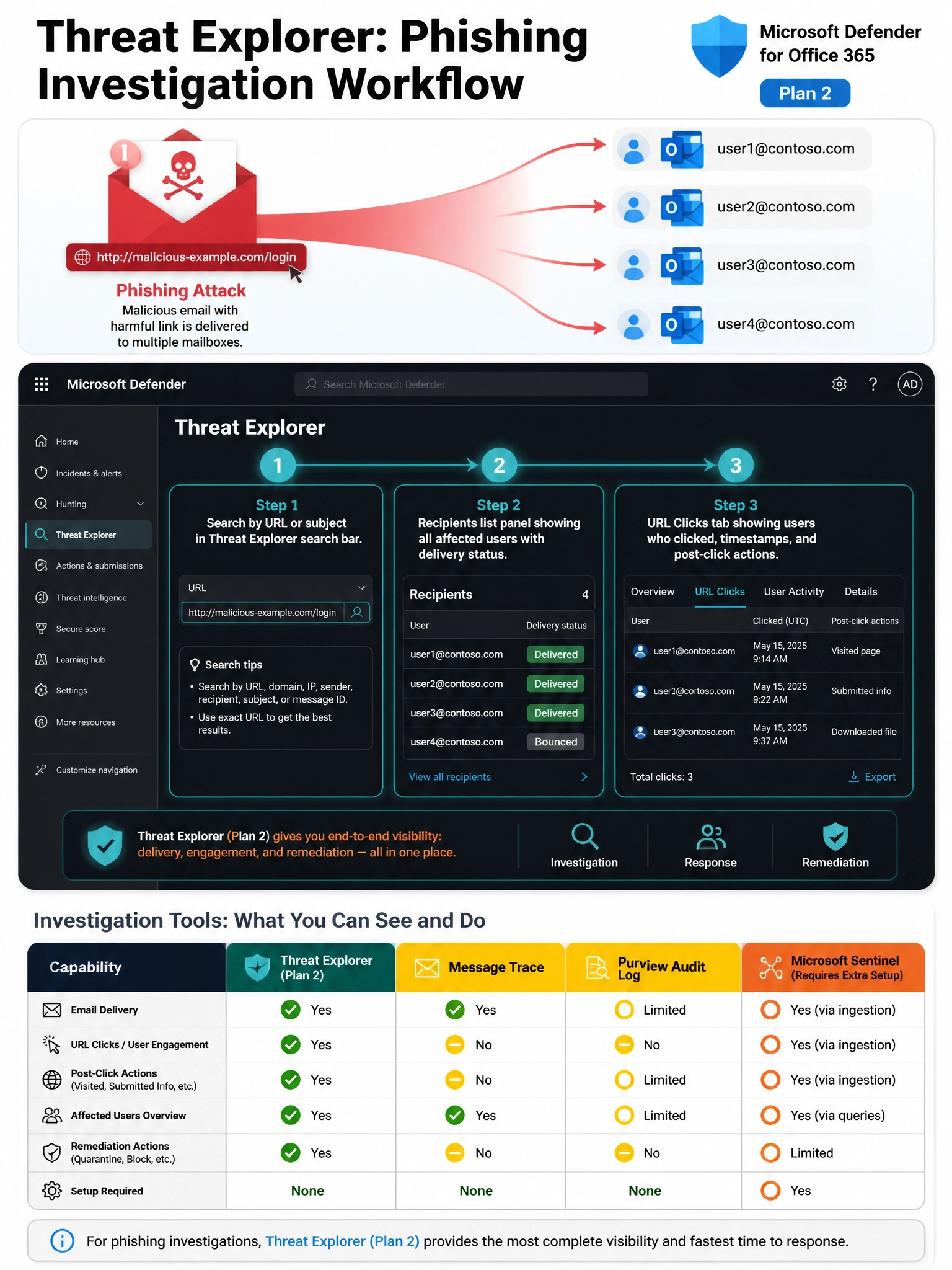
Threat Explorer is like your security team's detective workbench — it lets you search by URL, sender, or subject, see every recipient, and then drill into who actually clicked and what happened afterward, all in one place. Message Trace only shows delivery details, the Audit Log isn't built for email threat hunting, and Sentinel requires additional setup that isn't needed when you already have Defender for Office 365 Plan 2.
Full explanation below image
Full Explanation
Option B is correct. Threat Explorer (also called Explorer) is a real-time investigation tool available in Microsoft Defender for Office 365 Plan 2. It allows security administrators to search for emails by subject line, sender, recipient, URL, or malware family. Critically, Threat Explorer includes 'URL click' data — it shows which recipients clicked a specific URL contained in an email, and can also surface post-delivery actions such as whether the email was later automatically remediated by zero-hour auto purge (ZAP). This makes it the ideal tool for end-to-end phishing investigation without requiring any additional infrastructure.
Option A (Message Trace) is incorrect because Message Trace in the Exchange admin center provides delivery status information only — it shows whether an email was delivered, deferred, or rejected, and to which mailbox. It does not provide threat intelligence, URL click data, or any information about whether a recipient interacted with malicious content.
Option C (Microsoft Purview Audit Log) is incorrect for this specific investigation need. While the Audit Log records user and admin activities across Microsoft 365 services, it is not the right interface for correlating email delivery data with URL clicks in a phishing campaign context. You would need to correlate multiple separate searches manually, and the Audit Log lacks the phishing-specific views and URL detonation data available in Threat Explorer.
Option D (Microsoft Sentinel) is incorrect as a primary first-response tool in this scenario. While Sentinel is a powerful SIEM/SOAR platform that can ingest Microsoft 365 Defender data via the Microsoft 365 Defender connector, it requires additional configuration, workspace setup, and query expertise (KQL). For a built-in, immediate investigation within the Defender portal, Threat Explorer is the purpose-built tool and does not require any additional licensing or setup beyond Defender for Office 365 Plan 2.
Exam tip: Threat Explorer is available in Defender for Office 365 Plan 2 (included in Microsoft 365 E5 or as an add-on). Plan 1 customers have access to a limited read-only version called 'Real-time detections' instead of the full Explorer. Know this distinction for the exam.