
Trey Research's CEO, Megan Bowen ([email protected]), has been impersonated in phishing emails sent to employees from external addresses. Multiple employees received emails appearing to be from Megan with requests to wire transfer funds. The Microsoft 365 administrator needs to ensure that future emails attempting to impersonate the CEO are automatically quarantined before reaching any employee inbox. What is the most effective configuration?
Select an answer to reveal the explanation.
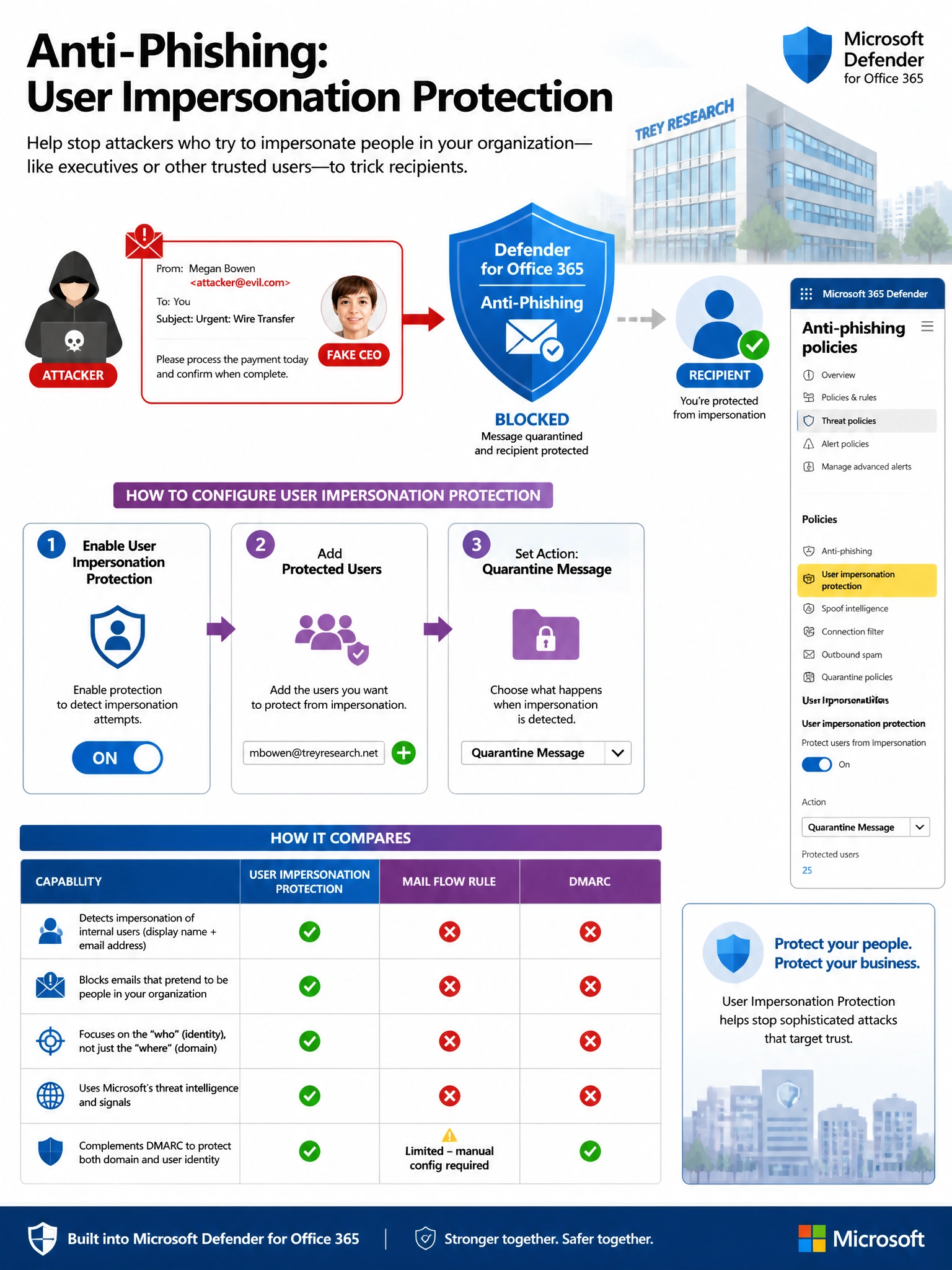
Short Explanation and Infographic
Think of User Impersonation Protection as putting a 'bodyguard' around specific VIP addresses. You tell Defender 'protect this exact person,' and it uses AI to catch even sophisticated impersonation attempts that spoof the name without spoofing the domain. A mail flow rule checking display names is easy to bypass, Safe Links doesn't help here, and DMARC only protects your outbound mail — not inbound attacks spoofing someone else's display name.
Full explanation below image
Full Explanation
Option B is correct. Microsoft Defender for Office 365's anti-phishing policy includes a User Impersonation Protection feature specifically designed for this scenario. By adding the CEO's email address ([email protected]) to the protected users list, Defender uses machine learning to detect when external emails appear to impersonate that user — even when the attacker does not spoof the actual domain. Setting the action to 'Quarantine the message' ensures these emails never reach end user inboxes. Administrators can protect up to 350 individual users per policy.
Option A (mail flow rule on display name) is incorrect because this is trivially bypassed by attackers. Display name matching in transport rules is unreliable — it generates excessive false positives on legitimate emails and false negatives when attackers change spacing, use Unicode lookalike characters, or slightly modify the name. It is not a security control Microsoft recommends for impersonation protection.
Option C (Safe Links policy) is incorrect because Safe Links is designed to protect users from malicious URLs within emails, not to detect or block impersonation attempts. Configuring Safe Links does nothing to prevent an email that appears to come from the CEO from reaching the inbox.
Option D (DMARC enforcement) is incorrect for this specific scenario. DMARC (Domain-based Message Authentication, Reporting, and Conformance) controls what happens when external senders try to spoof Trey Research's own domain. However, the attacker is not necessarily spoofing treyresearch.net — they are sending from a completely different domain while using the CEO's display name. DMARC also governs outbound policy, not protection of inbound impersonation attacks using display name tricks.
Exam tip: Distinguish between domain spoofing (caught by DMARC/SPF/DKIM) and user impersonation (caught by Defender's User Impersonation Protection). The AB-650 exam tests this distinction. User Impersonation Protection catches sophisticated attacks where the sending domain passes authentication but the human name tricks the recipient.