
Litware Inc wants to protect email users from malicious attachments without introducing delays in reading emails. Employees must be able to open and read the email body immediately upon arrival, while any attached files are still being scanned in the background. The security team has asked the Microsoft 365 administrator to configure the appropriate Safe Attachments policy action. Which action should the administrator select?
Select an answer to reveal the explanation.
Short Explanation and Infographic
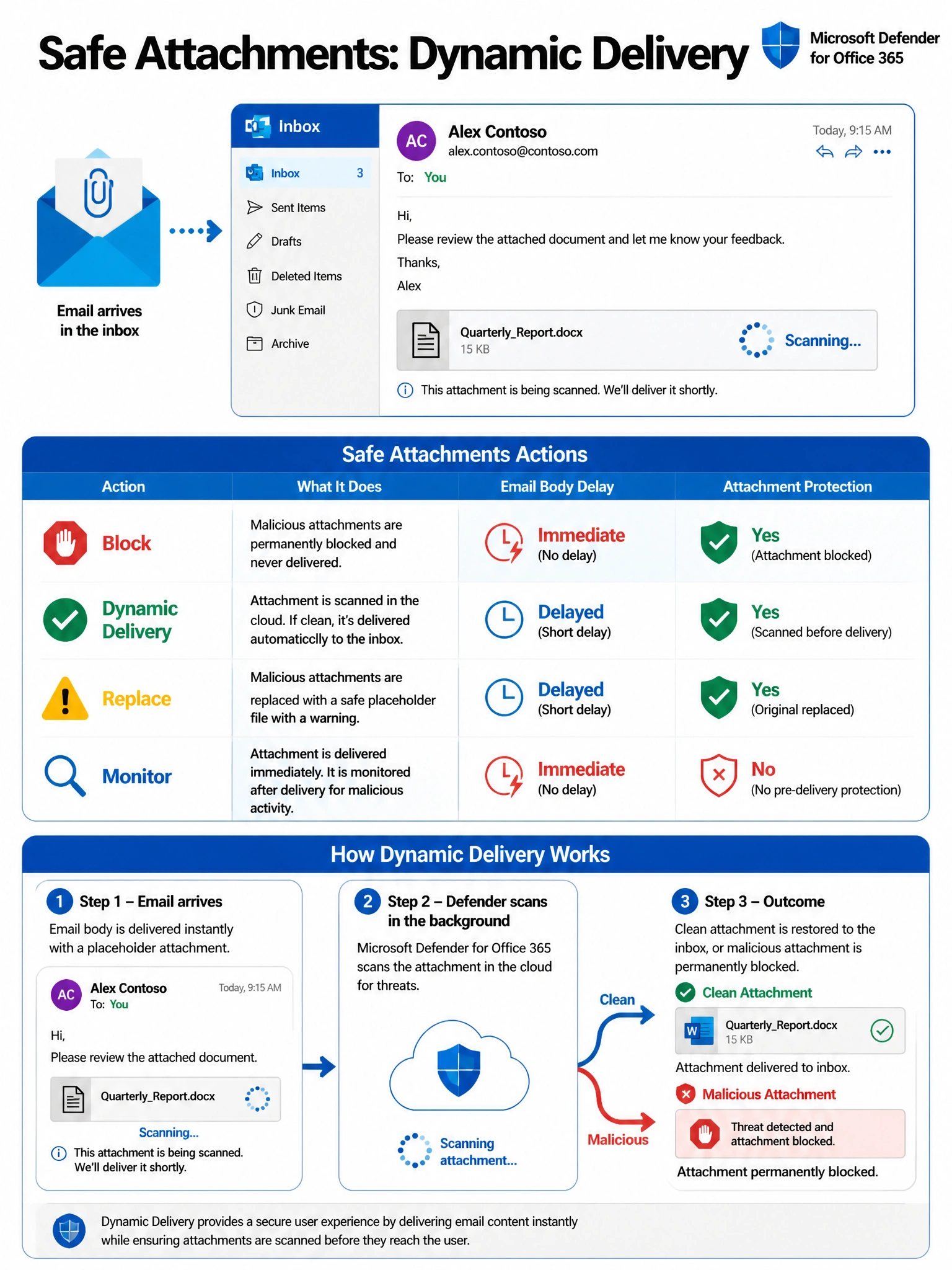
Dynamic Delivery is like a restaurant giving you bread and water while your entrée is still being cooked — you get the email body right away, and a placeholder sits where the attachment was until scanning finishes. Block stops everything cold, Replace delays delivery entirely, and Monitor scans without acting. Dynamic Delivery is the only option that balances zero-delay reading with real attachment protection.
Full explanation below image
Full Explanation
Dynamic Delivery is the correct Safe Attachments action for Litware Inc's requirement. When Dynamic Delivery is selected, Microsoft Defender for Office 365 delivers the email body to the recipient immediately, replacing the original attachment with a placeholder file. Once the asynchronous malware scan completes, if the attachment is clean, it is automatically swapped back in and the user receives a notification that the real file is now available. If the attachment is found to be malicious, it is permanently blocked. This gives users zero delay in reading email while still providing full attachment protection.
Option A (Block) is incorrect because the Block action prevents the entire email — including the message body — from reaching the recipient until scanning completes, or it permanently removes attachments found to be malicious. This introduces exactly the delay Litware Inc wants to avoid.
Option C (Replace) is incorrect because the Replace action also holds the entire email until scanning completes. It replaces the attachment with a placeholder and delivers the email only after the scan finishes. This delays delivery and does not meet the 'read immediately' requirement.
Option D (Monitor) is incorrect because Monitor delivers the email and attachment without delay but takes no protective action — it only logs results for analysis. Malicious attachments are delivered to end users, which is a significant security risk and not suitable for a production protection policy.
Exam tip: On the AB-650 exam, remember that Dynamic Delivery is the only Safe Attachments action that simultaneously satisfies two competing goals: immediate email body delivery AND active scanning. The word 'Dynamic' is your hint — it dynamically manages the attachment lifecycle in real time.