
Northwind Traders has accumulated over 8,000 Microsoft 365 groups over the past three years. Many are tied to completed projects and appear to be abandoned — no owner activity, no content updates. The IT governance team wants groups to automatically expire and be soft-deleted after 180 days of inactivity, with group owners receiving email notifications at 30, 15, and 1 day before expiration so they can renew active groups. What should the administrator configure?
Select an answer to reveal the explanation.
Short Explanation and Infographic
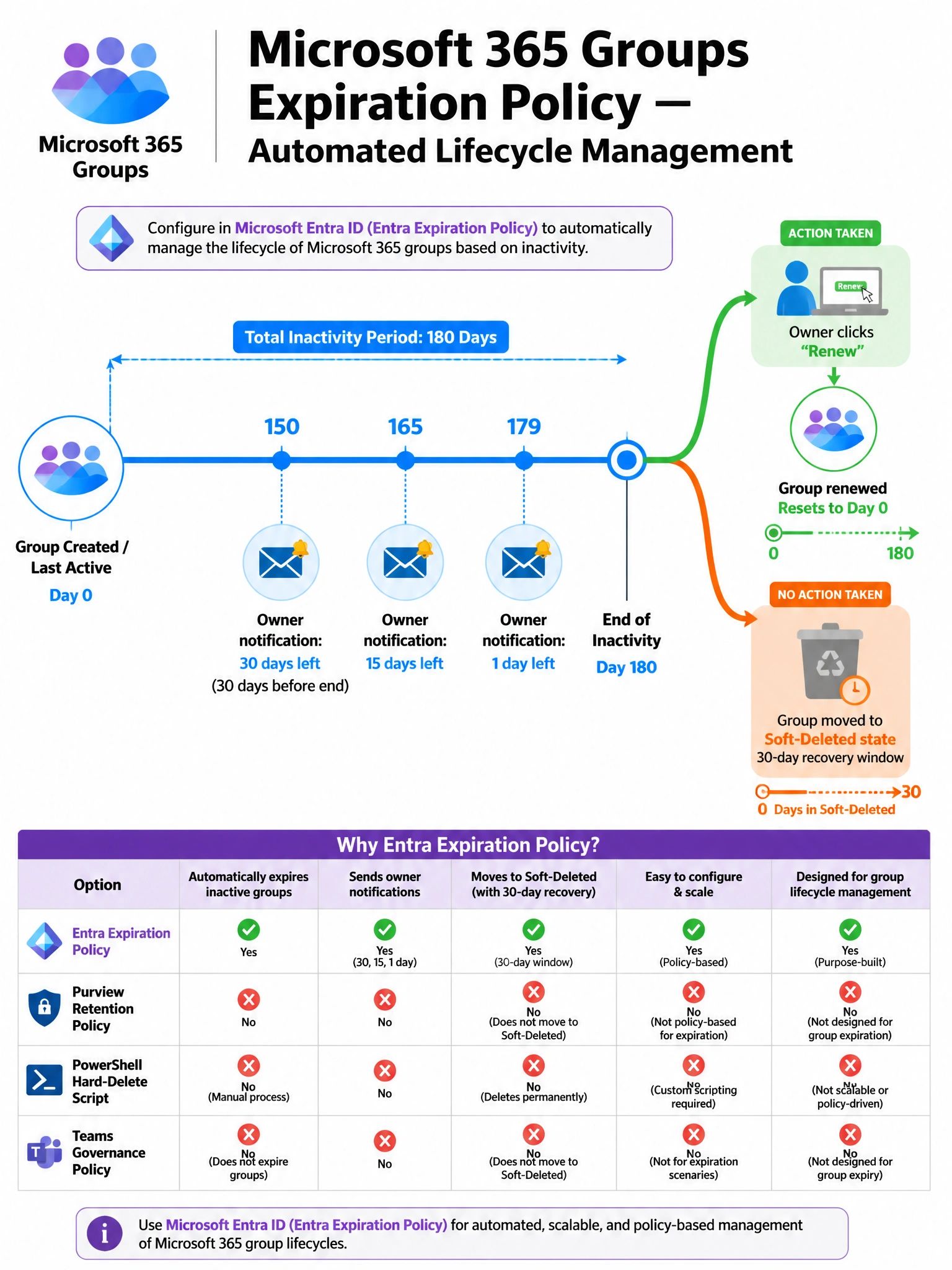
Group expiration in Entra ID is like a library book with a due date — if nobody renews it, it goes back on the shelf (soft-deleted, recoverable for 30 days). The built-in Microsoft 365 Groups expiration policy handles the countdown timers, the owner notification emails, and the soft-delete automatically. No scripts, no Purview, no Teams policy needed.
Full explanation below image
Full Explanation
The correct answer is B. Microsoft Entra ID includes a native Microsoft 365 Groups expiration policy feature specifically designed for this governance scenario. When configured, it sets a group lifetime (e.g., 180 days) that resets whenever meaningful activity occurs in the group (messages, file edits, etc.). As the expiration date approaches, Entra automatically emails the group's owners at 30, 15, and 1 day before expiration with a one-click renewal link. If no owner renews, the group is soft-deleted (not permanently deleted) and can be recovered by an admin for up to 30 days. This is the correct, built-in, low-maintenance solution.
Option A is wrong because Microsoft Purview retention policies control how long content (emails, files, messages) is retained or deleted for compliance purposes. A retention policy on a Microsoft 365 Group keeps the content for 180 days, it does not delete the group itself or notify owners. Retention and group lifecycle management are entirely separate governance concerns.
Option C is wrong for two important reasons. First, it uses Remove-MgGroup, which permanently (hard) deletes the group — there is no soft-delete recovery window. Permanent deletion without warning or owner input violates basic governance standards and could destroy active groups. Second, a manual script adds maintenance burden, error risk, and lacks the built-in owner notification and renewal workflow that the native expiration policy provides. Using a manual script when a native feature exists is always suboptimal on Microsoft exams.
Option D is wrong because Teams admin center channel governance policies manage Teams-specific behaviors (who can create channels, channel moderation, etc.) but do not control the lifecycle of the underlying Microsoft 365 group. Teams channels and Microsoft 365 group expiration are managed at different layers — group expiration lives in Microsoft Entra, not Teams admin center.
Exam tip: For Microsoft 365 group lifecycle management — expiration, renewal, naming policies, creation restrictions — always look to Microsoft Entra ID (specifically the Microsoft 365 Groups settings blade). Purview handles content compliance, Teams admin center handles Teams channel behavior. Don't mix up the admin portals.