
Tailwind Toys' security team is hardening their Microsoft 365 environment. They want the Exchange Administrator role to follow a zero-standing-access model: no one should have the role active at all times. When someone needs it, they must submit a business justification and get approved by the security team lead before the role activates. Which configuration in Microsoft Entra Privileged Identity Management (PIM) achieves this?
Select an answer to reveal the explanation.
Short Explanation and Infographic
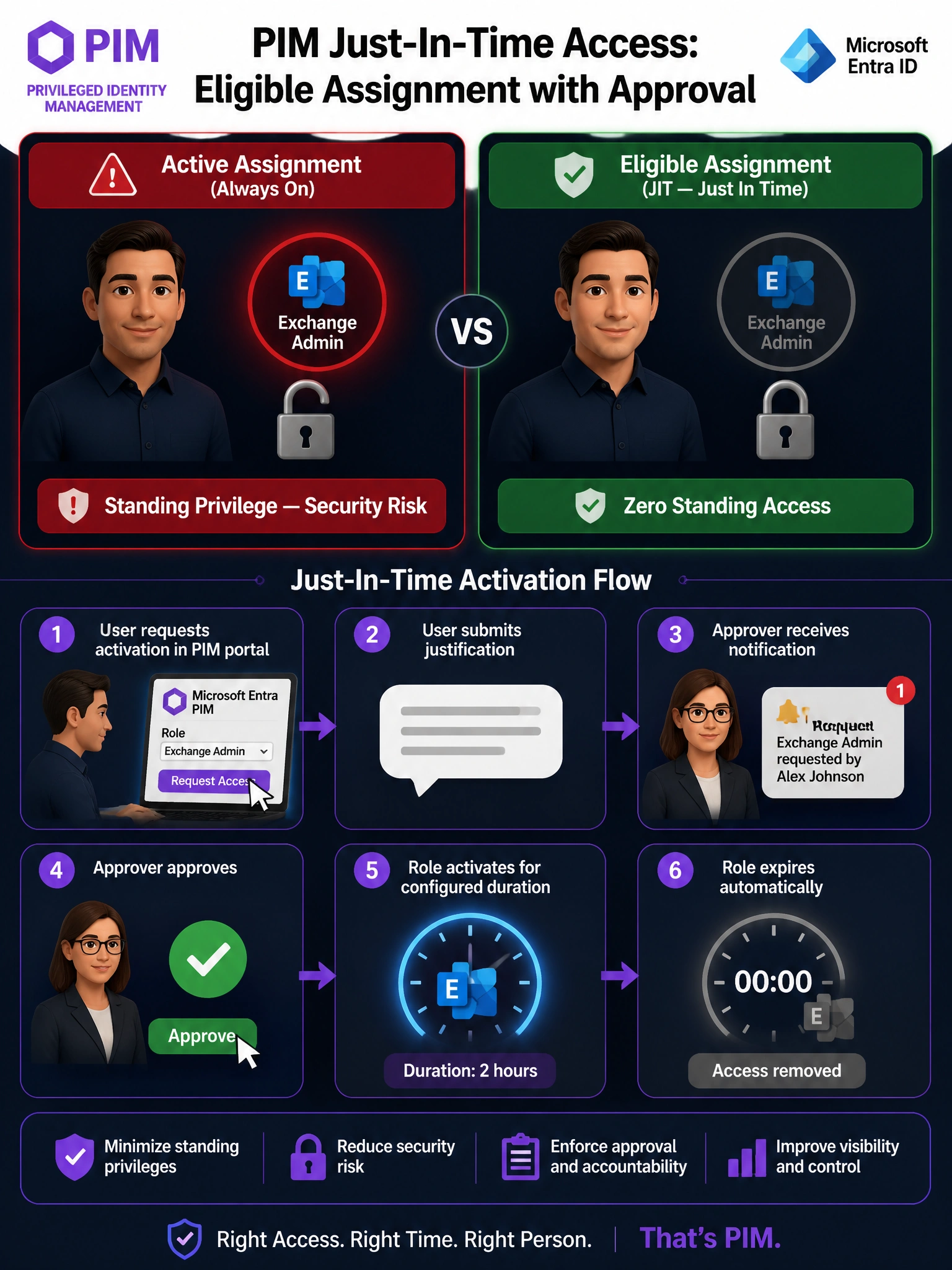
PIM 'Eligible' is like a spare car key locked in a safe — you have the right to use it, but you have to go get it approved before you can drive. 'Active' means the key is already in the ignition. Requiring approval and justification before activation is exactly what PIM role settings are built for — that's the combo that gives Tailwind Toys zero standing access with an auditable approval chain.
Full explanation below image
Full Explanation
The correct answer is B. Microsoft Entra Privileged Identity Management (PIM) supports two assignment types for Entra roles: Active (the role is always on) and Eligible (the user can activate the role when needed, subject to configured requirements). For the zero-standing-access model, Eligible is the right assignment type. Within PIM role settings for Exchange Administrator, you can configure: (1) Require justification on activation — the user must type a business reason; (2) Require approval to activate — a designated approver (the security team lead in this case) must approve the request before activation occurs. This creates a full, auditable just-in-time access workflow.
Option A is wrong because an 'Active' assignment in PIM means the role is permanently enabled — the user always has Exchange Administrator rights. This is the opposite of zero-standing-access. Adding a Conditional Access MFA requirement only adds an authentication step, it does not remove the standing privilege. The role is still always on.
Option C is wrong because Conditional Access policies control access to applications and resources based on conditions (device compliance, location, MFA, etc.), but they do not manage privileged role activation. A security group controlling access to the Exchange Admin Center is a coarse, unaudited workaround — it doesn't integrate with PIM's approval workflow, activation limits, or audit logs the way proper PIM eligible assignments do.
Option D is wrong because Azure Bastion is a secure remote access service for connecting to Azure virtual machines via the browser — it has nothing to do with Microsoft Entra role management or Exchange Administrator. This is a distractor designed to test whether you confuse Azure PaaS services with Entra identity governance features.
Exam tip: PIM questions almost always hinge on the Active vs. Eligible distinction. Memorize this: Eligible = just-in-time (user requests activation); Active = always on (standing privilege). Any scenario mentioning 'only when needed,' 'temporary,' 'request-based,' or 'zero standing access' points to Eligible with appropriate activation settings.