
Users at Coastal Engineering Associates' Denver branch office are experiencing degraded Microsoft Teams call quality and slow SharePoint page loads. The IT admin suspects the network path from the Denver office to Microsoft 365 service endpoints may be suboptimal. Which tool in the Microsoft 365 admin center provides per-office network connectivity assessment scores and actionable recommendations for improving Microsoft 365 network performance?
Select an answer to reveal the explanation.
Short Explanation and Infographic
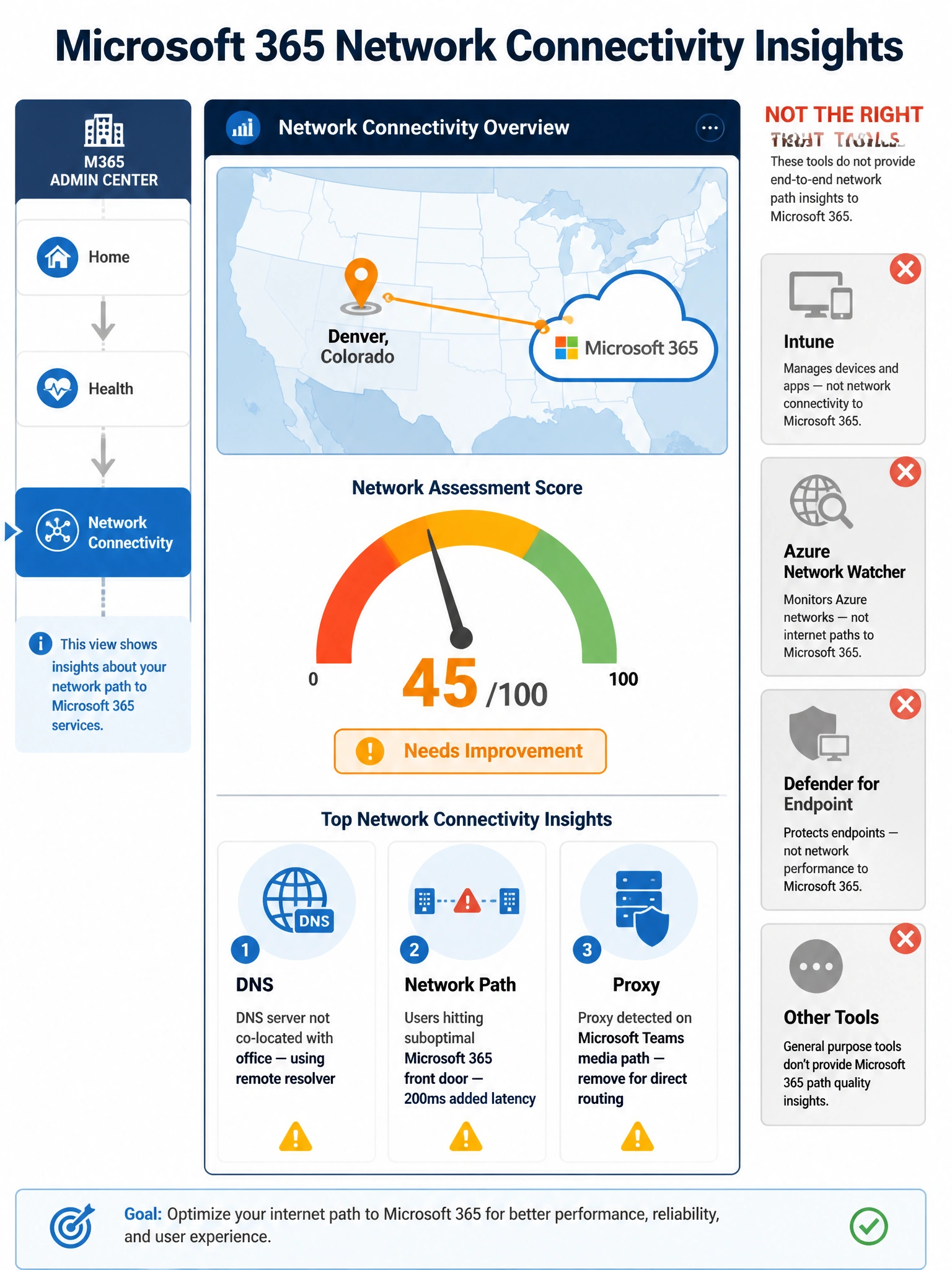
The Microsoft 365 admin center has a dedicated 'Network connectivity' page under Health that acts like a health checkup for each of your office locations — it shows a score, flags problems like hitting the wrong front door server, and tells you exactly what to fix. It's purpose-built for this, and nothing else on the list comes close.
Full explanation below image
Full Explanation
The Microsoft 365 admin center > Health > Network connectivity feature (sometimes called Microsoft 365 Network Insights or Network Assessments) is specifically designed to evaluate and report on the quality of network paths from organizational locations to Microsoft 365 service endpoints. It collects telemetry from Microsoft 365 client applications running on employee devices and correlates that data with network topology to produce a per-location Network Assessment Score ranging from 0 to 100.
The tool surfaces actionable insights such as: whether the DNS server resolving Microsoft 365 hostnames is co-located with the user's office (important for front door assignment), whether users are egressing through the correct Microsoft 365 service front door for their geography, whether a proxy server or VPN is adding latency to Microsoft 365 traffic, and whether there are packet loss or jitter issues affecting real-time workloads like Teams calls. Admins can drill into individual office locations and see specific recommendations.
Option B is incorrect. Microsoft Intune (formerly Endpoint Manager) is a device management and compliance platform. While it collects some device health telemetry, it does not provide Microsoft 365-specific network connectivity scores or network path analysis for office locations. It is not designed for diagnosing Microsoft 365 connectivity performance.
Option C is incorrect. Azure Network Watcher is a network monitoring and diagnostic tool for Azure virtual networks (VNets), Azure VPN gateways, ExpressRoute circuits, and Azure-hosted resources. It is not designed to monitor connectivity between on-premises branch offices and Microsoft 365 SaaS endpoints. It operates in the Azure infrastructure layer, not the Microsoft 365 layer.
Option D is incorrect. Microsoft Defender for Endpoint's network protection feature is a security tool designed to block connections to malicious domains and URLs. While it can provide visibility into outbound network connections from an endpoint security perspective, it does not provide network performance scoring, Microsoft 365-specific connectivity health data, or recommendations for improving office network configurations for Microsoft 365.
Exam tip: For the AB-650 exam, remember that Microsoft 365 network performance questions almost always point to Health > Network connectivity in the M365 admin center. Azure tools operate on Azure infrastructure, not Microsoft 365 SaaS paths.