
A Microsoft Teams site for a critical project at Lakeside Property Management was accidentally deleted by a team owner 97 days ago. The SharePoint admin has Microsoft 365 Backup configured for the tenant. What is the correct method for restoring the deleted SharePoint site associated with that team?
Select an answer to reveal the explanation.
Short Explanation and Infographic
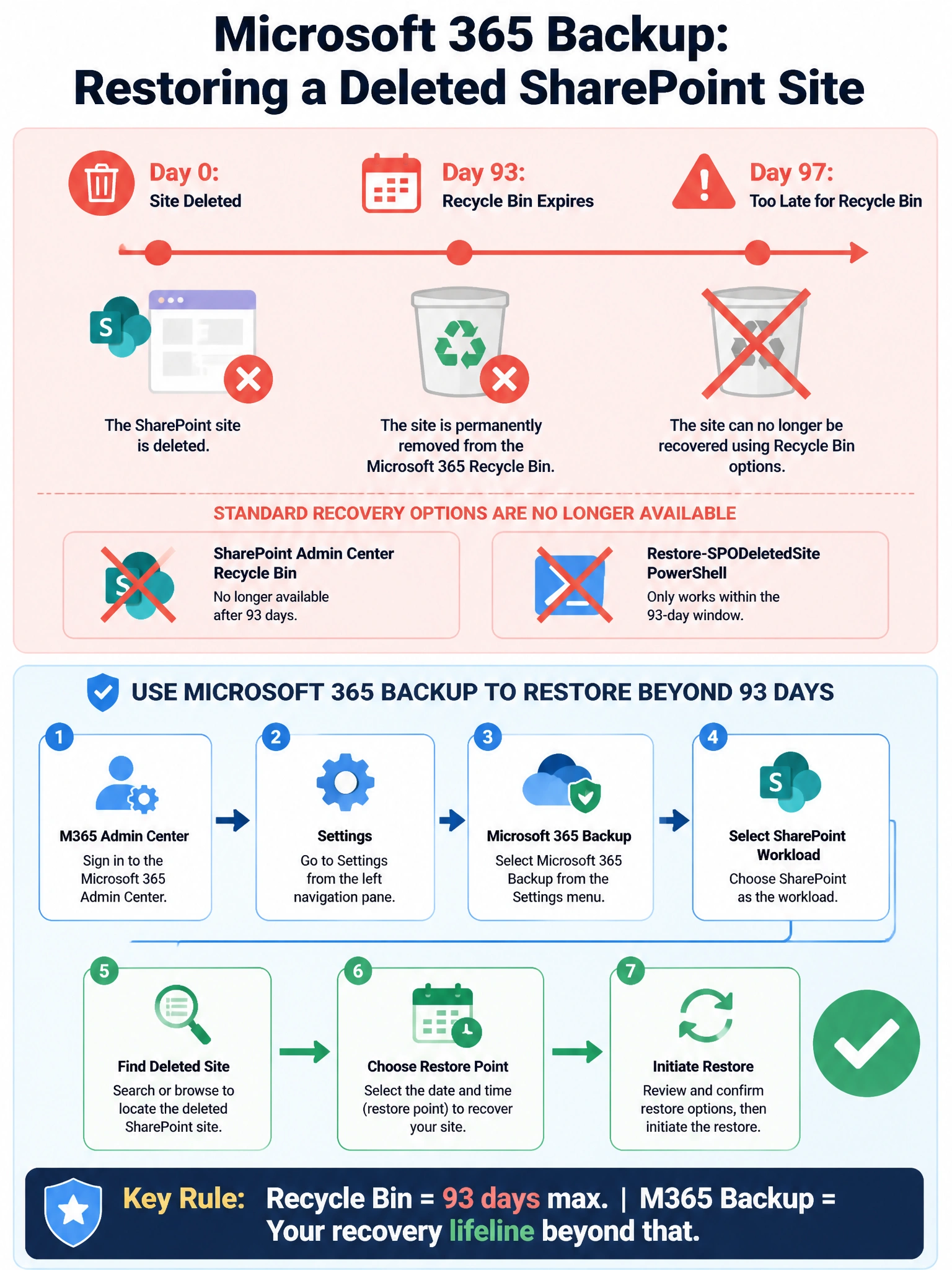
After 93 days, the SharePoint recycle bin — and the PowerShell cmdlets that depend on it — are dead ends. Microsoft 365 Backup is your time machine here: go to M365 admin center > Settings > Microsoft 365 Backup, find the SharePoint site, pick a restore point, and bring it back.
Full explanation below image
Full Explanation
Microsoft 365 Backup is a premium backup and restore solution that operates independently of the native SharePoint recycle bin. The recycle bin (both end-user and admin-stage) retains deleted sites for up to 93 days. At 97 days, the site has permanently aged out of both recycle bin stages and is no longer recoverable through recycle bin-based methods.
The correct restore path when Microsoft 365 Backup is configured is: Microsoft 365 admin center > Settings > Microsoft 365 Backup > select SharePoint as the workload > search for or browse to the deleted site > select a restore point from within the configured backup retention window > initiate the restore. Microsoft 365 Backup maintains its own independent backup snapshots on a defined schedule, allowing recovery of sites, items, and content well beyond what the recycle bin supports.
Option A is incorrect because the SharePoint admin center recycle bin only retains deleted sites for up to 93 days total (first-stage and second-stage combined). The site was deleted 97 days ago, which means it has been permanently purged from the recycle bin and is no longer visible or restorable from that interface.
Option B is incorrect for the same underlying reason. The Restore-SPODeletedSite PowerShell cmdlet operates on the SharePoint Online deleted site collection pool, which corresponds to the same 93-day recycle bin window. Once that window closes, the cmdlet will return an error indicating the site is no longer available for restoration via this method.
Option D is incorrect because with Microsoft 365 Backup properly configured, an admin does not need to open a Microsoft support ticket for this scenario. Microsoft 365 Backup is an admin self-service tool specifically designed to provide independent recovery capabilities. Escalating to support would be unnecessary and slower than using the backup restore flow directly.
Exam tip: The AB-650 exam tests your ability to distinguish between native recycle bin recovery and Microsoft 365 Backup recovery. The 93-day boundary for the SharePoint recycle bin is a key number to memorize. Any scenario involving deletion beyond 93 days points toward Microsoft 365 Backup as the answer.