
Redwood Diagnostics Inc. has a strict data privacy policy. The CISO has directed the IT admin team to minimize the amount of diagnostic and telemetry data that Microsoft 365 desktop applications send back to Microsoft from employee devices. The admin needs to find the setting that controls this behavior and configure it to the lowest acceptable level — sending only the data Microsoft requires to keep the service secure and up to date. Which setting and location in the Microsoft 365 admin center should the admin configure?
Select an answer to reveal the explanation.
Short Explanation and Infographic
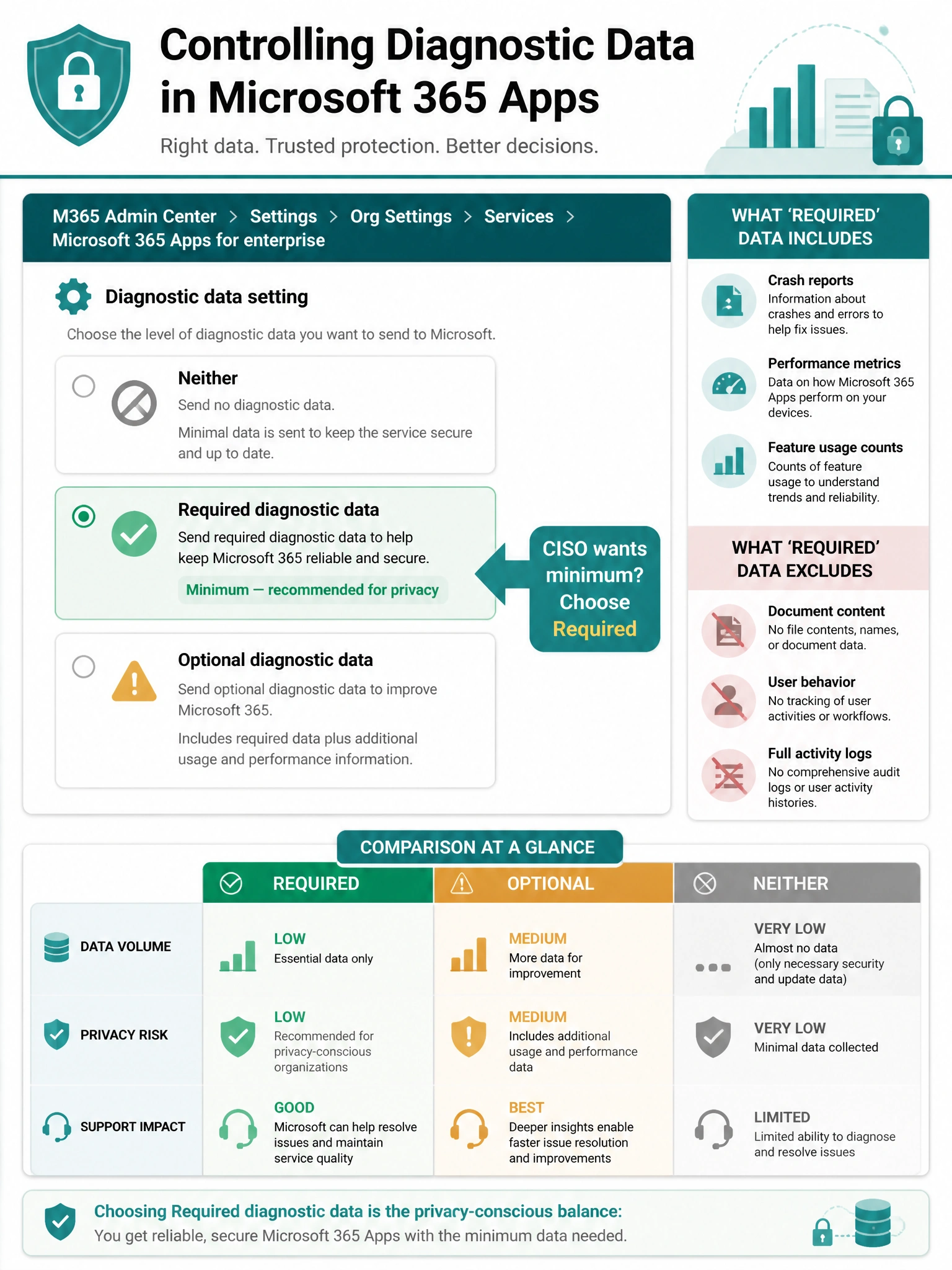
The dial for controlling how much diagnostic data Office apps send to Microsoft is found under Org settings > Services > Microsoft 365 Apps for enterprise — set the Diagnostic data level to 'Required' to send only the minimum data Microsoft needs to keep things running safely. Think of 'Required' as the low-flow setting on a faucet — just enough, nothing extra.
Full explanation below image
Full Explanation
Microsoft 365 provides tenant-level control over the diagnostic data level collected from Office desktop applications (Word, Excel, PowerPoint, Outlook, etc.) on employee devices. This is configured in the Microsoft 365 admin center under Settings > Org settings > Services > Microsoft 365 Apps for enterprise. The admin can choose from: 'Required diagnostic data' (minimum required for security and reliability), 'Optional diagnostic data' (richer telemetry for product improvement), or 'Neither' (no diagnostic data, though this may limit some support scenarios). To satisfy the CISO's requirement of sending only the minimum required, the admin should select 'Required'.
Option A (Customer Lockbox) is a completely different privacy control. Customer Lockbox is used to require explicit admin approval before Microsoft support engineers can access tenant content during a support incident. It has nothing to do with controlling diagnostic telemetry from Office apps on employee devices.
Option C (Microsoft Intune > Endpoint security > Attack surface reduction) is incorrect. While Intune can manage device-level telemetry settings through configuration profiles and Windows diagnostic data policies, the question is specifically about Microsoft 365 Apps for enterprise diagnostic data — which is configured in the M365 admin center, not Intune's endpoint security blade. Intune telemetry policies relate to Windows OS-level data, not Office app-level data.
Option D (Data residency) controls where Microsoft stores tenant data at rest — geographic region selection for data sovereignty purposes. This has no bearing on the amount or type of diagnostic data sent by Office applications to Microsoft.
Exam tip: Know the three diagnostic data tiers for Microsoft 365 Apps: Required, Optional, and Neither. The AB-650 exam may ask you to map a business privacy requirement to the correct tier. 'Required' = minimum for service operation; 'Optional' = additional product improvement data; 'Neither' = org manages its own diagnostic data collection separately (often via Group Policy). The admin center path is always Org settings > Services > Microsoft 365 Apps for enterprise.