
Crestwood Legal Group has acquired a new subdomain, mail.crestwoodlegal.com, that they want to add to their Microsoft 365 tenant to support a new email routing strategy. As part of the domain addition process, Microsoft 365 requires Crestwood to prove they own the domain before it can be used. The IT admin checks the setup wizard and sees that Microsoft 365 will provide a verification value that must be added to the domain's DNS. What type of DNS record does Microsoft 365 use by default to verify domain ownership?
Select an answer to reveal the explanation.
Short Explanation and Infographic
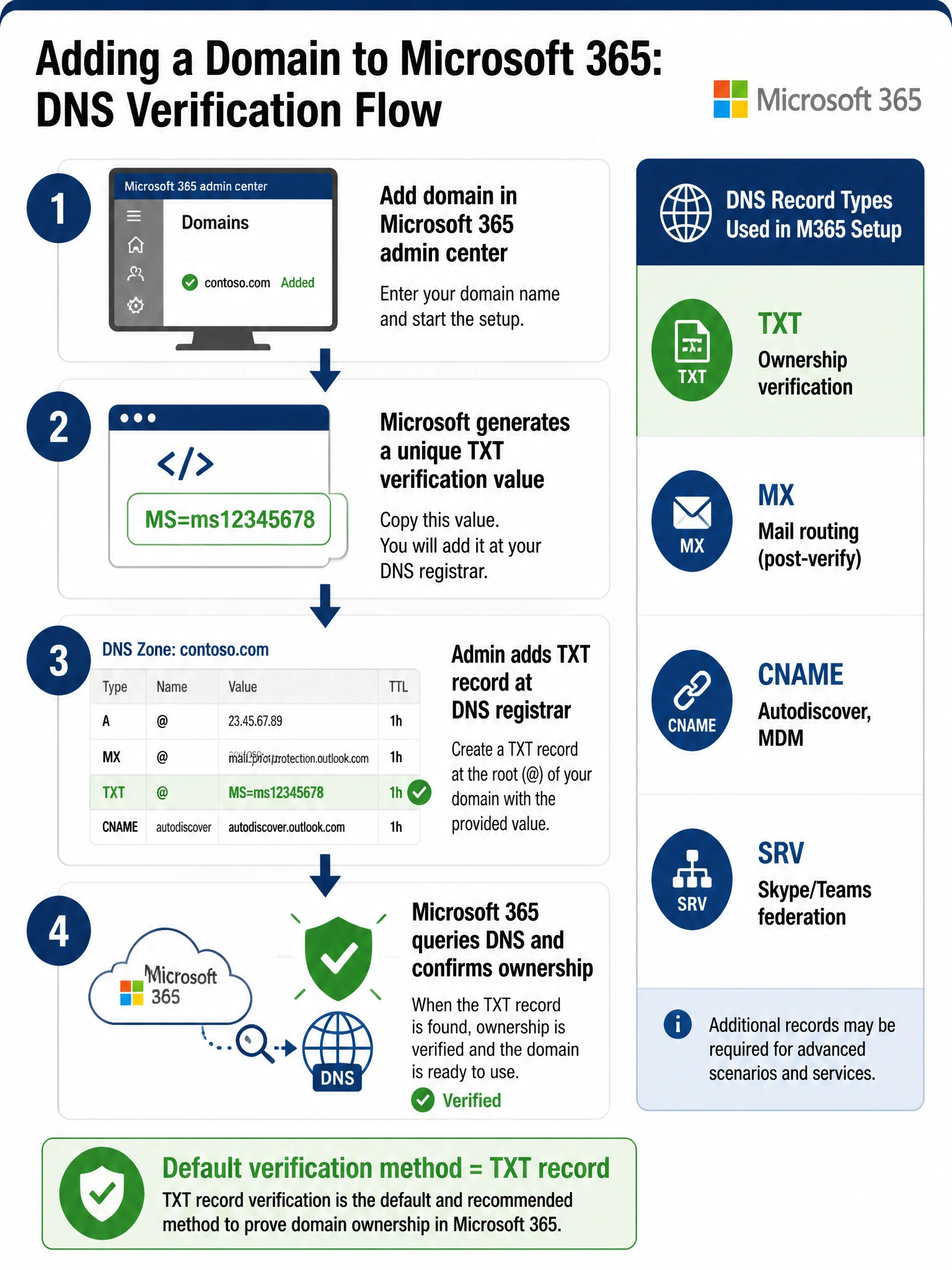
Microsoft 365 uses a TXT record to verify domain ownership — think of it as Microsoft slipping a secret code into your DNS that only the actual domain owner can place there. The MX and CNAME records come later during domain setup for mail routing and service configuration, but the ownership proof step always starts with a TXT record.
Full explanation below image
Full Explanation
When you add a domain to Microsoft 365, the setup wizard generates a unique verification value and instructs you to add it as a TXT record to your domain's DNS zone (at your domain registrar or DNS provider). Once the TXT record propagates, Microsoft 365 queries for it to confirm you control the domain. This TXT-based verification is the default method because TXT records are flexible, do not affect mail flow, and are easy to add without disrupting existing services.
Option A (MX record) is incorrect for ownership verification. MX records are Mail Exchanger records that direct email to the correct mail server. Microsoft 365 does ask you to update your MX record — but that step happens after ownership is already verified, to point email to Exchange Online. Using an MX record for verification would disrupt existing mail flow before setup is complete.
Option B (CNAME record) is used during Microsoft 365 domain setup, but for a different purpose: specifically for services like Exchange Autodiscover, Skype for Business, or Mobile Device Management enrollment — not for the initial domain ownership verification step.
Option D (SRV record) is used in Microsoft 365 DNS configuration for Skype for Business and Teams federation scenarios. Like CNAMEs, SRV records are part of service configuration after domain ownership is already established — not used for the verification step.
Exam tip: The AB-650 exam may try to trick you with MX records since they are the most recognizable DNS record type associated with email. Remember: MX = mail routing (post-verification), TXT = ownership verification (first step). The sequence in Microsoft 365 domain setup is always: verify ownership via TXT → configure services via MX, CNAME, and SRV.