
Northgate Financial Services is rolling out a new brand identity. The IT admin has been asked to upload a custom banner logo that will appear on the sign-in page and apply a custom navigation bar color across the Microsoft 365 experience. The admin opens the Microsoft 365 admin center but is unsure which section controls these specific sign-in and navigation branding settings. Which location should the admin use to configure the banner logo and navigation bar color?
Select an answer to reveal the explanation.
Short Explanation and Infographic
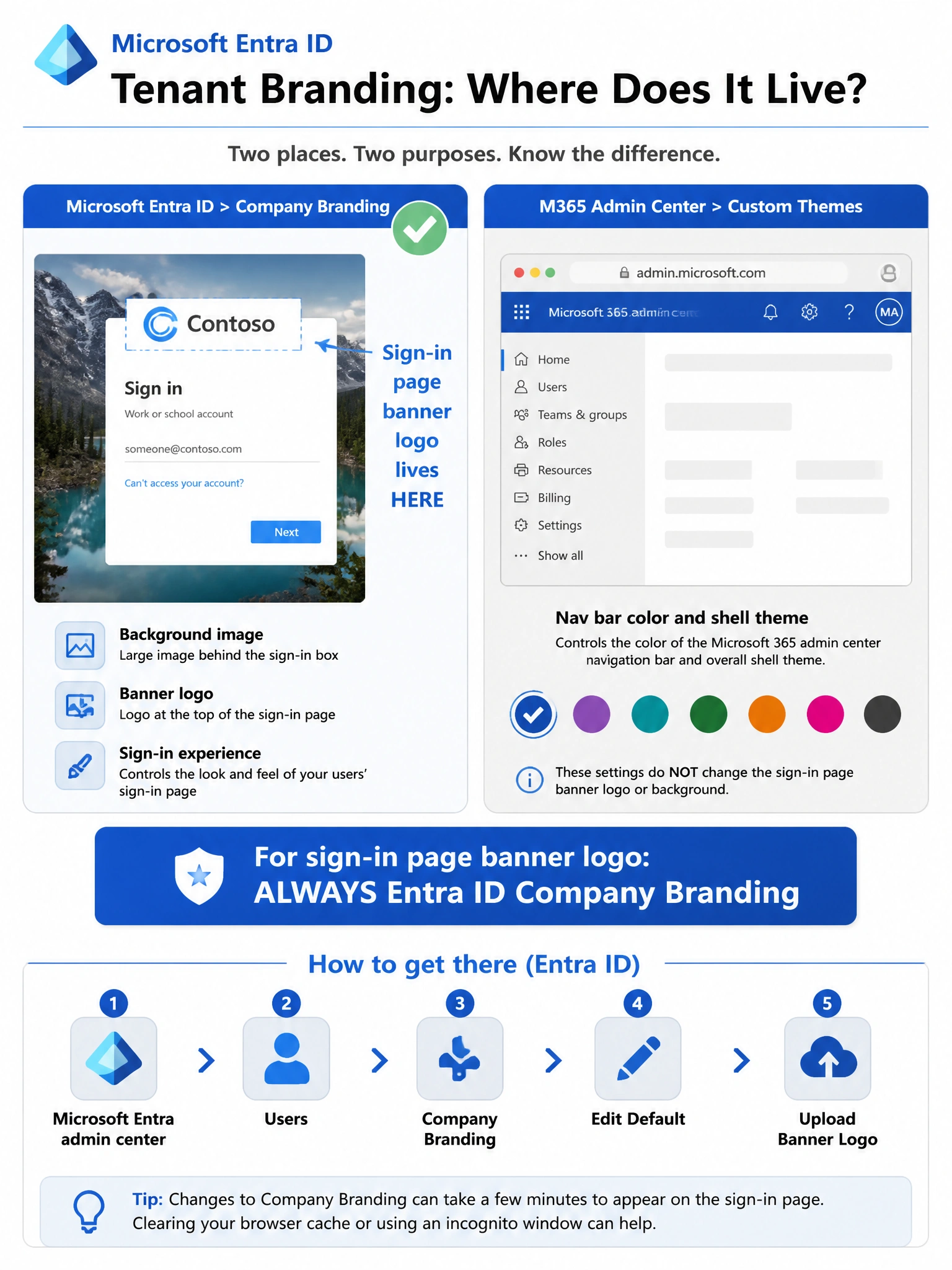
Think of Company Branding in Microsoft Entra ID as the front door of your tenant — it's where you control what users see on the sign-in page, including banner logos and background images. Custom Themes in the Microsoft 365 admin center handles the nav bar color for the Microsoft 365 shell, but the sign-in page banner logo lives exclusively in Entra ID Company Branding. For the combo of banner logo AND nav bar color, Entra Company Branding is the primary correct destination.
Full explanation below image
Full Explanation
Microsoft Entra ID Company Branding is the correct location for configuring the sign-in page experience, including the banner logo, background image, and sign-in page text. This is the centralized identity-layer branding that appears before a user is even authenticated. Admins navigate to Microsoft Entra ID (formerly Azure AD) > Company Branding to upload logos and set colors that appear on sign-in, password reset, and multifactor authentication pages.
Option A (Microsoft 365 admin center > Custom Themes) is a close distractor and controls the navigation bar color and theme for the Microsoft 365 shell experience (the top bar after sign-in), but it does NOT control the sign-in page banner logo. Custom Themes can manage nav bar color but is a separate concept from Company Branding on the authentication flow.
Option C (Organization information) only contains basic contact details like address and phone number — it has no branding upload capability whatsoever.
Option D (Teams admin center > Org-wide settings) relates to Teams-specific meeting and org settings and has no bearing on tenant sign-in branding or navigation bar colors across Microsoft 365.
Exam tip: On the AB-650 exam, watch for questions that separate 'sign-in page branding' (Entra ID Company Branding) from 'post-login shell branding' (Microsoft 365 Custom Themes). The banner logo on the sign-in page is always Company Branding territory. When a question mentions both sign-in AND nav bar, Entra Company Branding is the single source that covers the sign-in side — and that makes it the correct primary answer.