
Users at Graphic Design Institute are reporting that Microsoft 365 Copilot is responding slowly and occasionally returning errors in Teams and Outlook. The administrator needs to determine whether this is a service-side issue with Copilot infrastructure, check for any active service incidents, and review historical availability data to include in an incident report. Which tool in the Microsoft 365 ecosystem provides this AI-specific service health information?
Select an answer to reveal the explanation.
Short Explanation and Infographic
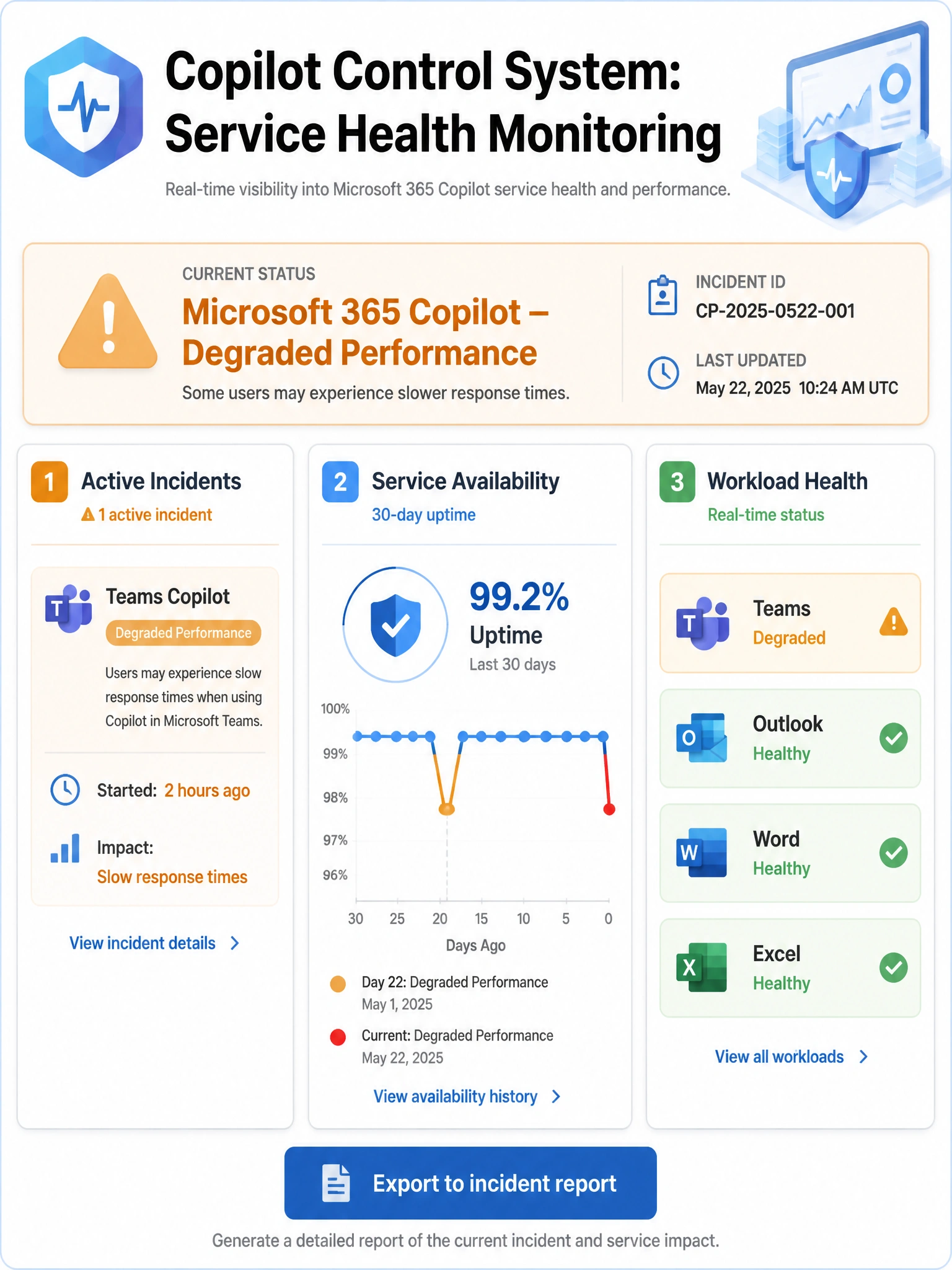
The Copilot Control System doesn't just track who's using Copilot — it also monitors whether Copilot itself is healthy. Think of it as a heartbeat monitor for your AI services, giving you incident status and historical uptime all in one Copilot-aware dashboard.
Full explanation below image
Full Explanation
The Copilot Control System in the Microsoft 365 admin center includes a dedicated service health monitoring section that provides AI-specific health status for Microsoft 365 Copilot services. This includes active incident notifications for Copilot service disruptions, historical service availability data (useful for building incident reports and SLA tracking), and workload-specific health signals for Copilot across Teams, Outlook, Word, and other applications. The Copilot Control System consolidates this information in a Copilot-focused view, making it easier to distinguish Copilot-specific issues from broader Microsoft 365 service problems.
Option A, Microsoft 365 admin center Service health filtered for Copilot incidents, is also a valid place to see Copilot-related service advisories and incidents — the standard Service health dashboard does list Copilot incidents. However, the Copilot Control System provides more Copilot-specific health context, including AI workload-specific signals and availability trends, making it the preferred tool specifically for Copilot service health monitoring as described in the exam objective.
Option C, Azure Service Health in the Azure portal, monitors Azure infrastructure resources and platform-level events. Microsoft 365 Copilot is a SaaS service, not an Azure resource consumed directly by the customer's subscription, so Azure Service Health does not surface M365 Copilot service health events.
Option D, Microsoft Defender portal Incidents & alerts, surfaces security incidents and threat detections. Service performance degradation and availability issues for Microsoft 365 Copilot are not the type of signal that appears in the Defender incidents queue — that is for security events, not service health events.
Exam tip: The Copilot Control System is explicitly called out in the AB-650 exam objectives for monitoring service health of Copilot. While the standard M365 Service health page also shows Copilot incidents, questions specifically mentioning the Copilot Control System for health monitoring should be answered with the Copilot Control System.