
Alpine Ski House requires MFA for all users when accessing Microsoft 365 services from outside the corporate network. Users connecting from within the office should have a seamless experience without MFA prompts. What should the admin configure?
Select an answer to reveal the explanation.
Short Explanation and Infographic
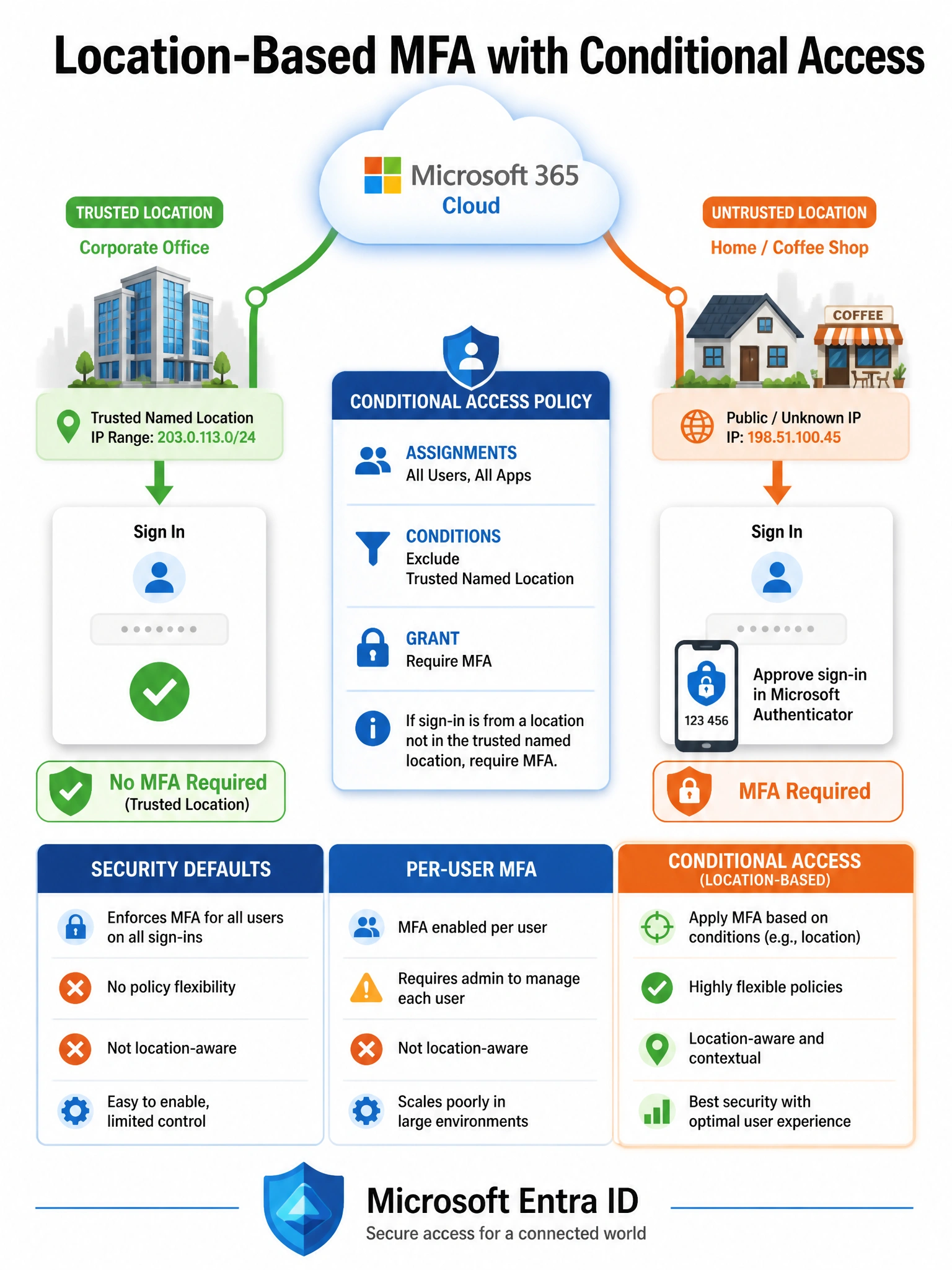
Conditional Access is like a smart doorman: same building, different entrance gets different treatment. You define your office IP ranges as a 'trusted Named Location', then tell the policy: if you're NOT coming from that trusted location, prove it's really you (MFA). Inside the office? Sail right through. Outside? Prove yourself. That's the network-aware MFA pattern.
Full explanation below image
Full Explanation
The correct approach uses two Conditional Access components together. First, the admin creates a Named Location in Microsoft Entra ID representing the corporate IP ranges and marks it as 'Trusted'. Second, a Conditional Access policy is created with: Assignments targeting All Users and All Cloud Apps; Conditions > Locations set to 'Any location' but EXCLUDING the trusted Named Location; and Grant control set to 'Require multifactor authentication'. This means MFA is required only for sign-ins that do not originate from the trusted corporate network — exactly the behavior required.
Option A (Security Defaults) enforces MFA for all sign-ins regardless of network location. It does not support exceptions based on Named Locations, so users inside the office would still be challenged for MFA. Additionally, Security Defaults cannot coexist with custom Conditional Access policies — you must choose one or the other.
Option C (per-user MFA) is a legacy approach that has been largely superseded by Conditional Access. Per-user MFA also does not natively support location-based exclusions without additional configuration. It would require users to register and be prompted for MFA even when on the corporate network, again failing the seamless-internal-experience requirement.
Option D (block sign-ins outside the network) goes far beyond the requirement. Blocking external access entirely would prevent remote work and any access outside the office. The requirement is to require MFA, not to block access — this answer imposes an overly restrictive control.
Exam tip: The Conditional Access Named Location + exclusion pattern is the standard enterprise approach to location-based MFA. Remember: Conditional Access policies evaluate INCLUDE minus EXCLUDE. If you include 'Any location' and exclude 'Trusted Named Location', the policy applies to everything except trusted locations. Also know that Conditional Access requires Microsoft Entra ID P1 or P2 licensing (or Microsoft 365 Business Premium).