
Contoso is onboarding 500 employees from a recently acquired company. The IT admin has a CSV file containing user attributes including Department, Job Title, and Manager, and needs to create all accounts with proper Microsoft 365 license assignments as quickly as possible. Which approach should the admin use?
Select an answer to reveal the explanation.
Short Explanation and Infographic
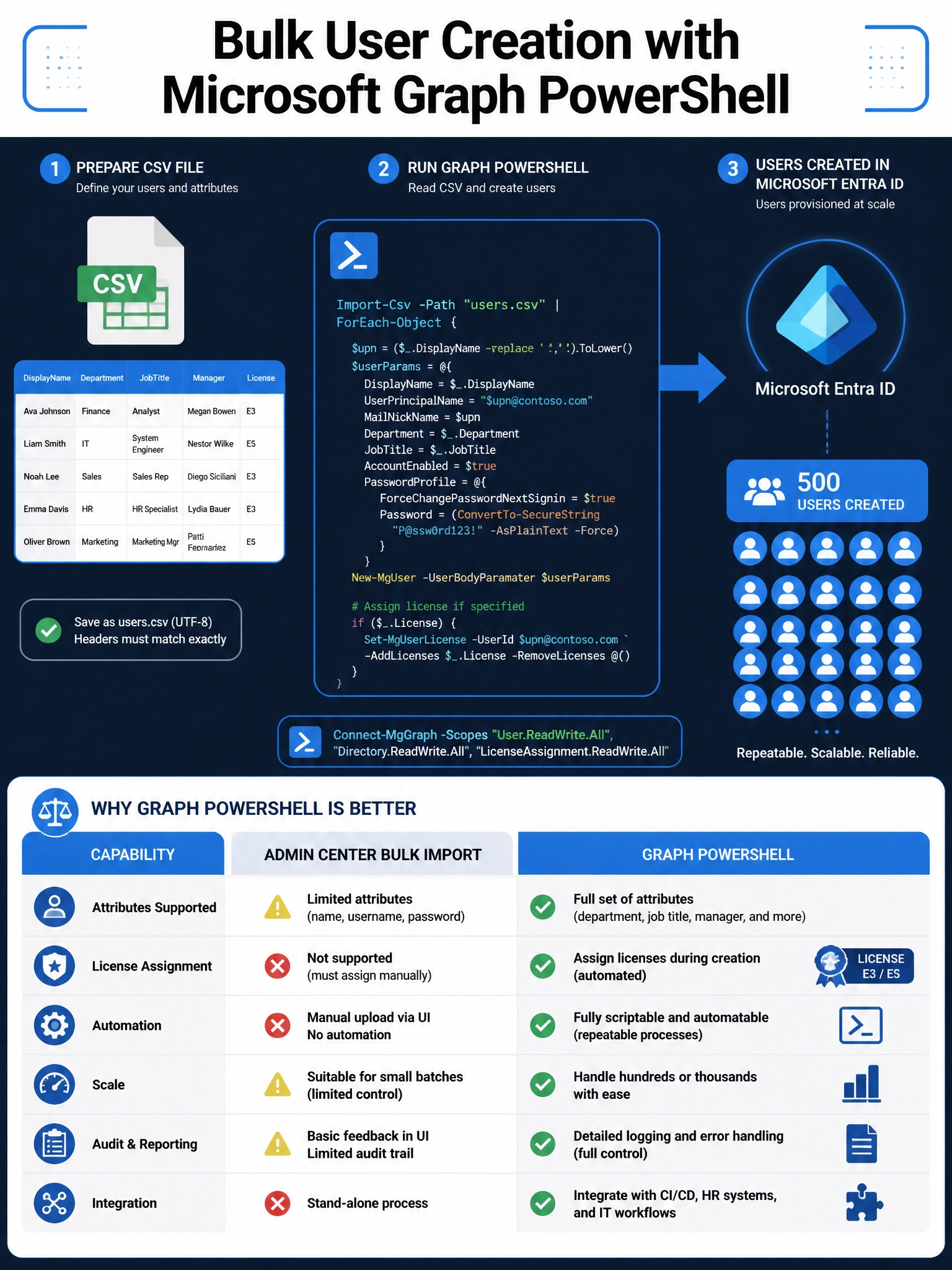
Think of Graph PowerShell as your Swiss Army knife for bulk user ops. New-MgUser + Import-Csv lets you loop through your CSV and stamp every user with department, title, manager, AND license — all in one script. The admin center bulk import works, but it supports a limited attribute set and can't do license assignments in the same step.
Full explanation below image
Full Explanation
Microsoft Graph PowerShell is the modern, recommended tool for bulk identity management in Microsoft Entra ID (formerly Azure AD). The pattern of piping Import-Csv into a ForEach loop that calls New-MgUser gives the admin full control over every user attribute and allows license assignment via Set-MgUserLicense in the same script. This satisfies all the scenario requirements in a single automated pass.
Option A (admin center bulk import) is a valid tool for simpler scenarios, but it uses a fixed CSV template with limited attribute columns — it does not support setting the Manager attribute or assigning licenses in one operation. The admin would need multiple passes.
Option C (Azure AD Connect) is used for hybrid identity — syncing an on-premises Active Directory to Microsoft Entra ID. If the acquired company's AD is already set up for sync, this could be a path, but the scenario describes a CSV file of attributes, not an on-premises directory being integrated. Azure AD Connect is also not a quick, one-time bulk operation.
Option D (Exchange admin center) is incorrect because Exchange Online mailboxes are provisioned after a Microsoft Entra user account exists. Creating a mailbox in EXO does not create the Entra user account; it's the other way around. Additionally, Exchange admin center does not support the departmental and license attributes in the scenario.
Exam tip: Any time a question mentions bulk operations + custom attributes + scripting, Graph PowerShell (specifically New-MgUser, Set-MgUserLicense, and Import-Csv patterns) is the target answer. The older AzureAD and MSOnline modules are deprecated in favor of the Microsoft.Graph PowerShell SDK.