
Fourth Coffee has deployed Microsoft 365 Copilot to 300 users. The legal team is concerned that Copilot might surface confidential merger documents stored in a restricted SharePoint site called 'Legal-M&A' in its responses to regular employees. The admin needs to prevent Copilot from using content from this specific SharePoint site without deleting the site or changing existing user permissions. What is the BEST approach?
Select an answer to reveal the explanation.
Short Explanation and Infographic
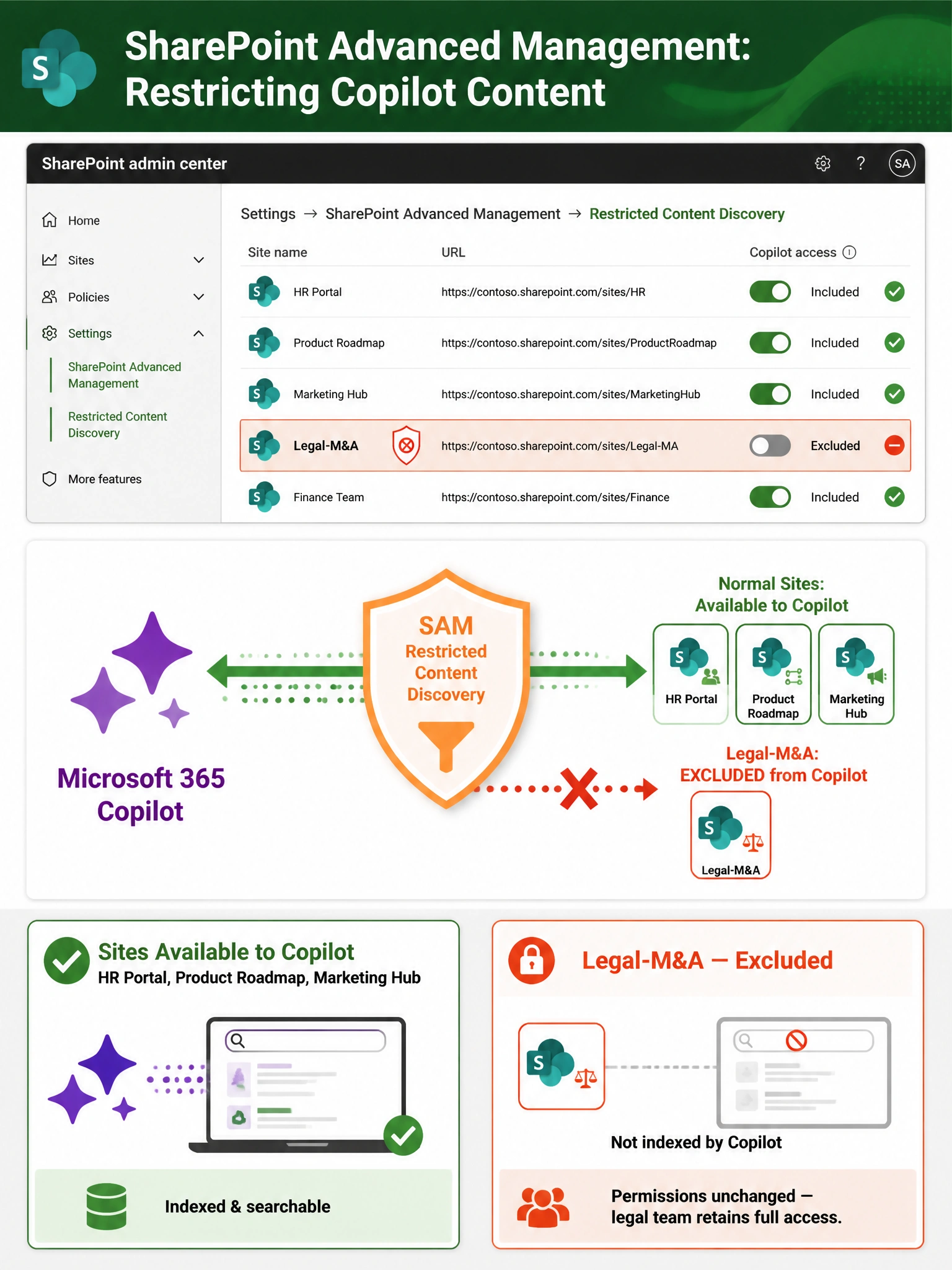
SharePoint Advanced Management's Restricted Content Discovery is the bouncer for Copilot — it lets you say 'this site stays off the menu' without touching any files or permissions. Sensitivity labels are good cops for data protection, but they don't actually stop Copilot from indexing the site in the first place.
Full explanation below image
Full Explanation
SharePoint Advanced Management (SAM) is a Microsoft add-on feature that provides enhanced governance controls for SharePoint and OneDrive. One of its key capabilities is Restricted Content Discovery, which allows administrators to exclude specific SharePoint sites from appearing in Microsoft 365 Copilot responses and Microsoft Search results. This is configured in the SharePoint admin center and operates at the site level — the content remains fully accessible to users who have permissions, but it is proactively removed from Copilot's indexing and retrieval pipeline. This is precisely the tool designed for this scenario: no deletion, no permission changes, just a clean exclusion from Copilot's knowledge base.
Option A (applying sensitivity labels) is incorrect because sensitivity labels primarily enforce data protection through encryption, access control, and policy enforcement — they do not directly prevent Microsoft 365 Copilot from indexing or surfacing site content. Copilot does honor existing SharePoint permissions (it will not show content to users who don't have access), but if regular employees somehow had read access to the Legal-M&A site, a sensitivity label alone would not stop Copilot from surfacing that content in responses. More importantly, labels do not serve as a Copilot exclusion mechanism. Sensitivity labels and Copilot site exclusions are complementary but distinct controls.
Option C (Microsoft Purview Information Barriers) is incorrect because Information Barriers are designed to prevent communication and collaboration between specific groups of users — for example, preventing investment bankers from chatting with traders. They address who can communicate with whom, not what SharePoint content Copilot can or cannot index. Information Barriers are primarily a compliance feature for regulated industries and are not the correct mechanism for removing a SharePoint site from Copilot's content sources.
Option D (deleting and recreating the site as a private Teams channel) is explicitly disqualified by the question's own constraints, which state the admin must not delete the site or change existing permissions. Beyond violating the stated requirements, this approach would be destructive and operationally disruptive — the legal team would lose their site history, metadata, and existing workflows. It also would not guarantee Copilot exclusion, as content in private Teams channels can still be indexed by Copilot for users with appropriate access.
Exam Tip: SharePoint Advanced Management (SAM) is a key feature area tested on the AB-650 exam. Know that SAM's Restricted Content Discovery is the feature specifically designed to exclude SharePoint sites from Copilot and Microsoft Search — it is the correct tool when the requirement is 'exclude this site from Copilot without changing permissions or deleting content.' Also remember: Copilot already respects SharePoint permissions by default (it will not show users content they cannot access), but proactive site exclusion via SAM goes one step further by removing the site from indexing entirely.