
Wide World Importers wants to proactively receive email notifications whenever there is an incident or advisory affecting Microsoft Teams or Exchange Online in their tenant. The admin wants the IT helpdesk team to be automatically notified without having to check the admin center manually. Where should the admin configure these service health email notifications?
Select an answer to reveal the explanation.
Short Explanation and Infographic
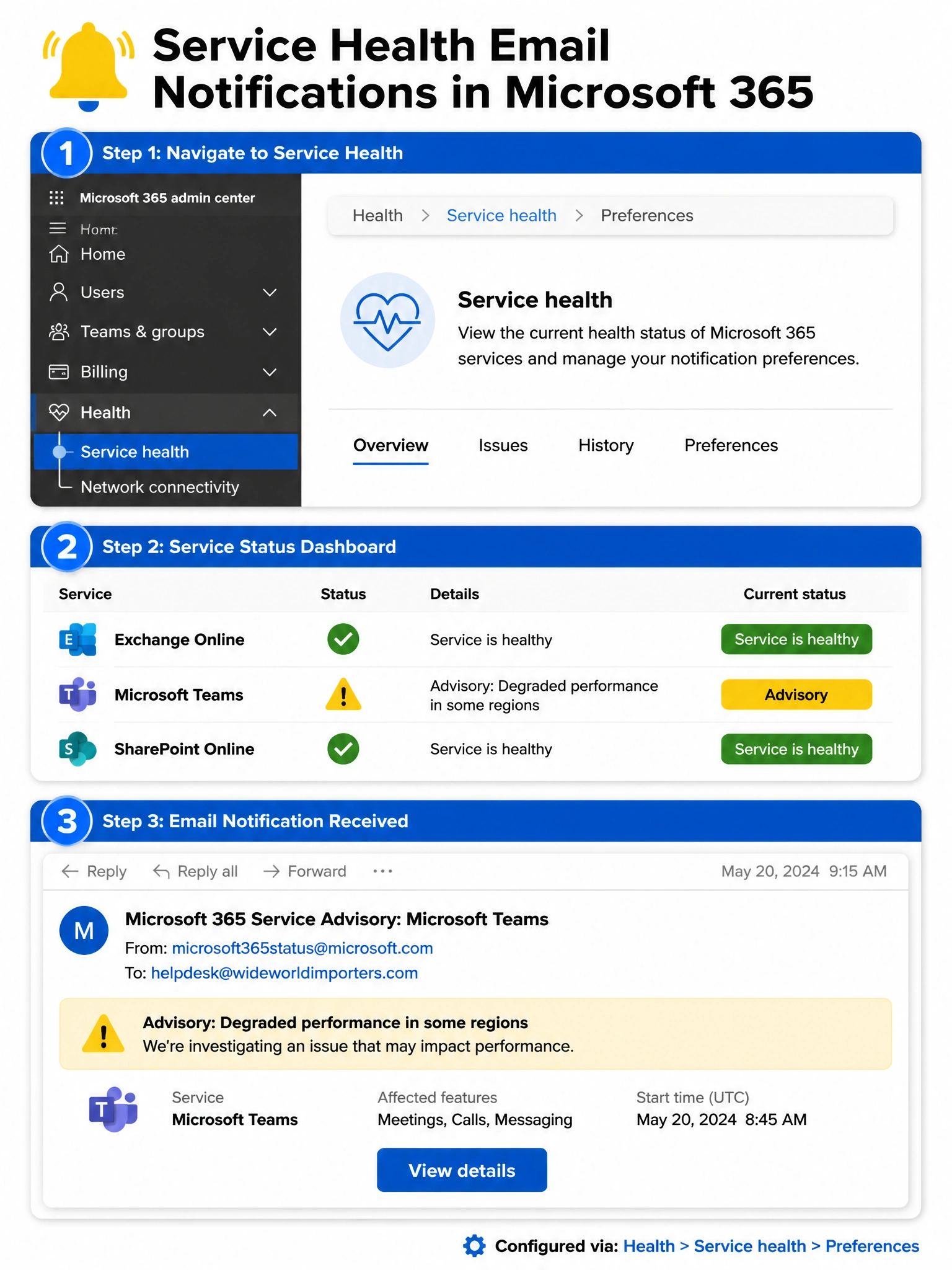
Service health notifications live right where you'd expect them — inside Health > Service health, there's a Preferences option where you check the boxes for Teams, Exchange, and whatever else you want, then drop in the helpdesk email. Done. No third-party tools, no elaborate routing rules.
Full explanation below image
Full Explanation
The correct answer is B. Within the Microsoft 365 admin center, navigating to Health > Service health reveals a Preferences or Customize option (the label may vary slightly by tenant view). From there, an admin can enable email notifications, select specific services to monitor (such as Microsoft Teams and Exchange Online), and specify one or more email addresses to receive alerts. When Microsoft detects an incident or posts an advisory for those services, the configured email addresses automatically receive a notification. This is the built-in, purpose-built mechanism for service health alerting.
Option A is incorrect. There is no "Org settings > Notifications > Add service alerts" path in the Microsoft 365 admin center. This is a fabricated navigation path designed to test whether exam candidates know the correct location. Service health notification preferences are configured within the Service health section itself — not under Org settings. Knowing exact navigation paths is a key skill tested on the AB-650.
Option C is incorrect. Microsoft Sentinel is a cloud-native Security Information and Event Management (SIEM) and Security Orchestration, Automation, and Response (SOAR) platform. It ingests security signals, threat intelligence, and log data to detect and respond to security threats. While Sentinel can ingest Microsoft 365 activity logs via data connectors, it is not designed or used to configure Microsoft 365 service health email notifications. Using Sentinel for this purpose would be massively over-engineered and would not provide the built-in service health notification experience.
Option D is incorrect. Microsoft Entra (formerly Azure AD) Diagnostic settings allow administrators to stream audit logs and sign-in logs to destinations like Azure Monitor Log Analytics workspaces, Azure Storage, or Azure Event Hubs. This is a log streaming feature, not an email notification system for Microsoft 365 service health. Diagnostic settings have no knowledge of Microsoft 365 service incidents or advisories.
Exam Tip: Remember the distinction between service health notifications (email preferences inside Health > Service health) and Message center (where Microsoft communicates upcoming changes and feature rollouts). Both are in the Health section of the admin center, but they serve different purposes. Service health is reactive (incidents happening now); Message center is proactive (changes coming soon).