
Contoso's customer support team needs a shared email address — [email protected] — that five support agents can send and receive email from without requiring each agent to have a separate additional mailbox license. The admin needs to create this mailbox in the most license-efficient way possible. Which mailbox type should the admin create, and what is the license requirement?
Select an answer to reveal the explanation.
Short Explanation and Infographic
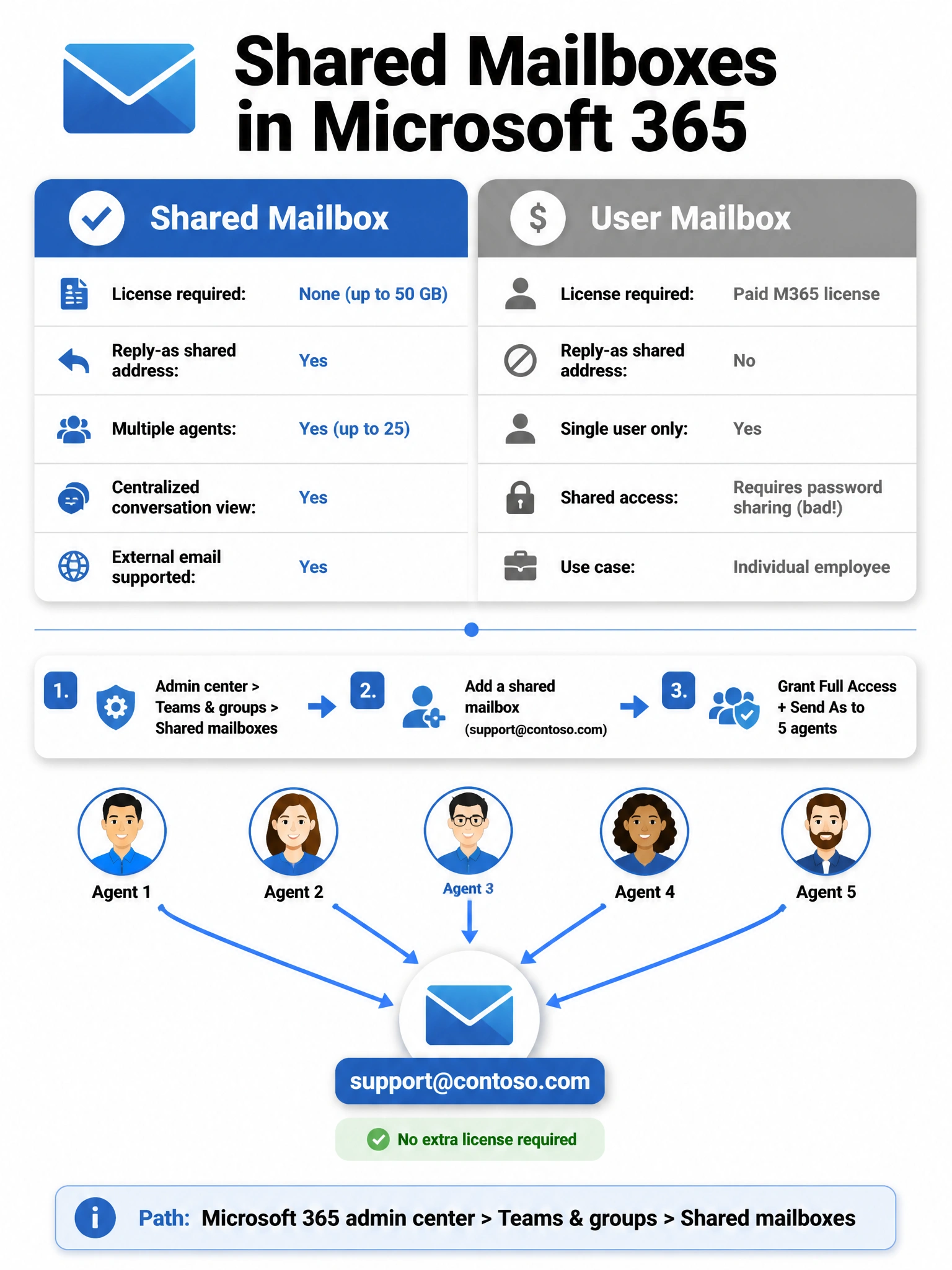
A shared mailbox is exactly the right tool here — it's like a community mailbox on a street corner that anyone with a key (a licensed account) can open and use to reply as '[email protected]', and Microsoft doesn't charge you extra for the mailbox itself up to 50 GB.
Full explanation below image
Full Explanation
The correct answer is C. A shared mailbox is a Microsoft Exchange/Microsoft 365 mailbox type specifically designed for scenarios where multiple users need to send and receive email from a common address. Shared mailboxes do not require their own Microsoft 365 license as long as the mailbox stays under 50 GB. Users with their own licensed Microsoft 365 accounts can be granted Full Access and Send As permissions to the shared mailbox, allowing them to read all messages, compose new messages, and reply using [email protected] as the sender address. Shared mailboxes can be created in the Microsoft 365 admin center under Teams & groups > Shared mailboxes, or in the Exchange admin center under Recipients > Shared.
Option A is incorrect. A distribution group (or distribution list) acts as an email alias that forwards incoming messages to each member's own individual inbox. While agents would receive the emails, they would land in their personal mailboxes and they would NOT be able to reply from the shared [email protected] address. There is also no single view of all conversations, making it impractical for coordinated customer support where agents need to see if someone has already responded.
Option B is incorrect. Creating a regular user mailbox and sharing the password is a serious security violation that breaches Microsoft's Terms of Service and violates security best practices. It creates an unauditable shared credential, makes it impossible to track individual agent actions, requires an additional paid Microsoft 365 license for the mailbox, and undermines identity governance. This option is wrong on both security and licensing grounds.
Option D is incorrect. A Microsoft 365 group does create a shared inbox (group email), but it is optimized for team collaboration — document libraries, Teams channel integration, shared calendar — rather than customer-facing support scenarios. Microsoft 365 groups also require slightly different configuration for external email, and they are not the standard recommendation for a dedicated support alias. More importantly, shared mailboxes are the industry-standard and exam-expected answer for this exact use case: a shared external-facing email address with multiple responders and no extra licensing cost.
Exam Tip: On the AB-650, shared mailboxes = no extra license (up to 50 GB), multiple senders, replies as the shared address. This is a classic scenario question. Know the path: Microsoft 365 admin center > Teams & groups > Shared mailboxes > Add a shared mailbox. After creation, the admin adds members and grants them Full Access and Send As permissions.