
Lamna Healthcare has been experiencing slow Microsoft 365 performance for employees at their branch office in Austin, TX. The IT manager wants to identify whether the network path to Microsoft 365 services is causing the issue and get specific recommendations to improve connectivity. Which Microsoft 365 admin center feature should the admin use to diagnose and review connectivity issues for the Austin branch?
Select an answer to reveal the explanation.
Short Explanation and Infographic
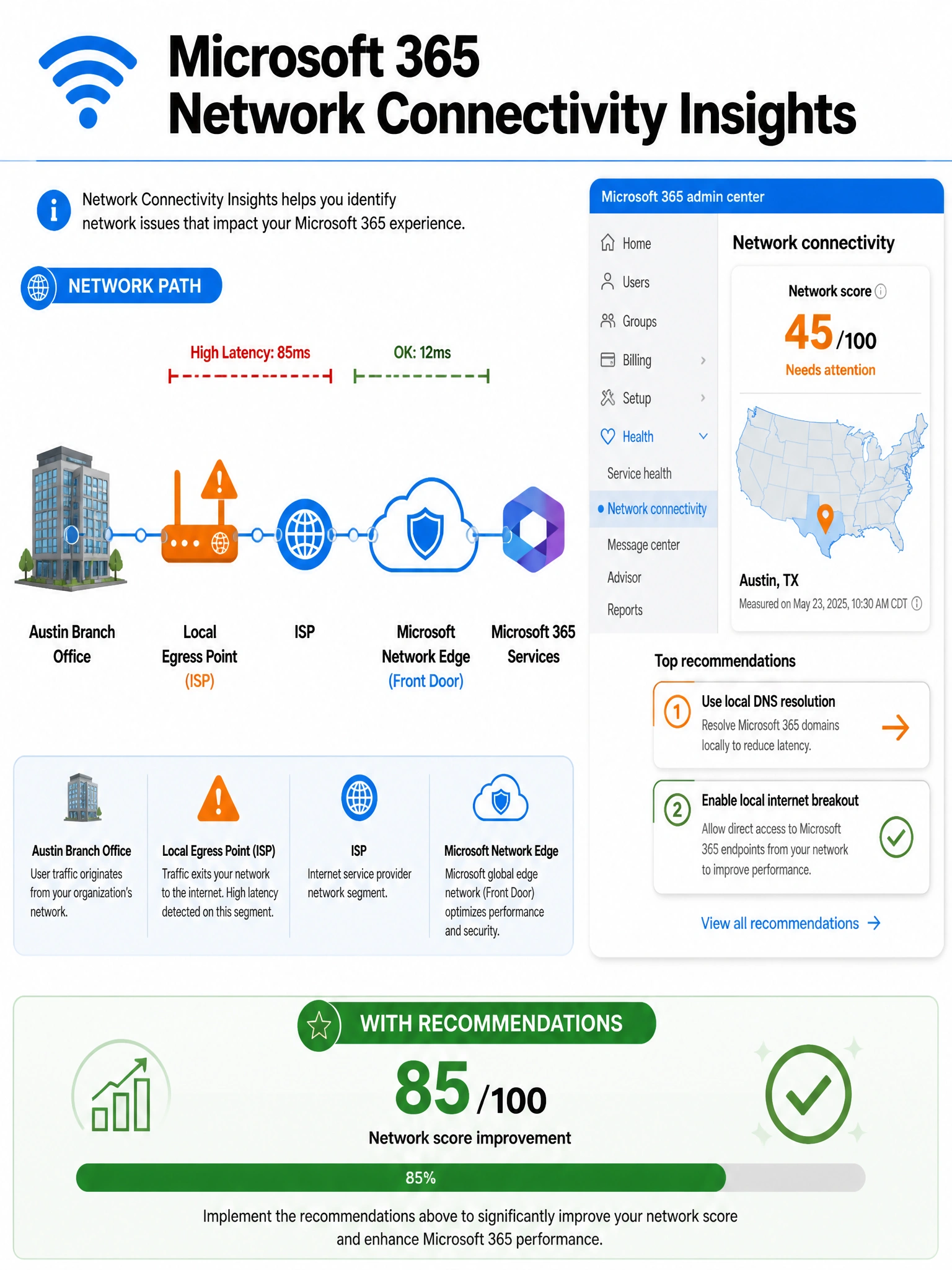
Health > Network connectivity is your network doctor — it runs location-specific tests from each office, shows you exactly where packets are taking a wrong turn, and gives you actionable fix recommendations. Service health only tells you if Microsoft's side is sick, not yours.
Full explanation below image
Full Explanation
The correct answer is C. The Microsoft 365 admin center's Health > Network connectivity feature is specifically designed to assess network performance from specific office locations to Microsoft 365 services. When a tenant uploads its office locations (or installs the Microsoft 365 Network Connectivity Test client), the tool measures key metrics like latency to front-door servers, DNS resolution quality, TCP connect times, and routing efficiency. It then generates a network score for each location and provides specific, actionable recommendations — for example, identifying that the Austin office is backhauling traffic through a central data center instead of connecting directly to a local Microsoft 365 front-door node. This is the right tool for location-specific network diagnostics.
Option A is incorrect. Health > Service health is a dashboard that shows the current and historical status of Microsoft 365 services as operated by Microsoft — incidents, advisories, and planned maintenance. It tells you if Exchange Online is down globally or if Teams has a partial outage in a region. It does NOT analyze the customer's network path between their branch office and Microsoft's infrastructure, so it would not identify a slow egress point or a suboptimal routing issue at the Austin office.
Option B is incorrect. There is no "Org settings > Network performance" path in the Microsoft 365 admin center. This is a distractor. Network connectivity insights are located under Health > Network connectivity, not under Settings. Knowing the exact navigation path is important for this exam.
Option D is incorrect. Microsoft Entra admin center > Monitoring > Sign-in logs provides a record of authentication events — who signed in, from where, which app, and whether the sign-in succeeded or was blocked by conditional access. While sign-in logs can help diagnose authentication failures, they contain no information about network latency, routing quality, or TCP performance to Microsoft 365 service endpoints.
Exam Tip: On the AB-650, distinguish between three different health/monitoring areas in the Microsoft 365 admin center: Service health (Microsoft-side outages), Network connectivity (customer network path quality), and Message center (change communications). Each serves a distinct purpose — do not confuse them.