
Alpine Ski House regularly works with external contractors from partner companies. The IT team wants these contractors to access specific Teams channels and SharePoint project sites via B2B collaboration. However, the security team has flagged a concern: they do not want guest users to be able to invite additional external users on their own. The global admin needs to configure this restriction. Which setting should be adjusted?
Select an answer to reveal the explanation.
Short Explanation
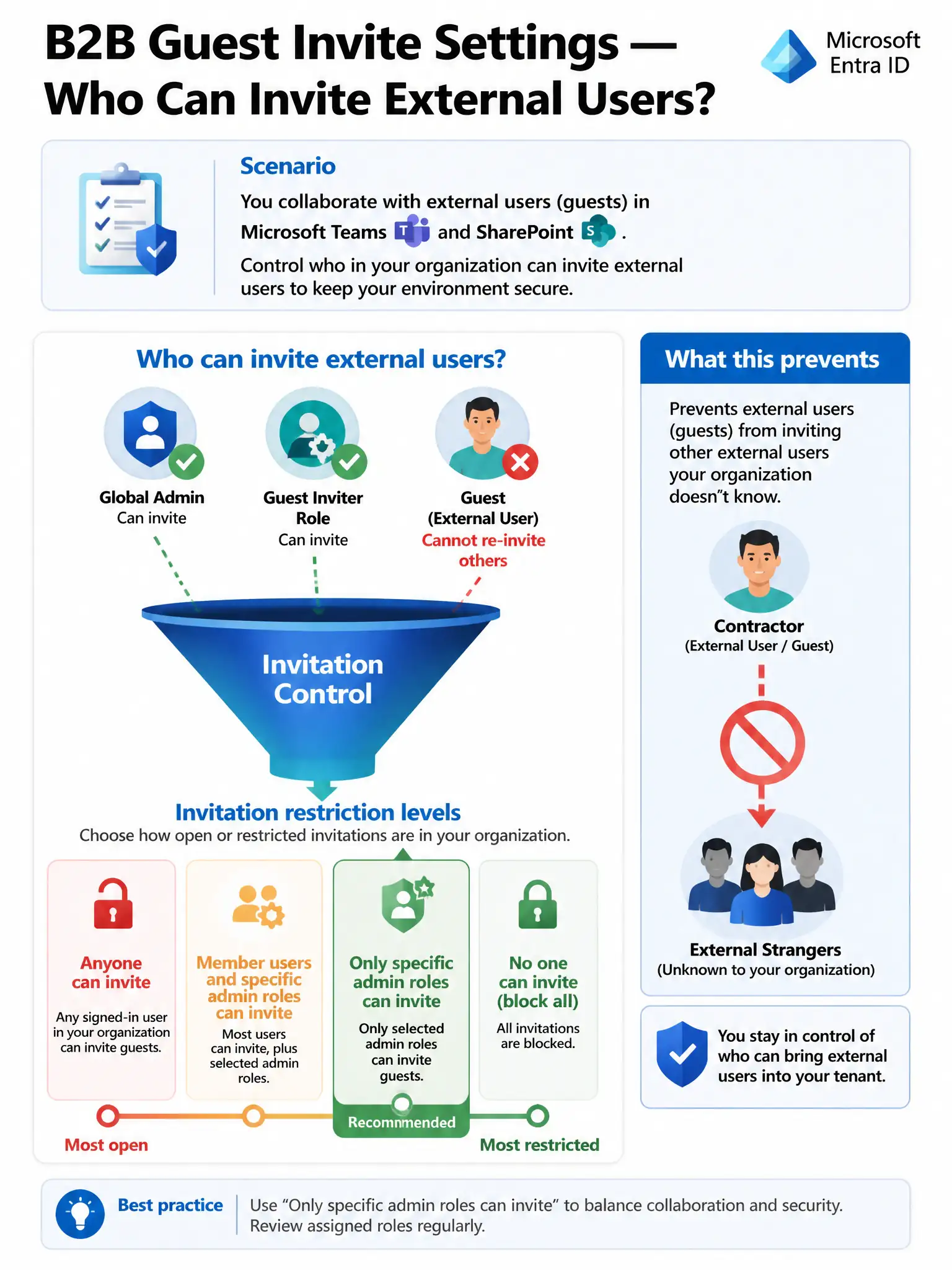
This is a guest-list control problem—you want contractors at the party, but you don't want them bringing their own plus-ones. In Microsoft Entra External Identities, restrict who can send invitations to admin roles, and keep guests out of the Guest Inviter role. That lets them join Teams and SharePoint without sponsoring new external users.
Full Explanation
The correct choice is the Microsoft Entra External Identities collaboration setting that sets guest invite restrictions to 'Only users assigned to specific admin roles can invite' and ensures guests are not assigned the Guest Inviter role. Microsoft Entra External Identities provides a guest invite settings control, also called guest invite restrictions, that determines who in the tenant is authorized to send external collaboration invitations. The available options range from 'Anyone in the organization can invite' (most permissive) to 'Only users assigned to specific admin roles can invite' (most restrictive while still allowing external collaboration). By setting this to admin-only and ensuring guest users are not assigned the Guest Inviter role, Alpine Ski House prevents contractors from spawning additional external invitations. This is the precise, targeted control for this scenario. The setting that sets Guest user access restrictions to 'Guest users have the same access as members (most inclusive)' is wrong because that control governs what directory objects guests can read, such as seeing the full user list, not who can send invitations. Choosing it would give guests more directory visibility, not less invitation power. It solves the wrong problem and introduces new risks. Enabling cross-tenant synchronization between Alpine Ski House and each partner company's tenant is wrong because cross-tenant synchronization is designed for organizations that want to provision users from a partner tenant into their own directory so they appear as internal users. It is an identity provisioning tool, not an invitation control mechanism, and would be far more complex than the scenario requires. Blocking all guest access in Microsoft Entra is wrong because it is the nuclear option that eliminates the business value entirely. Alpine Ski House wants contractors to collaborate via Teams and SharePoint, so blocking all guest access would prevent that legitimate use case. The goal is controlled access, not no access. Exam caveat: Microsoft Entra External Identities has two separate controls that sound similar but are different: guest invite restrictions, which control who can send invitations, and guest user access restrictions, which control what directory data guests can see. Make sure you know which one is being tested.