
Parkway Insurance has deployed a Copilot Studio agent integrated with Dynamics 365 Customer Service omnichannel. When the agent escalates to a live agent, the human agent receives no context about the prior conversation, forcing them to ask the customer to repeat everything. The developer needs to configure the escalation node to pass a summary and key variables to the live agent's queue. Which properties of the Transfer to Agent node should the developer configure to resolve this problem?
Select an answer to reveal the explanation.
Short Explanation and Infographic
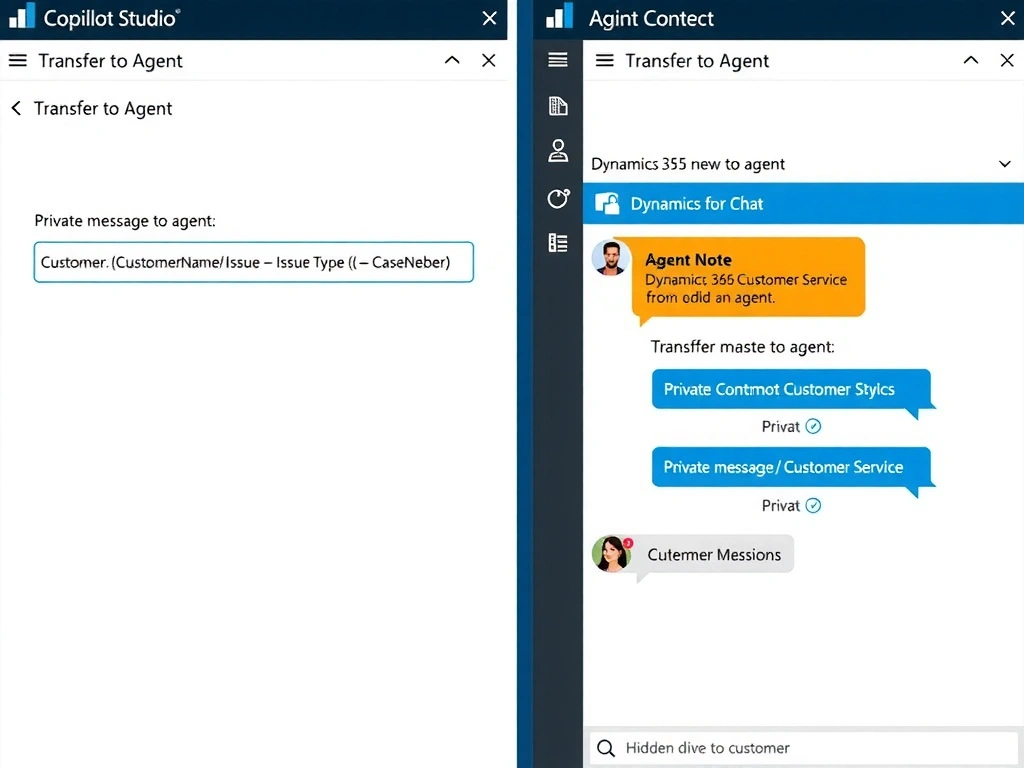
The 'Private message to agent' property on the Transfer to Agent node is the handoff note slipped from the bot to the human — it doesn't go to the customer, just to the live agent picking up the queue item. Option D is correct; this property lets you embed variable values into a structured context summary that appears in the agent's interface when they accept the conversation.
Full explanation below image
Full Explanation
In Copilot Studio, the Transfer to Agent node (used for omnichannel handoff to Dynamics 365 Customer Service or similar platforms) has a key property called 'Private message to agent.' This is a text field that accepts variable references (using the {variable_name} syntax) and is sent as a hidden context message to the live agent when the conversation is transferred. The human agent sees this message in their conversation panel before they begin responding to the customer, giving them the case summary they need.
The developer should populate this field with a template like: 'Customer: {CustomerName} | Issue: {IssueType} | Case Number: {CaseNumber} | Summary: {IssueSummary}' — drawing on variables already captured in the topic flow.
Option D is correct and directly solves the described problem using the built-in node property.
Option A is wrong. There is no 'Include conversation transcript' toggle in Copilot Studio's agent settings that automatically sends a transcript file to the live agent. While conversation transcripts are stored in Dataverse and can be accessed by supervisors, there is no automatic file-attachment mechanism for live agent handoff.
Option B is wrong. Using a Power Automate flow to write to a Dataverse case record is a viable workaround but requires the live agent to separately open the Dataverse record to see the context — which adds a manual step and does not surface information automatically in the omnichannel conversation panel. It also requires additional development effort for the flow. The private message property solves this directly.
Option C is wrong. There is no 'Set Context Variables' node in Copilot Studio's standard node palette. Copilot Studio uses 'Set a Variable' nodes to assign values to topic variables. Context variables for omnichannel are passed through the Transfer to Agent node's configuration, not a separate context node.
Exam tip: Know the Transfer to Agent node's main configurable properties: (1) 'Private message to agent' — the context handoff note visible only to the live agent; (2) routing configuration for queues. The exam will test whether you know that private message is for agent context, not for the customer.