
Justine is developing a Copilot Studio agent for Metro City Council. The agent has a registered plugin action named 'GetPermitStatus' that accepts a 'PermitNumber' input (Text) and returns a 'Status' output (Text) and 'ExpiryDate' output (Text). Justine needs to build a topic that lets residents query their building permit status and display both the status and expiry date in a single formatted message. Which topic design correctly invokes the plugin and displays the response?
Select an answer to reveal the explanation.
Short Explanation
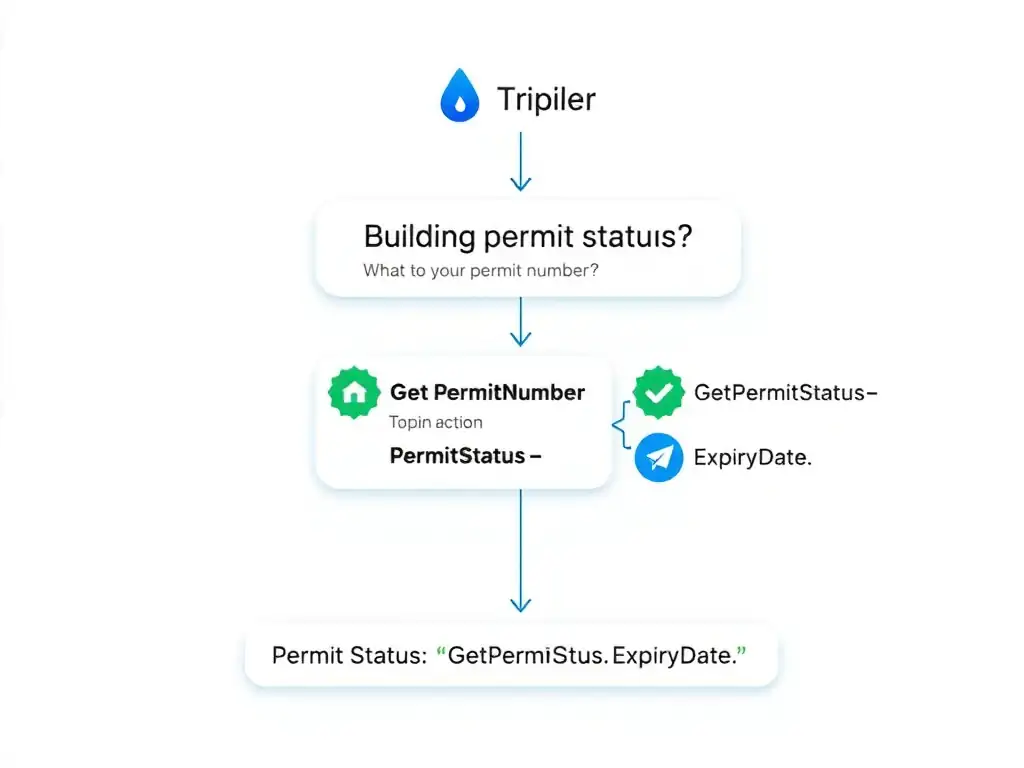
You just drop a 'Call an action' node, pick 'GetPermitStatus', map the resident's permit number to 'PermitNumber', then use the action's 'Status' and 'ExpiryDate' outputs in one message. That's the standard Copilot Studio pattern: input, action, outputs, message.
Full Explanation
Invoking a plugin action in a Copilot Studio topic follows a fixed, tool-supported pattern using the 'Call an action' node and downstream variable references. This pattern is consistent across all action types — plugin actions, cloud flows, and Power Platform connector actions. The correct design is the one that adds a 'Call an action' node and selects 'GetPermitStatus', maps the resident's permit number topic variable to the 'PermitNumber' input, then adds a 'Send a message' node using the output variables {GetPermitStatus.Status} and {GetPermitStatus.ExpiryDate} in the message text. After a question node captures the permit number into a topic variable (e.g., Topic.PermitNumber), the developer adds the 'Call an action' node and selects the 'GetPermitStatus' plugin from the action picker. The input parameter 'PermitNumber' is mapped to 'Topic.PermitNumber'. After the node executes, Copilot Studio creates two output variables: 'GetPermitStatus.Status' and 'GetPermitStatus.ExpiryDate'. A 'Send a message' node following the action node can directly embed these variables: 'Your permit status is {GetPermitStatus.Status}. It expires on {GetPermitStatus.ExpiryDate}.' The design that adds a 'Send HTTP Request' node configured with the plugin's internal API URL, parses the JSON response using a condition node to extract 'Status' and 'ExpiryDate', and concatenates them in a variable before the message node is incorrect because the 'Send HTTP Request' node is a low-level tool for calling arbitrary HTTP endpoints — it bypasses the plugin action framework entirely. The plugin is already registered as a first-class action; there is no need to reconstruct an HTTP call. Additionally, plugins do not expose an 'internal API URL' that developers can call directly. The design that uses a 'Condition' node to check if the resident's input matches a permit number pattern, and for each matched permit hardcodes the expected status values in separate topic branches, is incorrect because hardcoding expected status values in condition branches is not a scalable or correct approach. With hundreds or thousands of possible permit numbers and dynamic statuses, condition-based branching cannot substitute for a real data lookup. The design that adds a 'Redirect to topic' node pointing to a dedicated 'Display Permit Result' topic, passing the permit number as a parameter, and configures that topic to call the plugin and return the message, is incorrect because redirecting to another topic adds unnecessary indirection. A single topic can call the plugin and display results in the same conversation flow. Topic redirection is for reusable subtopics (like authentication or escalation), not for a linear lookup-and-display flow that fits in one topic. Exam tip: Justine's scenario is a clean example of the standard plugin invocation pattern. Input → action → output → message. There is no need for HTTP nodes, condition branches, or topic redirects when a plugin action is already registered and available in the action picker.