
Oluwaseun is a knowledge engineer at Bridgemont Legal. The firm's Copilot Studio agent searches a 50,000-document Azure AI Search index of case law. Users complain that simple keyword matches return tangentially related documents ranked above highly relevant ones. Oluwaseun wants to enable semantic re-ranking so the index uses language understanding to score results by contextual relevance rather than pure keyword frequency. What must Oluwaseun configure to enable this capability?
Select an answer to reveal the explanation.
Short Explanation
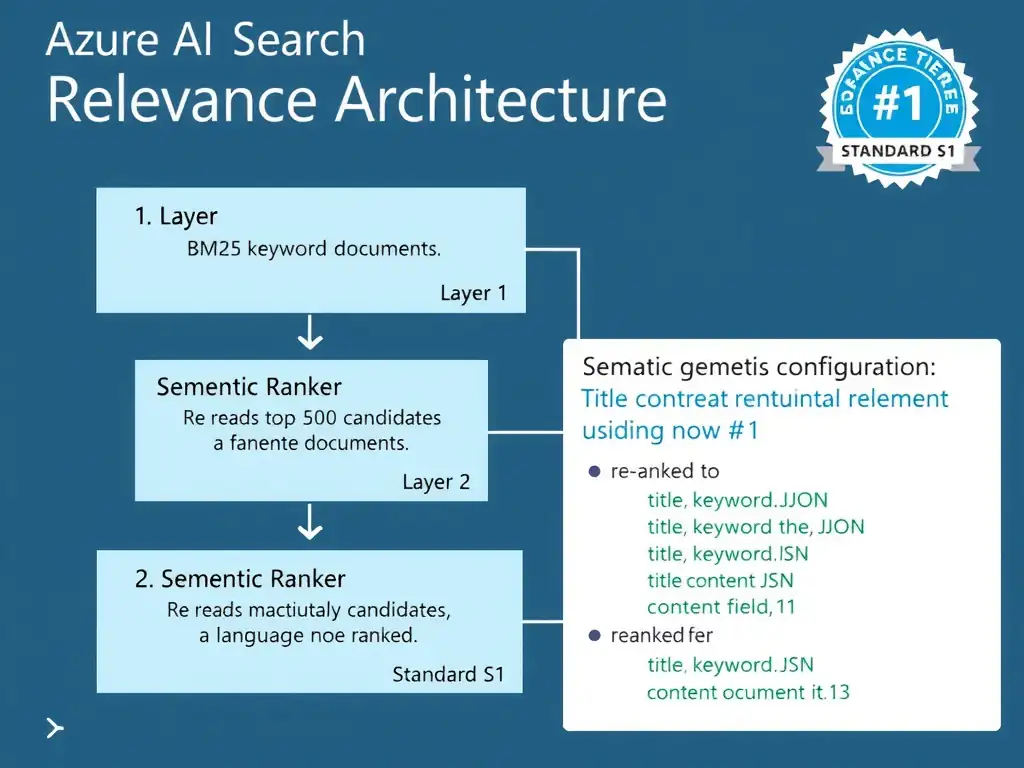
You need to turn on the semantic ranker at the right service tier, then create a semantic configuration that names the title, keyword, and content fields. You also have to reference that configuration in the search query so the language model actually re-ranks results. You don't just boost keywords with a scoring profile; that's a shallower knob, not semantic understanding.
Full Explanation
Azure AI Search's semantic ranker is a machine-learning-based re-ranking layer that reads the actual content of the top keyword-matched documents and re-scores them based on language understanding. It is distinct from keyword boosting, vector search, and query language settings.
The correct configuration is the one that enables the semantic ranker on an Azure AI Search resource tier that supports it, Standard S1 or higher, creates a semantic configuration on the index that designates title, keyword, and content fields, and references that configuration name in the search query. It covers all three required steps. First, the semantic ranker is only available on Standard S1 tier and above; the Free and Basic tiers do not support it, so the service tier must be confirmed or upgraded. Second, a semantic configuration must be defined on the index; this JSON configuration tells the ranker which field holds the document title for display, which fields contain key phrases, and which field or fields hold the primary content to re-rank against. Third, search queries issued by the agent or the Copilot Studio connector must include the queryType=semantic parameter and reference the configuration name; without this, the ranker is not invoked even when properly configured.
The custom scoring profile approach with a text weighting function on the content field and a boost value of 10 is incorrect. Custom scoring profiles use numeric functions to boost documents based on field values, freshness or date proximity, or geographic distance; they do not apply language understanding. Boosting a text field's BM25 score by a multiplier addresses field weight, not contextual relevance of the document's meaning relative to the query.
The approach that switches the indexer's parsing mode from text to jsonLines and adds an Azure OpenAI embedding skill so every document chunk is converted to a vector before indexing is incorrect because it configures vector search, not semantic ranking. Vector search uses embedding similarity rather than language model re-ranking. The two features serve different use cases and can coexist in the same index, but that approach describes vector search, not semantic ranking.
The approach that deploys an Azure Cognitive Services Language resource, links it to the search service via the Azure portal, and sets the queryLanguage parameter to en-US in every search request is incorrect because it enables language-specific query parsing, such as stemming and stopwords, for better keyword matching in non-English languages. It does not enable the semantic re-ranking layer.
Exam tip: Three distinct relevance features often appear on the exam: scoring profiles for field weighting, the semantic ranker for machine-learning re-ranking of text results, and vector search for embedding similarity. Know which feature addresses which problem: poor ranking of relevant documents calls for the semantic ranker; wrong keyword matches call for query language plus scoring profiles; concept similarity calls for vector search.