
A developer at Pacific Telco is building a Copilot Studio agent for customer self-service. When a customer starts a conversation, the agent should display a welcome message, ask what kind of help they need, and then route them to the appropriate topic based on their response. The developer is designing the opening topic flow. Which combination of node types should the developer use to implement this greeting and initial routing?
Select an answer to reveal the explanation.
Short Explanation
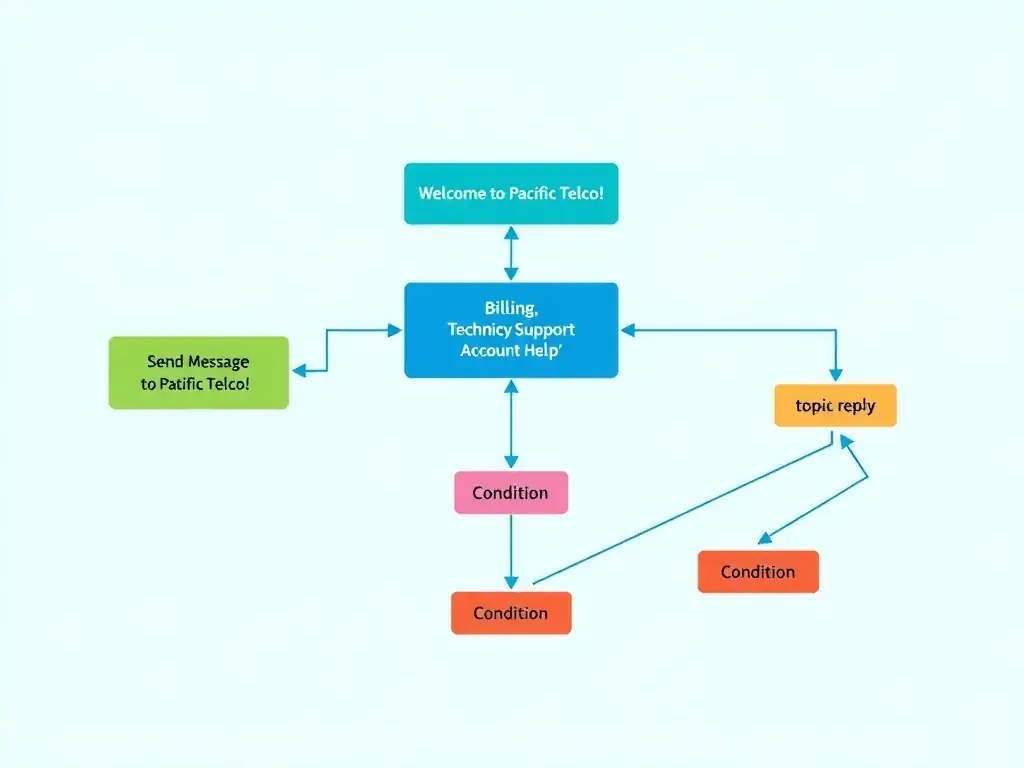
Build the greeting like a receptionist script: say hello with a Send Message node, ask what the customer needs with an Ask a Question node, then branch with Condition nodes to the right topic. This is the standard Copilot Studio pattern for greeting, intent capture, and routing.
Full Explanation
In Copilot Studio, topic flows are built by chaining nodes. For a greeting-and-routing scenario, the correct node sequence is:
1. Send Message node: Displays static or dynamic text to the user. This is where you put the welcome message — e.g., 'Welcome to Pacific Telco support! How can I help you today?' 2. Ask a Question node: Presents options (quick-reply buttons or free text) to the user and stores the response in a variable. This captures what kind of help the customer needs. 3. Condition nodes: Evaluate the variable stored by the Ask a Question node and branch the flow to the appropriate topic or sub-topic. Each branch can use a Redirect node to hand off to another topic.
The combination that uses a Send Message node to display the greeting, followed by an Ask a Question node to capture the customer's intent, followed by Condition nodes to branch to the correct topic correctly identifies this canonical pattern and is the right answer.
The combination using a Generative Answer node to produce a dynamic greeting, followed by an HTTP Request action to determine topic routing based on NLU results, is wrong. The Generative Answer node generates a response from knowledge sources (documents, websites) using AI — it is not designed for structured greetings or routing. Routing via an HTTP Request based on NLU results is over-engineered, not a standard pattern, and would require custom development outside Copilot Studio's no-code authoring.
The combination using a Variable node to store the greeting text and display it, followed by an End Conversation node that restarts the conversation with a new topic, is wrong. The Variable node stores values; it does not display messages on its own. The End Conversation node terminates the session — using it to 'restart' the conversation is not a supported pattern and would drop the user back to the beginning without proper routing.
The combination using a Trigger Phrases node to define the greeting text, followed by a Redirect node that automatically selects the best matching topic using AI, is wrong. Trigger Phrases define when a topic is activated by user input — they are metadata on the topic itself, not a node inside the flow that displays text. The Redirect node is valid for routing between topics, but it requires a Condition node before it to determine which topic to redirect to; it does not 'automatically select' topics by AI.
Exam tip: Memorize the purpose of each Copilot Studio node type: Send Message (display text), Ask a Question (capture input into a variable), Condition (branch on variable value), Redirect (hand off to another topic), Set Variable (assign a value), Call an Action (invoke Power Automate), End Conversation (terminate). Questions frequently test whether you pick the right node for the scenario.