
Global Shipping Co. is designing a Copilot Studio agent for their IT help desk. The agent must read open incidents from ServiceNow and create new incidents when a user reports an issue. The team wants to use the most purpose-built, officially supported connector available within the Power Platform ecosystem rather than building a custom HTTP integration. The ServiceNow instance is cloud-hosted. Which connector approach should they choose?
Select an answer to reveal the explanation.
Short Explanation
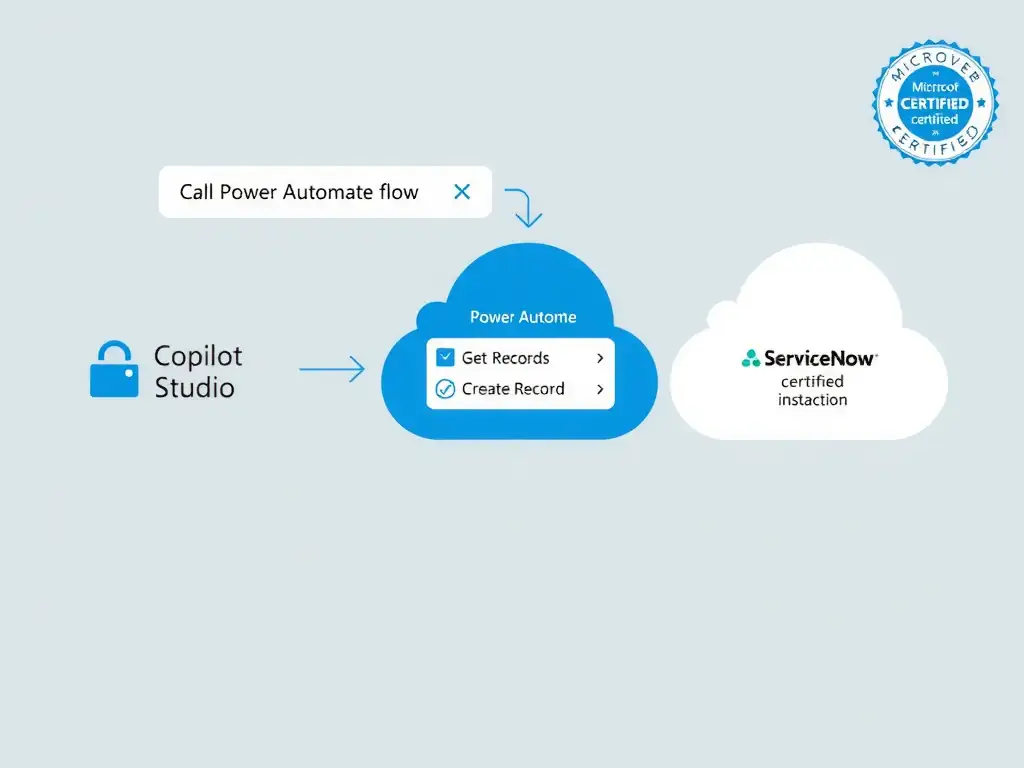
Use the certified ServiceNow connector in Power Automate. It's the ready-made, officially supported handshake with ServiceNow, with pre-built actions for reading and creating records already wired up. Since your instance is cloud-hosted, that's the lowest-effort path for your Copilot Studio agent.
Full Explanation
The correct approach is to use the ServiceNow certified connector available in Power Automate, which provides pre-built actions for reading and creating records. Microsoft Power Automate ships a certified ServiceNow connector that provides pre-built actions (Get Record, Get Records, Create Record, Update Record) and triggers (When a record is created/updated). These actions handle OAuth authentication to ServiceNow out of the box and are maintained by Microsoft. In a Copilot Studio solution, the agent calls a Power Automate cloud flow as an action; that flow uses the ServiceNow connector to interact with the ITSM system. This matches the requirement for the most purpose-built, officially supported connector, because certified connectors are the officially supported, purpose-built integration path in Power Platform.
The custom connector approach using ServiceNow's REST API OpenAPI definition is valid but it is more work than necessary when a certified connector already exists. Custom connectors are appropriate when no certified connector exists, and the question specifically asks for the most purpose-built option.
The raw HTTP action approach in Copilot Studio topics with a hard-coded basic authentication header is wrong because it is a security risk (credentials exposed in topic configuration), fragile (any ServiceNow API change breaks it), and bypasses the managed authentication that Power Automate connectors provide. Basic auth may also be disabled by ServiceNow admins.
The Dataverse virtual table approach is wrong because Dataverse virtual tables allow Dataverse to surface external data as if it were local, but this requires a virtual table provider plugin that must be developed and registered in Dataverse. It is complex to set up for ServiceNow, and it is not purpose-built for this use case. Virtual tables are better suited for tight Dataverse-centric scenarios, not general ITSM integration.
Exam tip: On the certification exam, when you see a major SaaS platform (ServiceNow, Salesforce, SAP, Jira, etc.) mentioned alongside 'best connector' or 'officially supported,' check whether a certified Power Platform connector exists for it. If one exists and the system is cloud-hosted, that connector through Power Automate is almost always the right answer.