
What is the 'workflow_dispatch' event in GitHub Actions and when would you use it?
Select an answer to reveal the explanation.
Short Explanation and Infographic
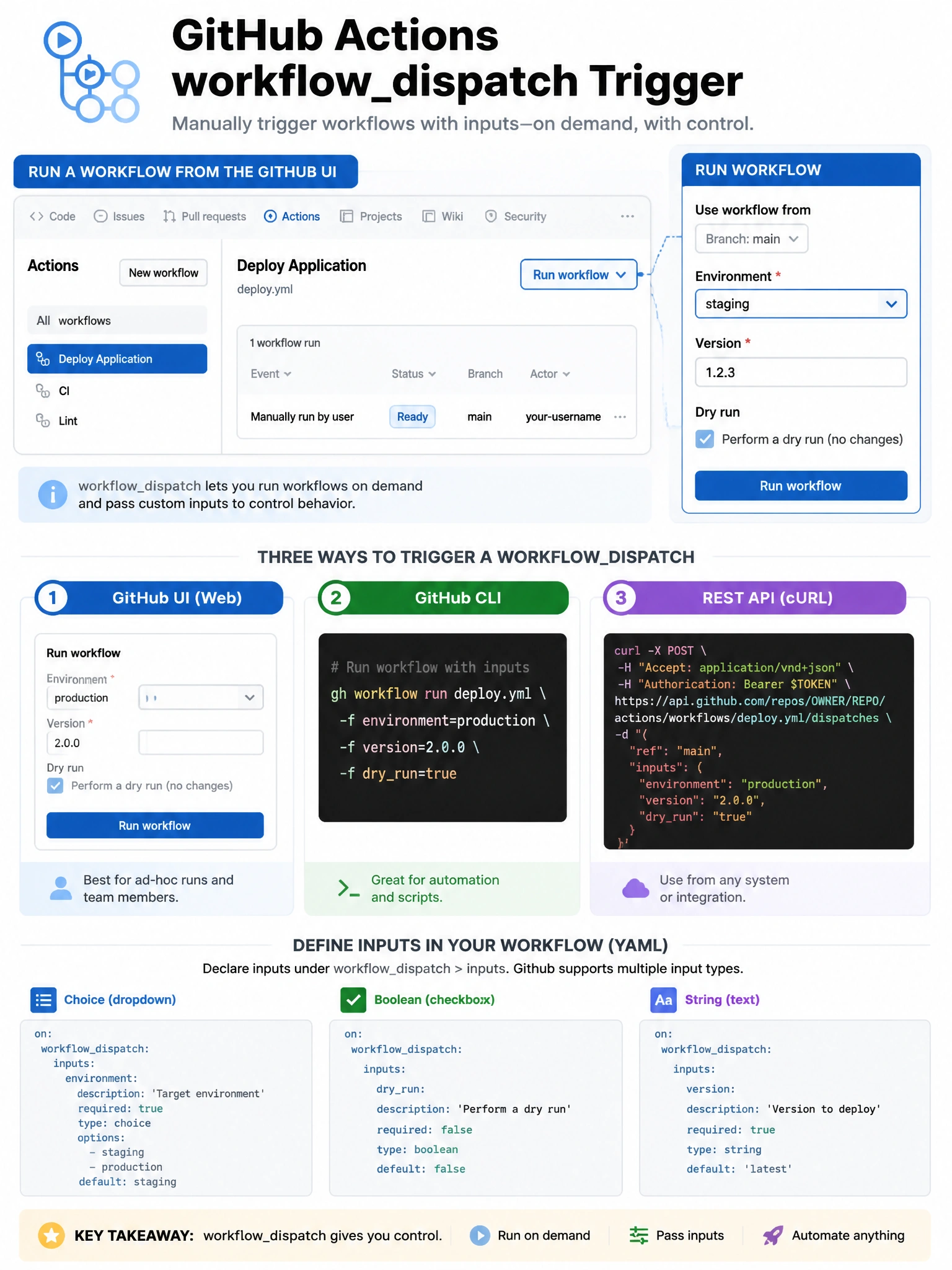
workflow_dispatch is your 'run it now' button for workflows. Instead of waiting for a push or PR, you click 'Run workflow' in GitHub's UI and it starts immediately. You can define input parameters so users provide values at trigger time — like selecting an environment or version.
Full explanation below image
Full Explanation
The 'workflow_dispatch' trigger in GitHub Actions enables manual workflow execution through multiple channels: (1) GitHub UI — the 'Actions' tab shows a 'Run workflow' button for dispatch-enabled workflows, with a form for any defined inputs. (2) GitHub CLI — 'gh workflow run <workflow-file>'. (3) REST API — POST to /repos/{owner}/{repo}/actions/workflows/{workflow_id}/dispatches. Input parameters can be defined with types (string, choice, boolean, number, environment, ref) and appear in the UI form when triggering manually. Use cases: manual deployments, on-demand security scans, database migrations, releasing a specific version, running maintenance tasks. The event is only available on branches that have committed the workflow file (it won't appear on feature branches unless the workflow has been merged).