
What does 'timeout-minutes' do in a GitHub Actions job or step?
Select an answer to reveal the explanation.
Short Explanation and Infographic
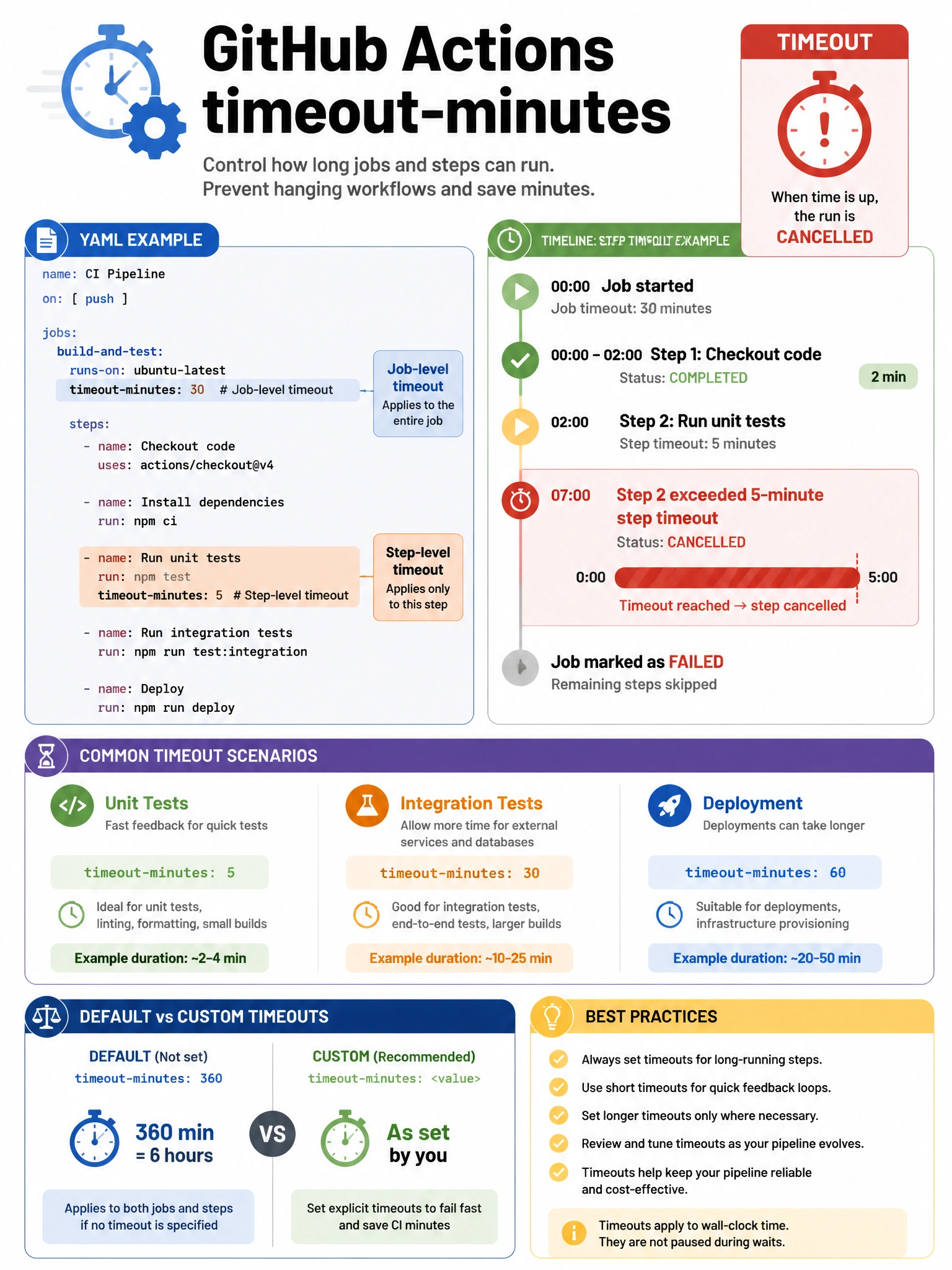
timeout-minutes is your runaway process kill switch. Set it on a job or step and if it hasn't finished in that many minutes, GitHub cancels it. Without it, a hung test suite could run for 6 hours (GitHub's default maximum) burning through runner minutes.
Full explanation below image
Full Explanation
The 'timeout-minutes' configuration in GitHub Actions sets a maximum duration for job or step execution. Behavior when timeout is reached: (1) GitHub sends SIGTERM to the running process. (2) If the process doesn't exit within a grace period, SIGKILL is sent. (3) The job/step is marked as cancelled/failed. (4) Any post steps and cleanup actions still run. Scope: (a) Job-level — applies to the entire job including all steps. Default is 360 minutes (6 hours) if not specified. (b) Step-level — applies to individual steps, overriding job-level timeout for that step. Use cases: preventing runaway tests from consuming unlimited minutes, detecting hung integration tests, ensuring deployment jobs don't block pipelines indefinitely. Setting appropriate timeouts is a best practice for workflow efficiency.