
What is the GitHub 'repository transfer' feature and what happens to existing links after transfer?
Select an answer to reveal the explanation.
Short Explanation and Infographic
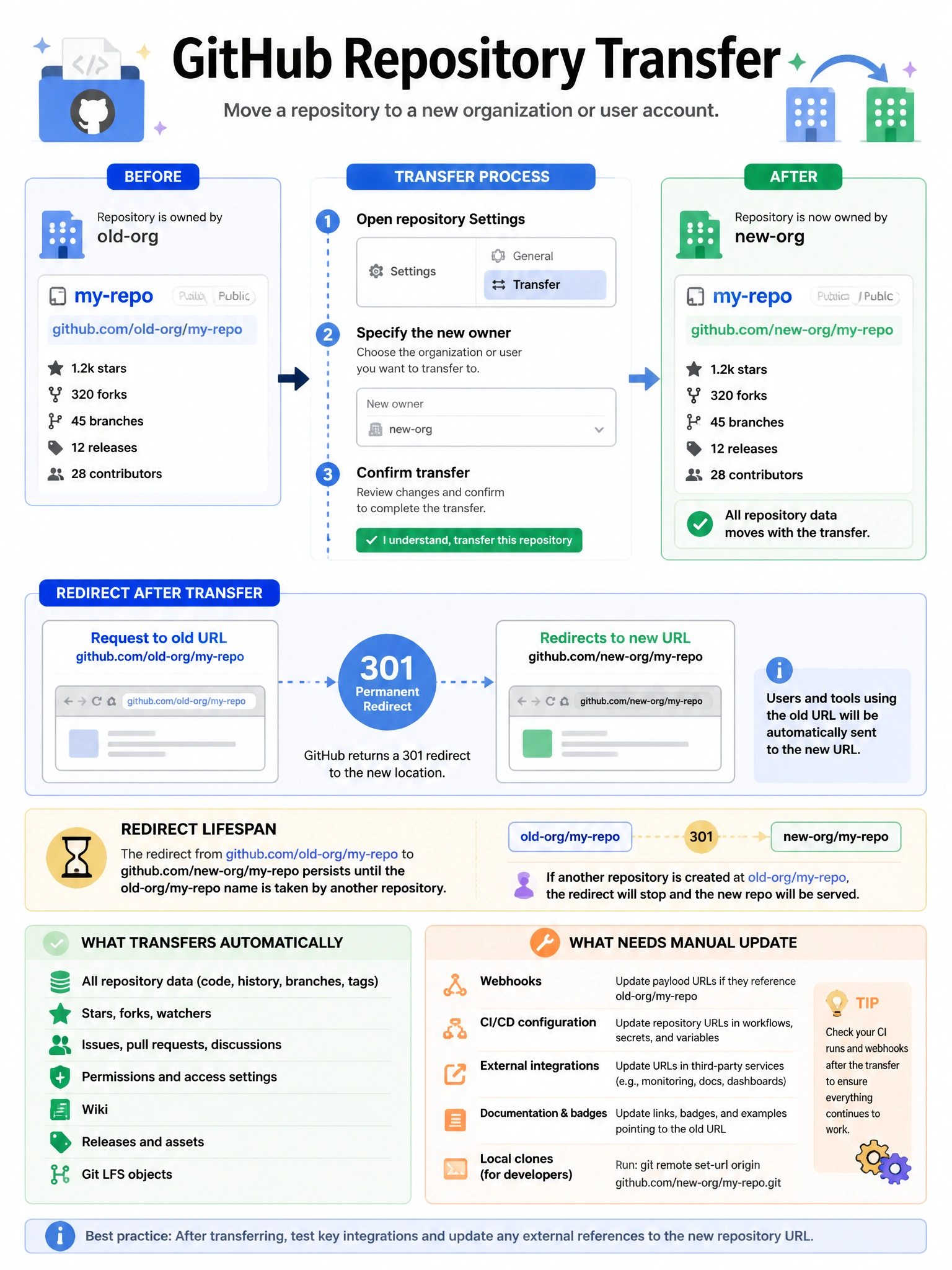
When you transfer a repo from one user/org to another, GitHub doesn't leave your old links broken. It sets up redirects from the old URL to the new one. This is generous — it gives your ecosystem time to update their bookmarks and clone URLs.
Full explanation below image
Full Explanation
GitHub repository transfers allow moving a repository to a different user or organization. Post-transfer behavior: (1) Redirect — GitHub automatically sets up HTTP redirects from the old URL to the new URL. This applies to web URLs, git clone URLs, and API URLs. (2) Duration — redirects persist as long as no other repository takes the old URL/name combination. (3) Forks — forks of the transferred repository remain pointing to the parent at its new location. (4) Issues and PRs — all remain intact. (5) Stars and watches — watchers are preserved. (6) Webhooks, deploy keys, and collaborators — may need to be reconfigured depending on organization policies. Repository transfers can occur between: user to user (if the recipient accepts), user to organization (user must be an org member), organization to user, or organization to another organization.