
What is the GitHub 'organization profile README' and where does it display?
Select an answer to reveal the explanation.
Short Explanation and Infographic
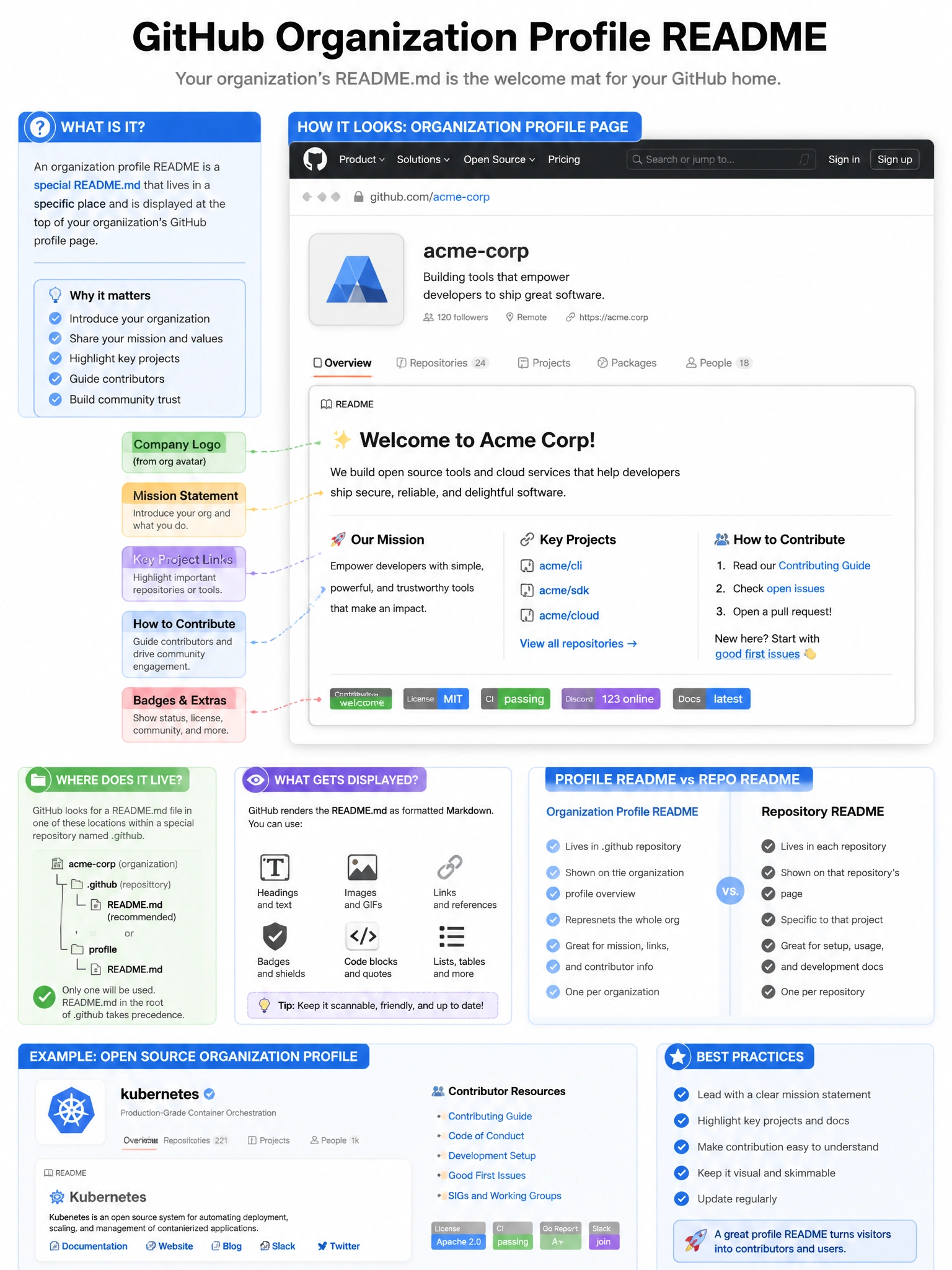
The org profile README lives in a special .github repo. GitHub surfaces it at the top of the org's profile page — above the repositories grid. It's your org's landing page content on GitHub.com: who you are, what you build, how to contribute.
Full explanation below image
Full Explanation
GitHub displays an organization profile README by reading a README.md from a special repository named '.github' within the organization. Setup: (1) Create a repository named '.github' in the organization. (2) Add a README.md file to the repository's root or a 'profile' subdirectory. (3) GitHub automatically displays this README.md on the organization's public profile page. Display location: above the list of repositories on the org's public profile (github.com/org-name). Use cases: introduce the organization, link to documentation or careers pages, highlight important repositories, specify contribution guidelines. This is different from repository-level README files and from the org's PROFILE.md (internal). Only visible on public GitHub.com profiles.