
What GitHub Enterprise Server configuration allows an organization to use its own SSL/TLS certificate instead of the default self-signed certificate?
Select an answer to reveal the explanation.
Short Explanation and Infographic
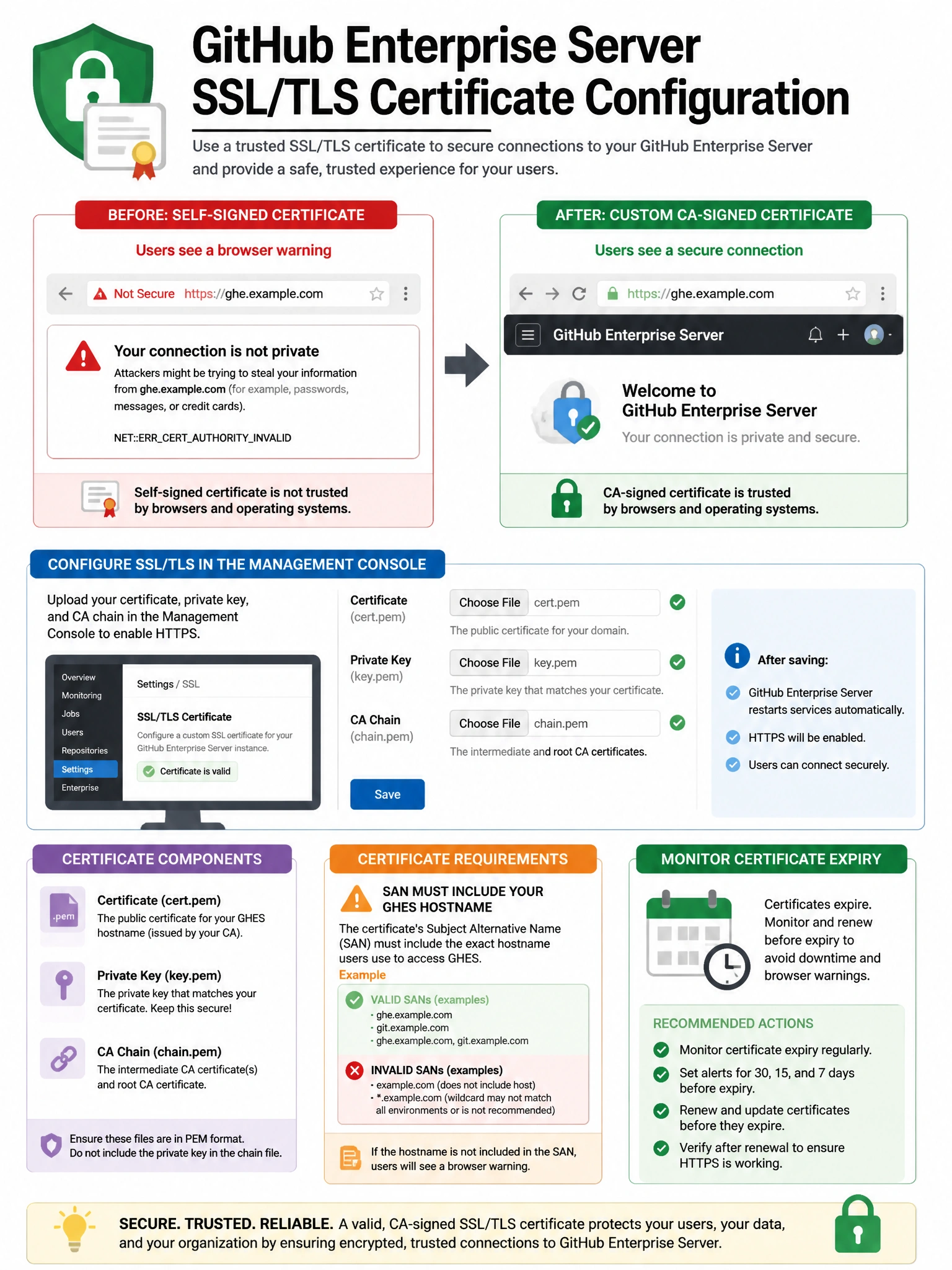
Out of the box, GHES uses a self-signed cert that browsers hate. The Management Console lets you upload your own CA-signed certificate and private key — turning those red browser warnings into a clean padlock.
Full explanation below image
Full Explanation
GitHub Enterprise Server ships with a self-signed SSL/TLS certificate by default, which causes browser warnings. Administrators can replace this with a proper CA-signed certificate by uploading the certificate and private key through the Management Console (Settings > Privacy > SSL/TLS Certificate). The certificate must include the GHES hostname as a Subject Alternative Name (SAN). GHES supports standard X.509 certificates from any certificate authority. Wildcard certificates are supported. GHES can also be configured to use certificates managed by an internal enterprise CA for organizations that don't use public CAs. While reverse proxy SSL termination is possible, GHES also natively supports custom certificates. Let's Encrypt is not natively integrated into GHES for automatic certificate management.