
How does GitHub Enterprise Server handle email notifications?
Select an answer to reveal the explanation.
Short Explanation and Infographic
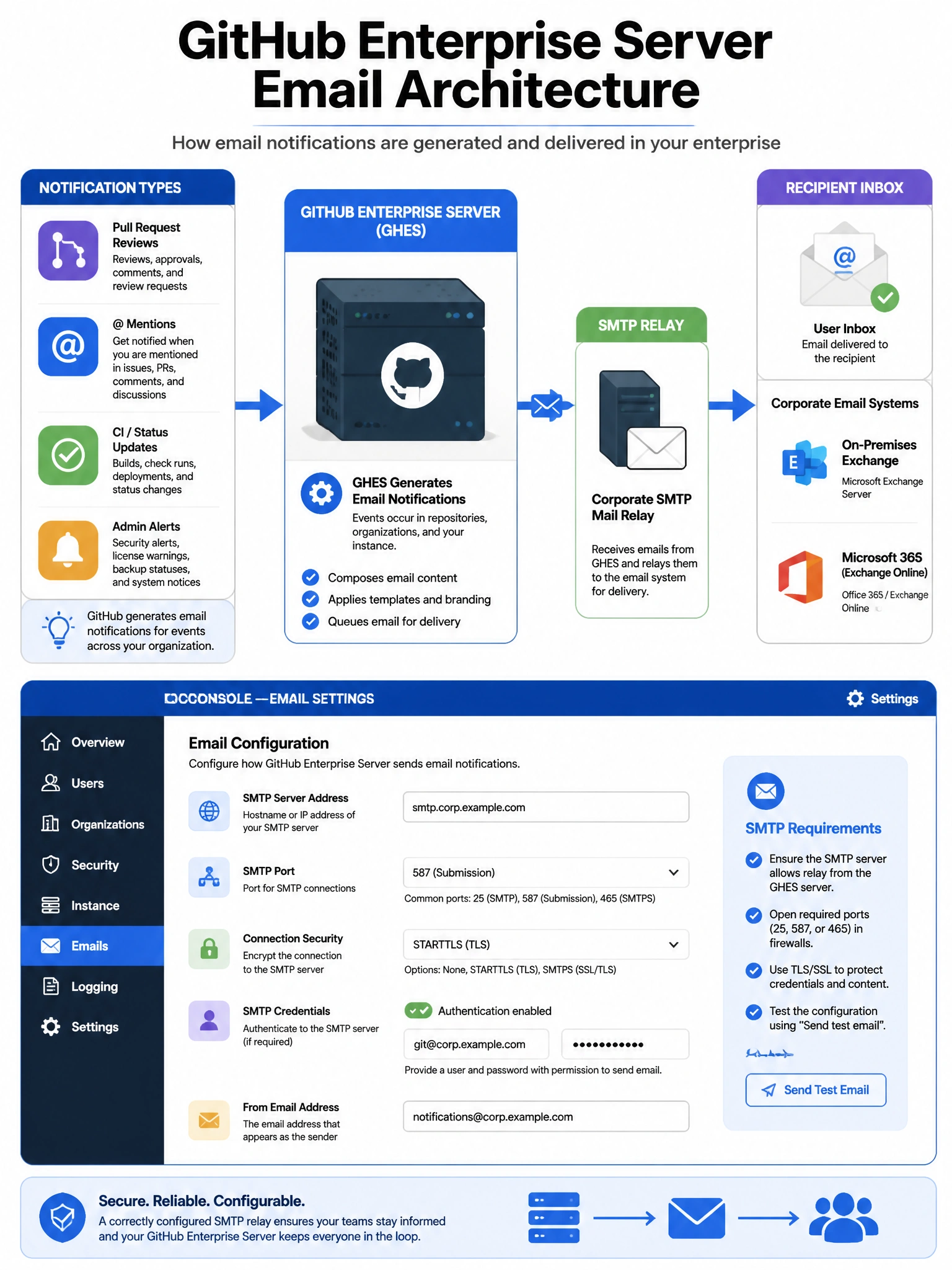
GHES is a self-contained system — it doesn't borrow GitHub.com's email servers. You configure your own SMTP relay in the Management Console, and GHES routes all notification emails through it. No SMTP, no email notifications.
Full explanation below image
Full Explanation
GitHub Enterprise Server requires an administrator to configure an SMTP (Simple Mail Transfer Protocol) server for email notification delivery. SMTP settings are configured in the Management Console under Email settings, including: SMTP server address and port, authentication credentials (username/password), TLS/SSL settings, and sender email address. GHES then routes all system emails through the configured SMTP server: user notifications (PR reviews, mentions, CI failures), admin alerts (disk space, backup status), and system notifications. GHES does NOT use GitHub.com's email infrastructure. Organizations typically configure GHES to use their corporate mail relay (Exchange, SendGrid, SES) or a dedicated email service.