
A cold-storage supervisor needs to see one HMI from home during an alarm. The supervisor must not download logic or reach other panels. Which remote-access design fits?
Select an answer to reveal the explanation.
Short Explanation
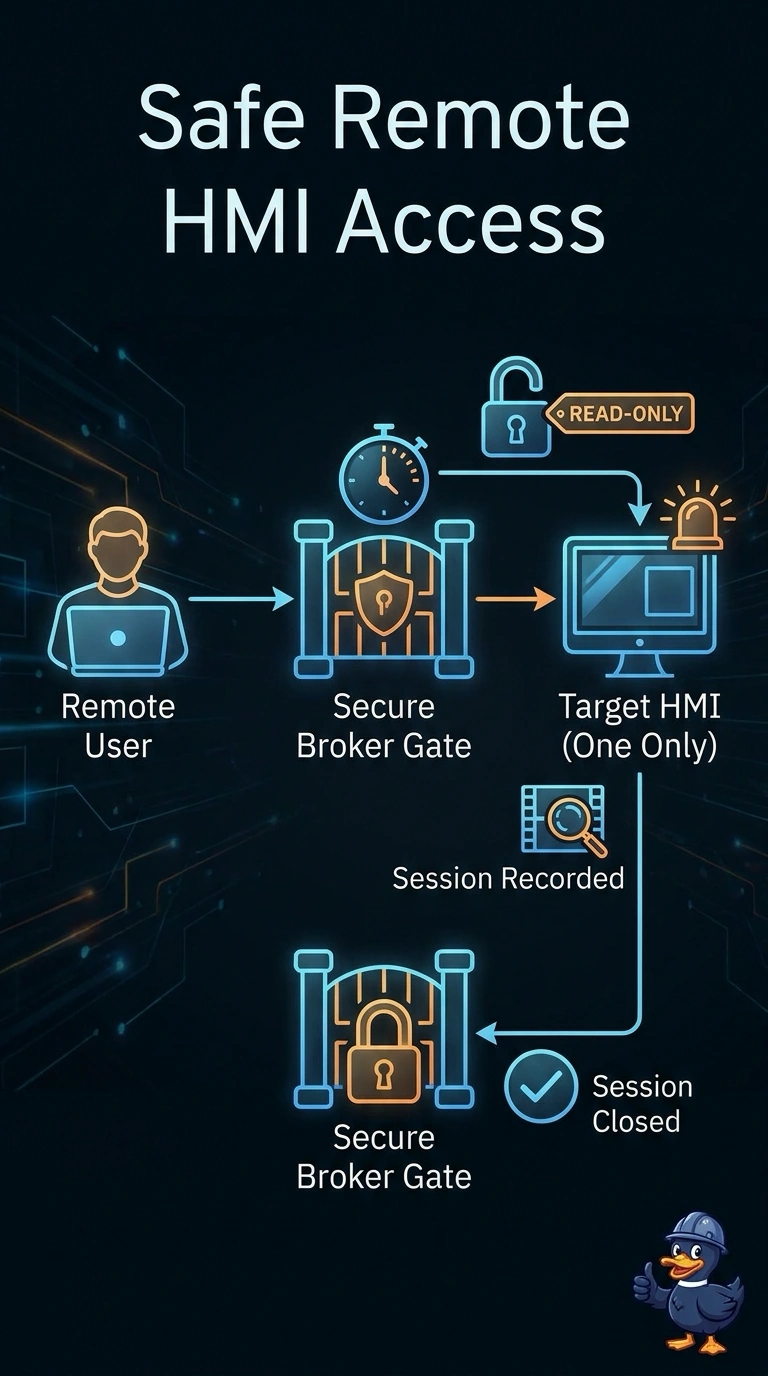
Seeing the alarm screen is not the same as holding the programming keys. You open a watched, read-only window to that one HMI and you close it when the alarm work is done. A tunnel onto the PLC VLAN, or a password in a text, hands over far more than a look.
Full Explanation
Controlled remote access to an HMI should match the job. This supervisor needs a view of one panel during an alarm, not a programming session and not a path to the rest of the warehouse. A broker that presents a read-only session, limits the clock, records the connection, and ends it when the work is done meets that need without landing the home PC inside the control VLAN. A standing VPN onto the PLC VLAN gives the home machine a network position the supervisor does not need and leaves it available after the alarm. Port-forwarding remote desktop from the internet exposes the HMI service to discovery and does not enforce read-only behavior. Texting the shared HMI password lets any client the supervisor can find log in as whoever knows the secret, with no recording and no end time. Exam caveat: read-only is a property you verify in the session broker or the HMI role. A full desktop of the HMI operating system is often still a write path even if you told the user not to click. Operational check: with a test supervisor account, confirm downloads and other panels are denied, the session is on the recording system, and it drops at the end of the window.