
An airline collaboration application grants a full employee license to every contractor in the directory. The provisioning sync succeeds. What should change so contractors stop inheriting that license?
Select an answer to reveal the explanation.
Short Explanation
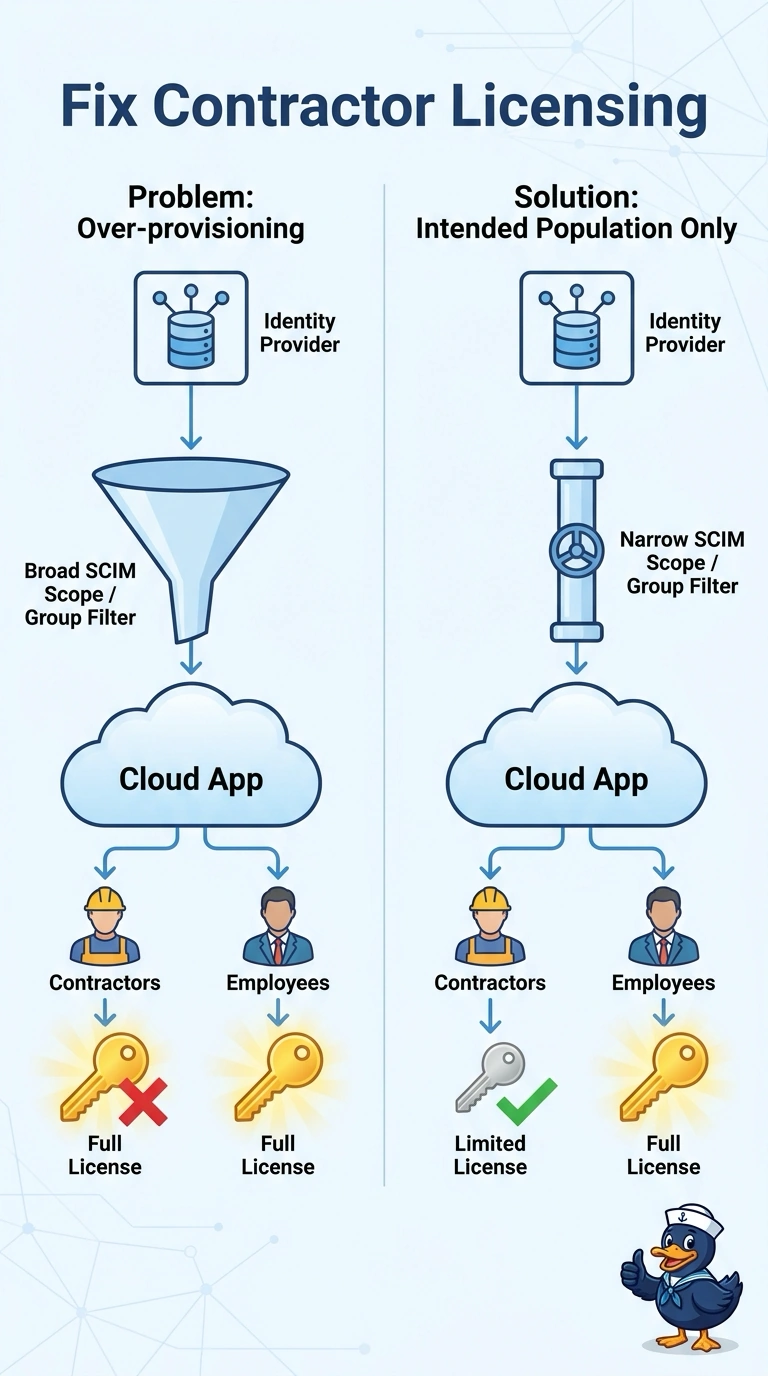
Inviting the whole neighborhood because the gate list says guests is how contractors get employee badges. You narrow the provisioning scope to the people who should actually receive the license. A healthy sync of the wrong population is still the wrong population.
Full Explanation
SCIM provisions the accounts in scope. If the scope is every contractor in the directory, each of them receives the license that scope maps to, and a successful sync does not make the scope correct. Narrow the SCIM scope or group filter to the intended population so contractors stop receiving the full employee license. Correct the group mapping or provisioning scope, and verify the provisioning integration deprovisions excluded users or removes their full license. Revoke existing grants explicitly if it does neither. Replacing the SAML signing certificate changes the login signing key. The sign-in trust does not assign the full employee license during contractor authentication. Turning on just-in-time creation for the contractor group builds or refreshes an account at first login. It does not remove the employee license that provisioning already granted, and it widens account creation rather than narrowing scope. Disabling single sign-on on the application brings back a local password form. That form is not what issues employee licenses to the contractor accounts, so the licenses remain until the provisioning scope changes. Exam caveat: a group filter that still contains the contractor population will keep granting the employee license no matter how healthy the sync looks. Operational check: move a test contractor outside the allowed group, run provisioning, and confirm the collaboration application no longer holds an employee license for that person.