
Guest laptops reach the splash page and sign in, yet they stay in the restricted VLAN until the user disconnects and reconnects. The switch performs URL redirect with a central web authentication ACL. Which part of the central web authentication flow should the engineer verify first?
Select an answer to reveal the explanation.
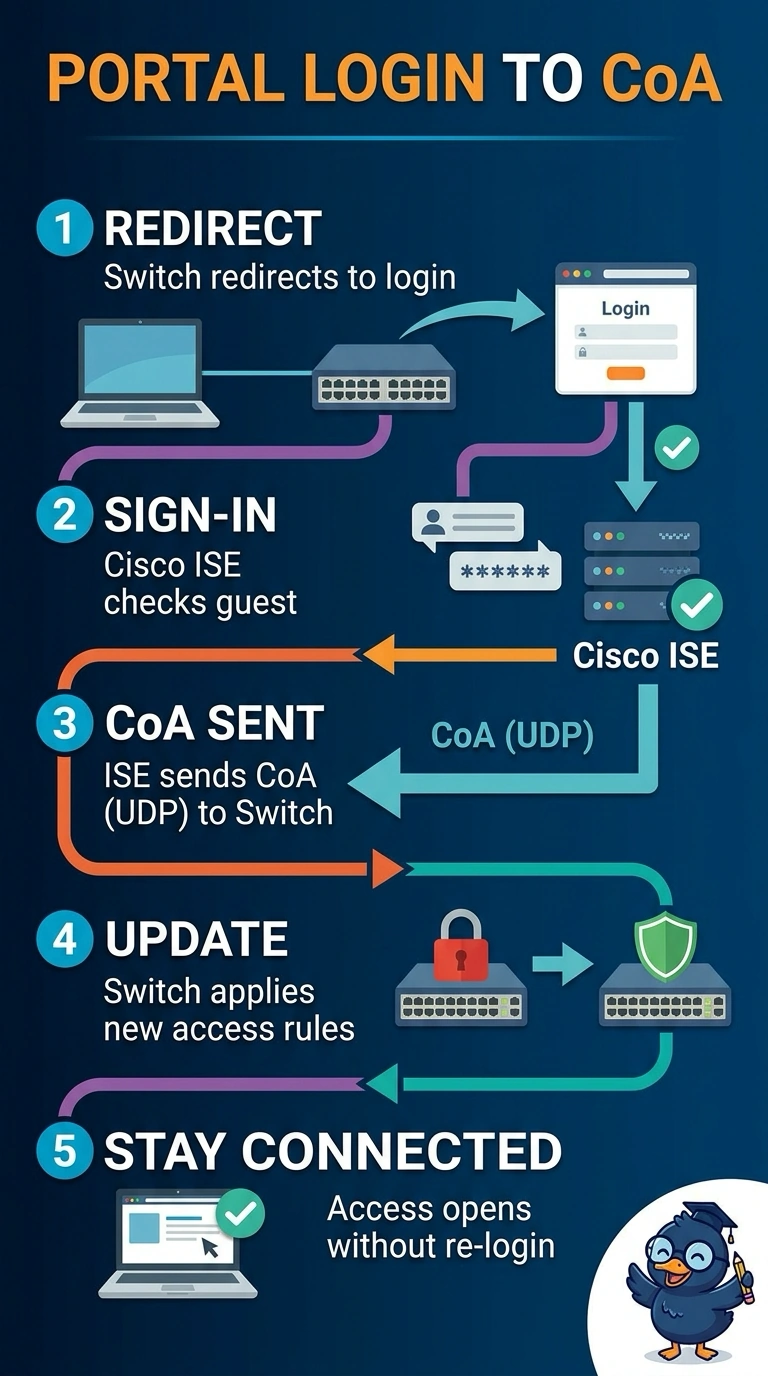
Short Explanation
The portal confirms who you are, but a CoA message tells the switch to refresh your access—like updating your ticket after check-in. Since you can sign in, verify that the switch accepts ISE’s CoA packets on the configured UDP port so your session is reauthorized.
Full Explanation
Central web authentication runs in two stages. The switch's redirect ACL first steers unauthenticated HTTP traffic to the ISE portal, and the authorization returned on the initial Access-Accept carries the URL-redirect instruction that keeps the client in the restricted state while it browses to the login page. After a successful login, ISE must send a RADIUS Change of Authorization to the switch so the existing session is reauthorized and receives the appropriate authorization profile without the client reconnecting. The CoA UDP port depends on the network device configuration; Cisco devices may use UDP 1700 or 3799. If CoA packets are dropped or the switch ignores them, the original restricted authorization can persist, matching the symptom. Redirect ACL tuning governs the initial redirect and cannot resolve a missing session update once the portal has loaded. Portal HTTPS protects credential transport, and raising the redirect timeout affects page loading rather than the session update. Practical check: review the RADIUS live logs while a guest signs in and confirm that the CoA is sent and acknowledged, or capture traffic on the configured CoA port.