
AWS Config reports that a bank data volume is unencrypted. Disabling the rule was proposed so the finding disappears. The data must stay in use, and the volume that stores it must actually be encrypted. How is that done?
Select an answer to reveal the explanation.
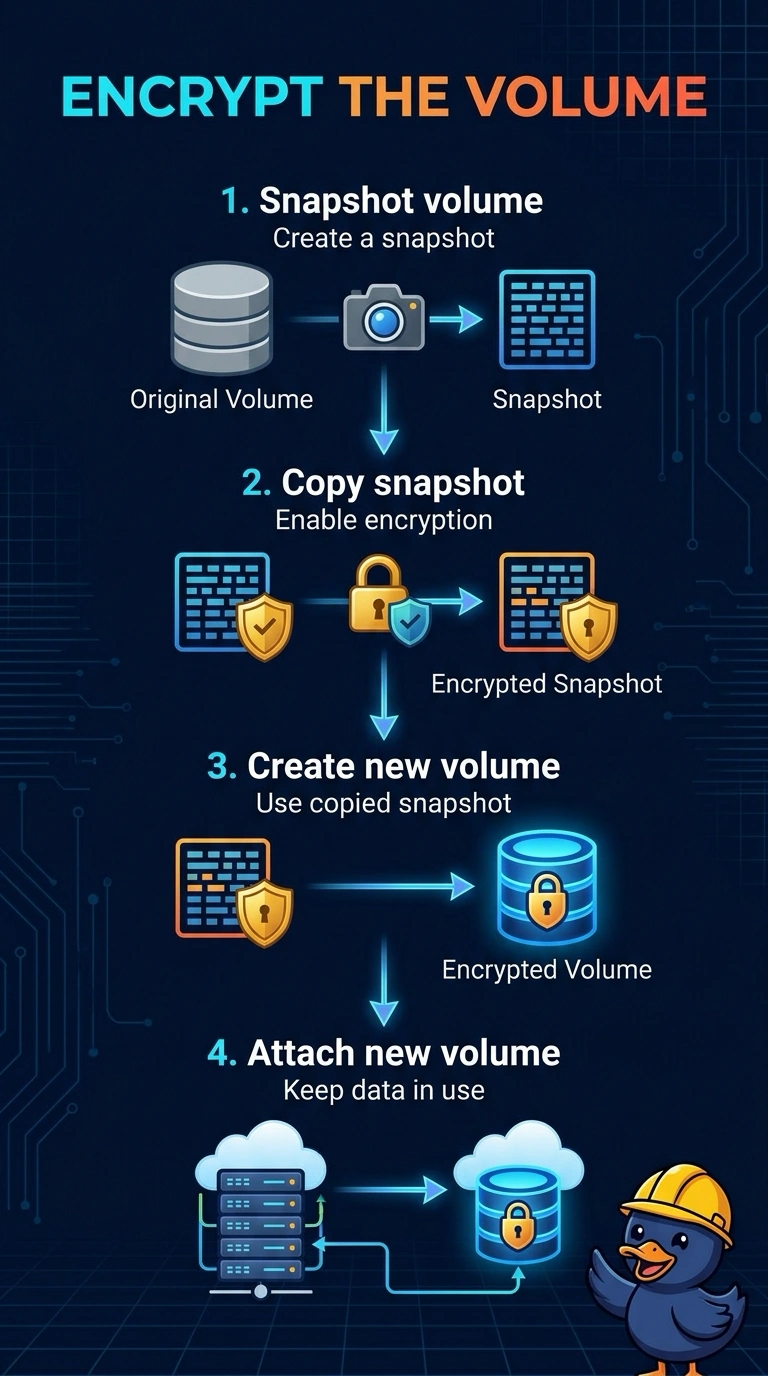
Short Explanation
You cannot bolt a lock onto a door by telling the inspector to look away. The volume stays unencrypted until an encrypted copy is created and the workload moves onto it, and disabling the rule only hides the finding. The trap is believing the existing volume grows an encryption flag in place.
Full Explanation
An existing unencrypted EBS volume cannot be encrypted by changing a flag on that same volume. The data is encrypted by snapshotting the volume, copying the snapshot with encryption enabled, creating a new volume from that encrypted copy, and attaching the new volume in place of the old one. Disabling the Config rule leaves the plaintext volume in service and only removes the finding from view. Stopping the configuration recorder stops evaluation for the Region, so every other rule goes blind with this one volume. An encryption toggle on the current volume ID is not an EBS operation, and the same volume remains unencrypted. Replacing a root volume means the instance is stopped for the swap, and any attachment that names the old volume ID has to move to the new one. After the cutover, confirm the new volume reports encryption as enabled and let the Config rule evaluate that volume on its next run. Specify a KMS key when the snapshot is copied with encryption, and point every attachment at the new volume ID.