
In a collaborative machine learning project, a common roadblock is when code runs perfectly on one engineer's system but fails on another due to library mismatches. How do software containers solve this problem to streamline teamwork?
Select an answer to reveal the explanation.
Short Explanation and Infographic
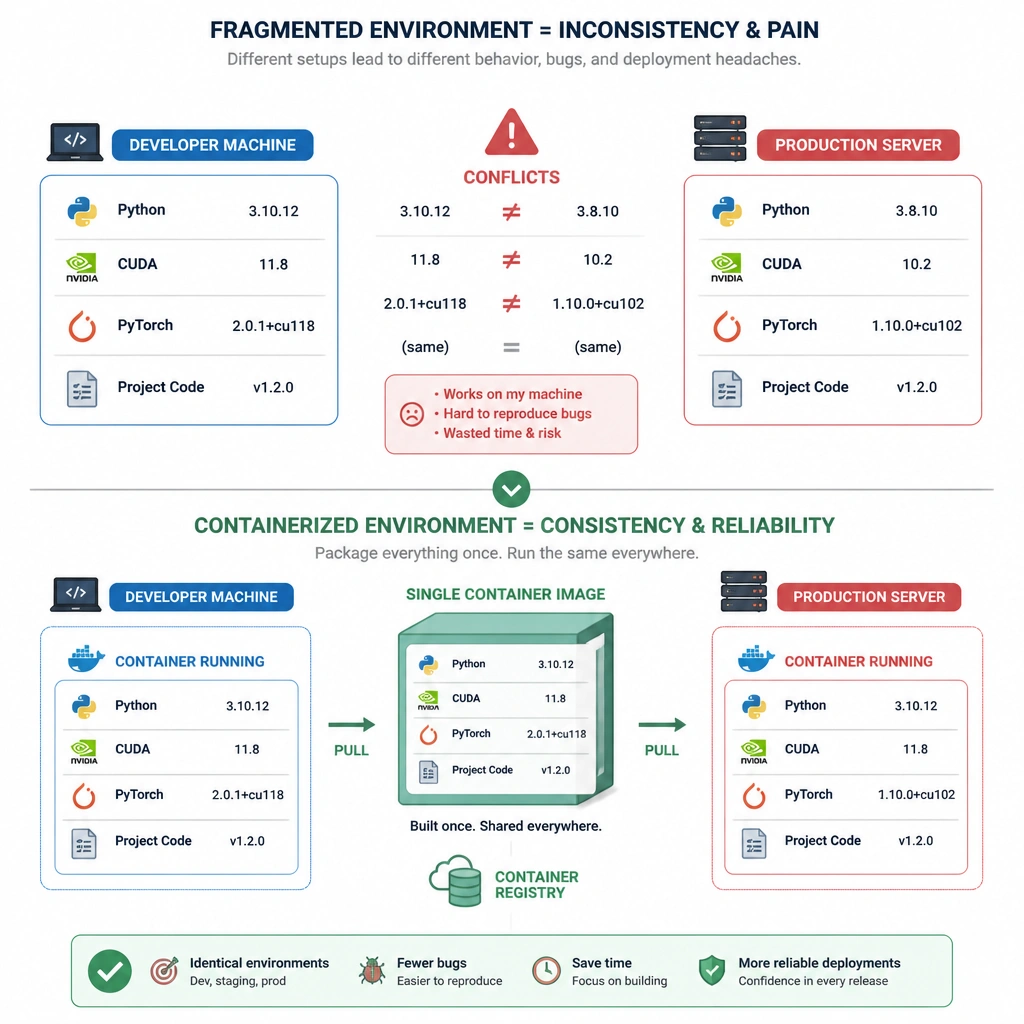
I'm sure you've heard this one: "But it worked on my machine!" It's the classic developer excuse, and in machine learning, it's a total nightmare because of how complex python environments are. You have CUDA versions, PyTorch versions, and dozens of packages that all have to align perfectly. Enter containers. Think of a container like a fully furnished, self-contained apartment. You package up your model code, the exact versions of all your libraries, the OS settings, and even the GPU drivers into a single container image. When you hand that image over to a teammate or push it to a cloud server, it runs exactly the same way. It saves hours of troubleshooting dependency conflicts. Keep in mind that containers don't do code sync (that's Git's job), and they don't track model metrics (that's MLflow or Weights & Biases).
Full explanation below image
Full Explanation
Collaboration in modern AI/ML workflows is frequently hampered by dependency hell—situations where code execution fails because of differences in python packages, library versions, host operating systems, or driver configurations (e.g., CUDA or cuDNN). Containers (such as Docker or Apptainer) solve this problem by providing environment isolation and consistency. A container image packages the application code together with its runtime engine, system tools, libraries, environment variables, and configuration files. This creates an immutable package that can be distributed and executed reliably on any host machine that supports the container runtime. This approach enhances collaboration by: 1. Ensuring Environment Consistency: Every team member—and eventually the production deployment system—runs the exact same software stack, eliminating configuration drift and "works on my machine" errors. 2. Simplifying Onboarding: New developers can download the container image and immediately begin working, rather than wasting hours manually setting up local environments. 3. Improving Reproducibility: Researchers can archive the container image used for a specific experiment, ensuring that the results can be replicated in the future.
Let's analyze why other choices are incorrect: - Version Control and Syncing (Option A) is handled by source control systems like Git, not by container engines. - Experiment Tracking and Model Versioning (Option C) are managed by dedicated MLops platforms (like MLflow, DVC, or Weights & Biases), not by containers. - Real-Time Collaboration (Option D) is enabled by collaborative notebooks or IDE plugins (such as JupyterHub, Google Colab, or VS Code Live Share), not by containerization.