
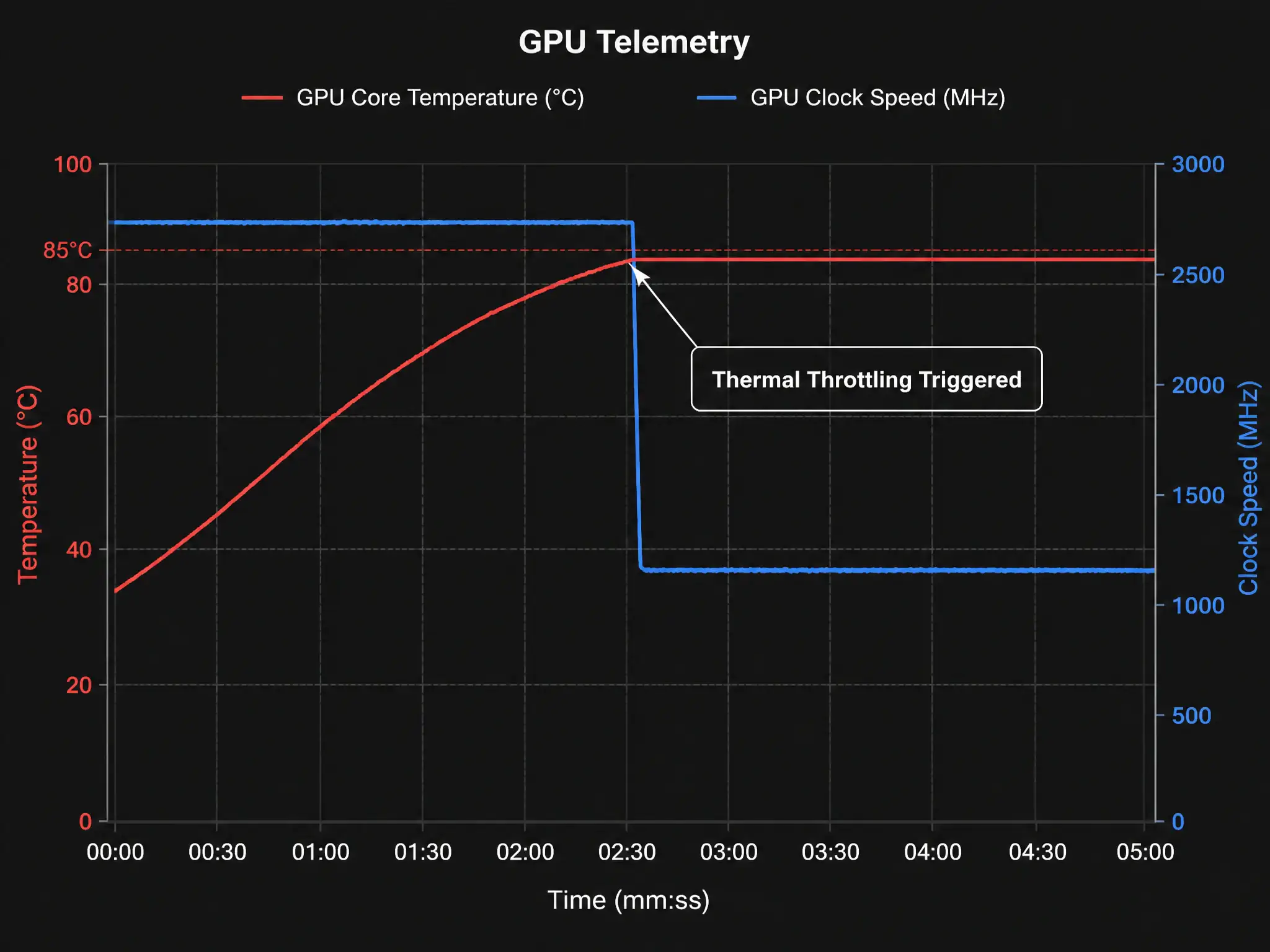
While monitoring a deep learning training job on a rack-mounted GPU server, you notice a sudden, sustained drop in the floating-point operations per second (FLOPS) and processing throughput. There are no software errors, and input data pipelines are serving frames normally. You suspect the server is throttling its clock speed to prevent physical hardware damage. Which set of telemetry metrics should you pull from the management interface (such as nvidia-smi) to confirm this hypothesis?
Select an answer to reveal the explanation.
Short Explanation
When GPUs get too hot, they don't just melt—they protect themselves by slashing clock speeds, which sinks FLOPS and training throughput. Run nvidia-smi and check GPU core temperature and thermal throttling flags; high temps or an active thermal violation flag confirm the culprit.
Full Explanation
Thermal throttling is a critical hardware protection mechanism implemented in modern GPUs. When a GPU is subjected to sustained high compute loads, such as during deep learning training, it generates massive amounts of heat. If the cooling infrastructure (fans, ambient server room air, or liquid cooling systems) cannot dissipate this heat, the GPU core temperature will rise. Once the temperature passes a specific safety threshold (typically between 80°C and 85°C), the GPU's onboard power management controller automatically reduces the clock frequency and operating voltage to prevent permanent silicon damage. This reduction directly slows down processing throughput. To diagnose this from a management interface such as nvidia-smi, operators must monitor the GPU core temperature and the associated thermal throttling status flags, which indicate whether the clocks are actively being limited due to thermal violations.
Analyzing other metrics will not provide direct confirmation of thermal throttling. PCIe link width and current PCIe generation status help troubleshoot host-to-device communication bottleneck issues, not internal thermal states. Memory bus utilization and GPU memory bandwidth consumption measure memory subsystem throughput; although they may drop as a side-effect of thermal slowdown, they are not a diagnostic tool for temperature issues. Fan speed percentage and CPU socket power draw indicate how hard the cooling system is working, but a fan at 100% capacity does not guarantee that thermal throttling is active or inactive, and CPU socket power draw is unrelated to the GPU's internal thermal protection status.