
Pacific Ventures Capital has deployed Microsoft 365 Copilot to 300 investment analysts. Six months in, the CTO asks for a centralized view showing overall Copilot adoption trends, a breakdown of which users are active versus licensed-but-inactive, and the ability to drill into specific teams to understand their Copilot usage patterns. Which tool provides this centralized AI adoption intelligence?
Select an answer to reveal the explanation.
Short Explanation and Infographic
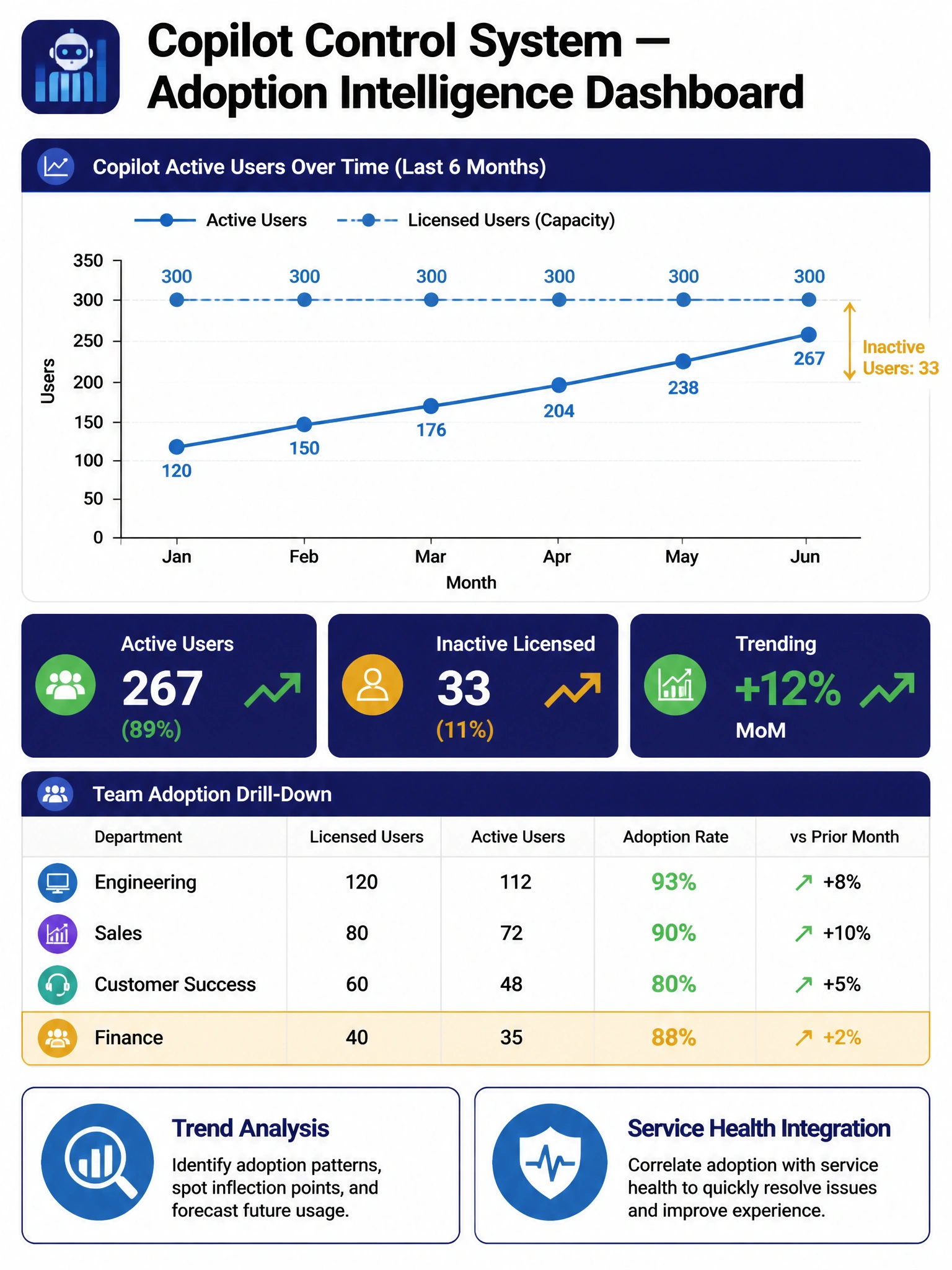
The Copilot Control System is the higher-level command center — it goes beyond the basic admin center usage report to give you trend lines, active vs. inactive user segmentation, and team-level drill-downs. It's purpose-built for the 'how is Copilot adoption going organization-wide?' executive question.
Full explanation below image
Full Explanation
The Copilot Control System provides a centralized, executive-level view of Copilot adoption across the organization. Unlike the standard Copilot usage report in the M365 admin center (which shows point-in-time metrics), the Copilot Control System offers trend analysis over time, segmentation of licensed users into active/inactive cohorts, service health integration, and the ability to explore adoption patterns at the team or department level. It is designed for ongoing adoption management, not just a single usage snapshot.
Option A is incorrect because the M365 admin center Copilot usage report does provide per-user activity data exportable to CSV, but it lacks the trend analysis, centralized adoption intelligence, team-level drill-down, and service health context that the CTO's requirement implies. The basic usage report answers 'how many users are active this week?' but not 'what are our adoption trends and where do we have inactive pockets?'
Option C is incorrect because Microsoft Viva Insights focuses on employee wellbeing, collaboration health, and manager effectiveness metrics. While it can surface some Copilot interaction data, it is not the primary Microsoft tool for Copilot adoption management and doesn't provide the Copilot-specific centralized dashboard the Copilot Control System offers.
Option D is incorrect because building a custom Power BI dashboard requires development effort, Graph API knowledge, data refresh pipeline configuration, and ongoing maintenance. While this is technically possible and might be used for highly customized reporting, the correct exam answer is the out-of-the-box Copilot Control System, which provides all the requested capabilities without custom development.
Exam tip: The Copilot Control System is distinct from the standard admin center Copilot usage report. Know that the Control System adds: adoption trends over time, active vs. inactive user segmentation, service health integration, and team-level drill-down. These capabilities distinguish it from the basic usage report.