
A developer at Lucerne Publishing has submitted a custom AI agent built with Microsoft Copilot Studio to the organization's agent registry for company-wide deployment. As the Microsoft 365 administrator, you receive a request to review and approve this agent. Where should you go to review the agent submission and publish or reject it for organizational use?
Select an answer to reveal the explanation.
Short Explanation and Infographic
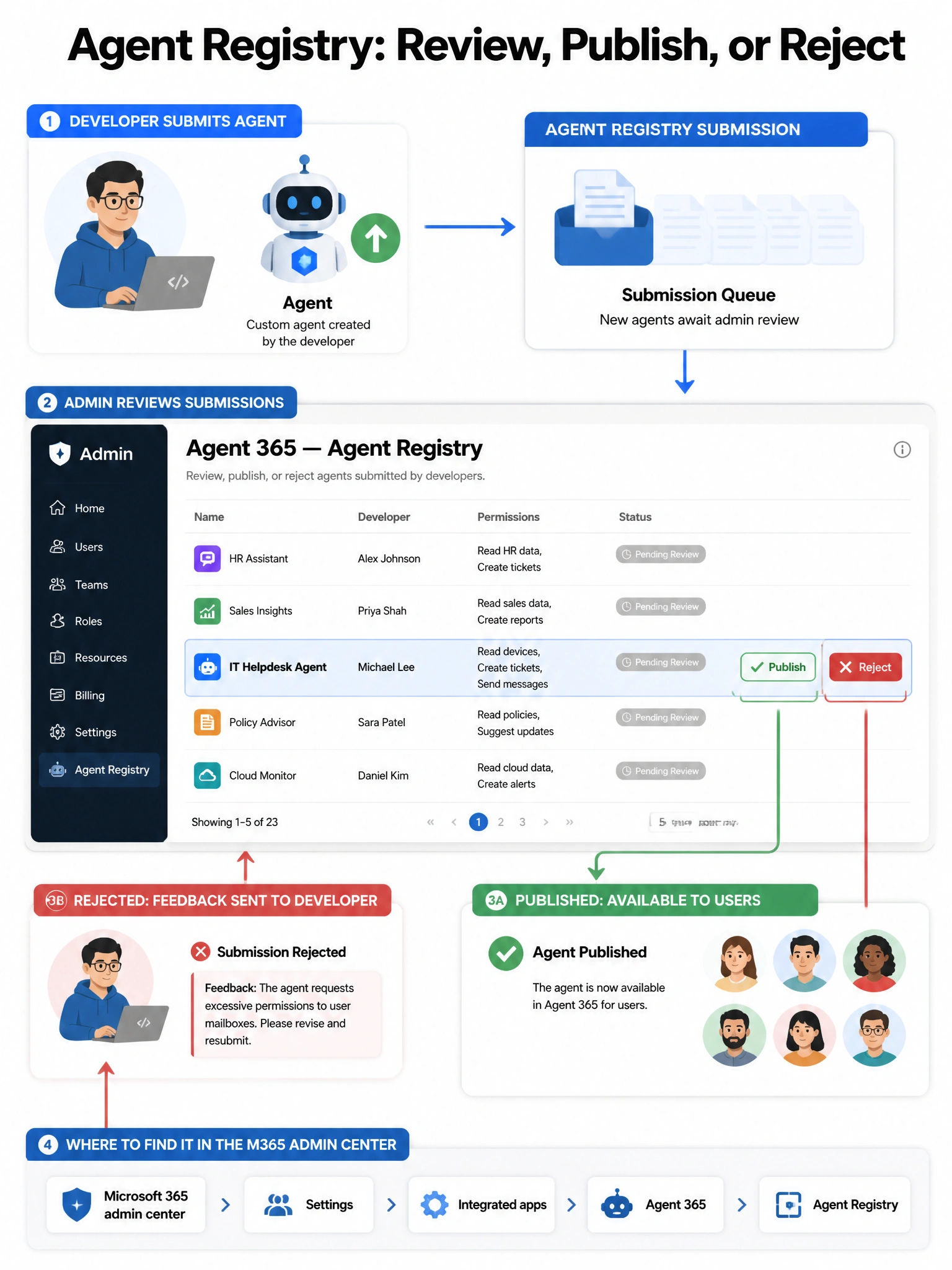
The agent registry in Agent 365 is like an app store approval queue specifically for AI agents. Developers submit, you review and either green-light or reject. It's the gatekeeper step before an agent goes live across your org.
Full explanation below image
Full Explanation
Agent 365, accessible within the Microsoft 365 admin center, includes an agent registry that serves as the centralized catalog and approval workflow for AI agents in the organization. When a developer submits a custom agent for organizational deployment, it enters a review queue in the agent registry. As an administrator, you can review the agent's description, capabilities, permissions requested, and policy compliance, then either publish the agent (making it available to users) or reject it with feedback. This workflow ensures IT governance over which agents are deployed across the organization.
Option A, Microsoft Copilot Studio admin portal, is where developers build and publish bots to specific channels. However, the organizational approval workflow for enterprise-wide agent governance happens in Agent 365 in the M365 admin center, not in the Copilot Studio admin portal directly.
Option C, Teams admin center under Manage apps, is used to manage Teams app submissions and policies for Teams-specific applications. While some agents surface in Teams, the unified agent registry governance for Microsoft 365 agents is managed through Agent 365, not the Teams admin center.
Option D, Microsoft Entra admin center pending consent requests, handles OAuth application permission consent requests for enterprise apps. This is not where Copilot agent submissions for organizational deployment are reviewed.
Exam tip: Remember that Agent 365 (in the M365 admin center) is the governance hub for the agent registry. Publishing and rejecting custom agents submitted by developers goes through the agent registry review queue in Agent 365 — not Teams admin center, not Entra, not Copilot Studio directly.